You're browsing on your iPhone when a pop-up fills the screen. It says your Apple ID has been compromised. There's a phone number to call immediately. The alert looks exactly like something Apple would send: clean design, Apple logo, professional language. It urges you to act right now or risk losing access to everything.
It is completely fake.
The "Apple High Alert" scam is one of the fastest-growing tech impersonation frauds circulating in 2025 and 2026. It follows the same playbook as the long-running Microsoft Tech Support scam, but scammers have switched brands, and Apple's trusted reputation makes it even more effective bait.
This guide explains exactly how the scam works, what the real Apple never does, and the specific steps you can take to protect yourself and the people around you.
What Is the Apple High Alert Scam?
The Apple High Alert scam is a type of phishing and social engineering attack in which criminals impersonate Apple's support and security teams to trick people into believing their device or account is under immediate threat.
Unlike older, more obvious scams, this one is highly polished. Fraudsters use Apple's branding, colour palette, and tone of voice convincingly enough that even people who consider themselves scam-savvy can be caught off guard. The word "High Alert," or variants like "Security Breach Detected" and "Immediate Action Required," is designed to trigger anxiety and override critical thinking.
The core goal is always the same: get the victim to act quickly, before they stop to question whether the alert is real.
How the Scam Reaches You
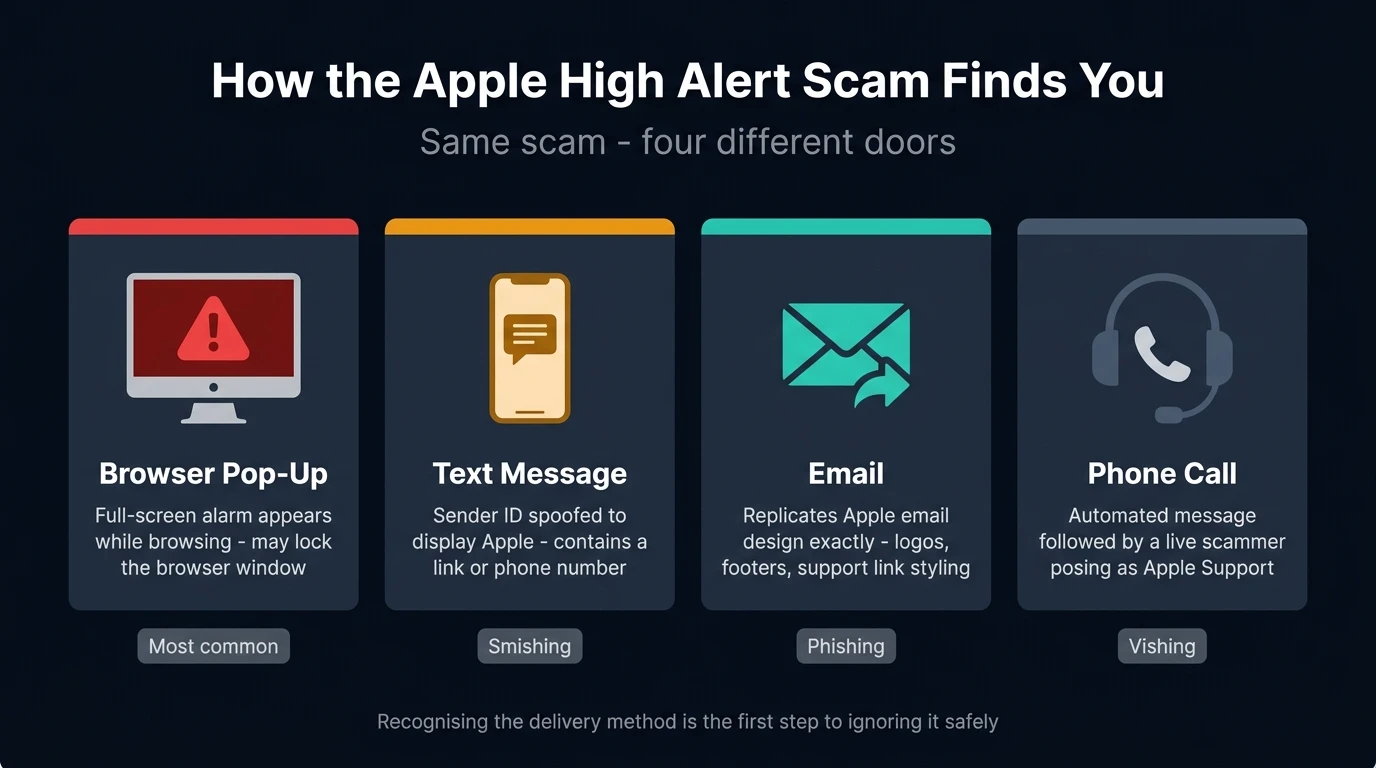
The Apple High Alert scam does not arrive through a single channel. Fraudsters use several delivery methods to cast a wide net, and understanding each one helps you spot the pattern wherever it appears.
Browser pop-up warnings
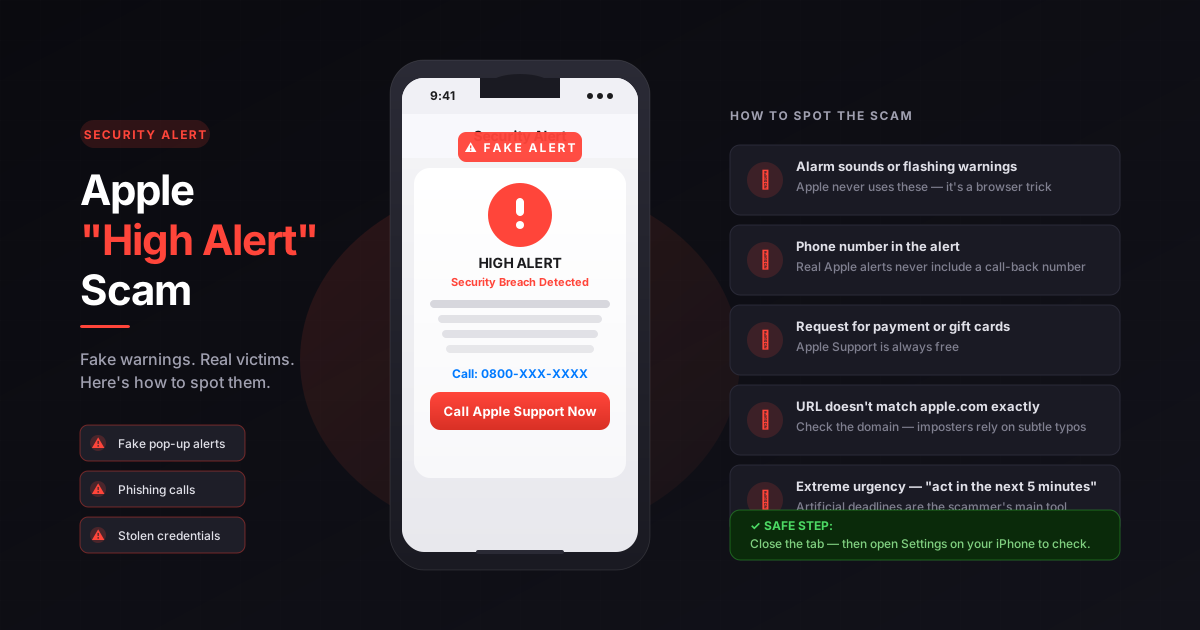
The most common delivery method is a full-screen or large pop-up that appears while browsing the web, often on sites that run third-party advertising networks or that have been compromised. The pop-up mimics a genuine Apple system alert, sometimes with a repeating alarm sound, flashing text, or a countdown timer to add urgency. Some versions lock the browser window so it appears impossible to close without calling the number displayed.
Text messages
Smishing variants of the scam send a text message claiming that your Apple ID has been locked, that a new device has been added to your account without authorisation, or that suspicious purchases have been flagged. These texts include a link or a phone number, and the sender ID is often spoofed to display "Apple" rather than a mobile number.
Emails
Phishing emails impersonating Apple often claim to be security notifications about unauthorised purchases, failed payment attempts, or login attempts from a new location. They closely replicate the formatting of genuine Apple communication, including logos, footers, and support link styling.
Phone calls
Vishing (voice phishing) variants involve a call from someone claiming to be from Apple Support. An automated message may tell you that your iCloud account has been breached and that you need to press a number to speak with a technician. The caller then attempts to guide you through "security steps" that in reality hand them access to your device or personal information.
What Happens When Victims Respond
Once someone clicks a link, calls the number, or engages with the scammer, the attack escalates quickly. Depending on the variant, criminals may attempt to:
Steal your Apple ID credentials. A fake Apple login page captures your username and password the moment you enter them. With those details, scammers can access iCloud photos, documents, contacts, and any payment methods saved to your account.
Collect banking and card information. After gaining trust by correctly guessing or verifying some personal details, scammers ask for payment card or bank account information to "verify your identity" or "process a refund" for fraudulent charges.
Install remote access software. This is one of the most dangerous outcomes. Scammers instruct victims to download a legitimate remote-access application, often AnyDesk or TeamViewer, under the pretence that a technician needs to inspect the device. Once installed, the scammer has full control of the screen, file system, and any apps open on the device.
Access photos, passwords, and saved data. Through remote access or by guiding victims through their own settings, fraudsters can extract photos from the camera roll, passwords saved in iCloud Keychain, and contact information.
Demand payment for fake technical support. Many victims are told that removing the "virus" or "hack" costs a fee, typically between £100 and £500. Payment is requested via bank transfer, gift cards (Apple, Amazon, Google Play), or cryptocurrency. Gift cards are particularly common because they are hard to trace and impossible to reverse.
Create ongoing leverage. Some scammers use the initial contact to establish a pattern of return calls, posing as Apple's "follow-up team" to extract further payments or keep the victim engaged over weeks.
Why This Scam Works So Well
Cybersecurity experts consistently note that social engineering succeeds not because victims are naive but because the psychological mechanisms being exploited are universal. The Apple High Alert scam is effective for several specific reasons.
Apple is synonymous with trust. People rely on their iPhone for banking, health data, photos, and communications. The idea of losing access, or of a criminal gaining it, is frightening in a way that overrides caution. That fear is the scam's fuel.
The branding is convincing. Modern phishing kits reproduce Apple's visual identity with remarkable accuracy, including logos at the correct resolution, support page styling, and professionally worded copy. Side-by-side with a genuine Apple alert, the fake can be almost indistinguishable.
Urgency shuts down scepticism. When a message tells you that your account is under active attack and that you have minutes to respond, the rational impulse to pause and verify gets overridden. Scammers know that time is their enemy, because a victim who searches "is this real" will usually find out it isn't.
Fake alerts can look completely native on-screen. A browser pop-up that fills the screen, plays a sound, and refuses to close can feel indistinguishable from a genuine operating system notification, especially on mobile, where the browser and the OS interface occupy the same visual space.
The script sounds authoritative. Scammers who work telephone operations are coached on Apple's products, terminology, and support processes. They can accurately describe your device model, reference your account email, and walk you through steps that sound exactly like what genuine support would do.
Warning Signs: What a Real Apple Alert Never Looks Like
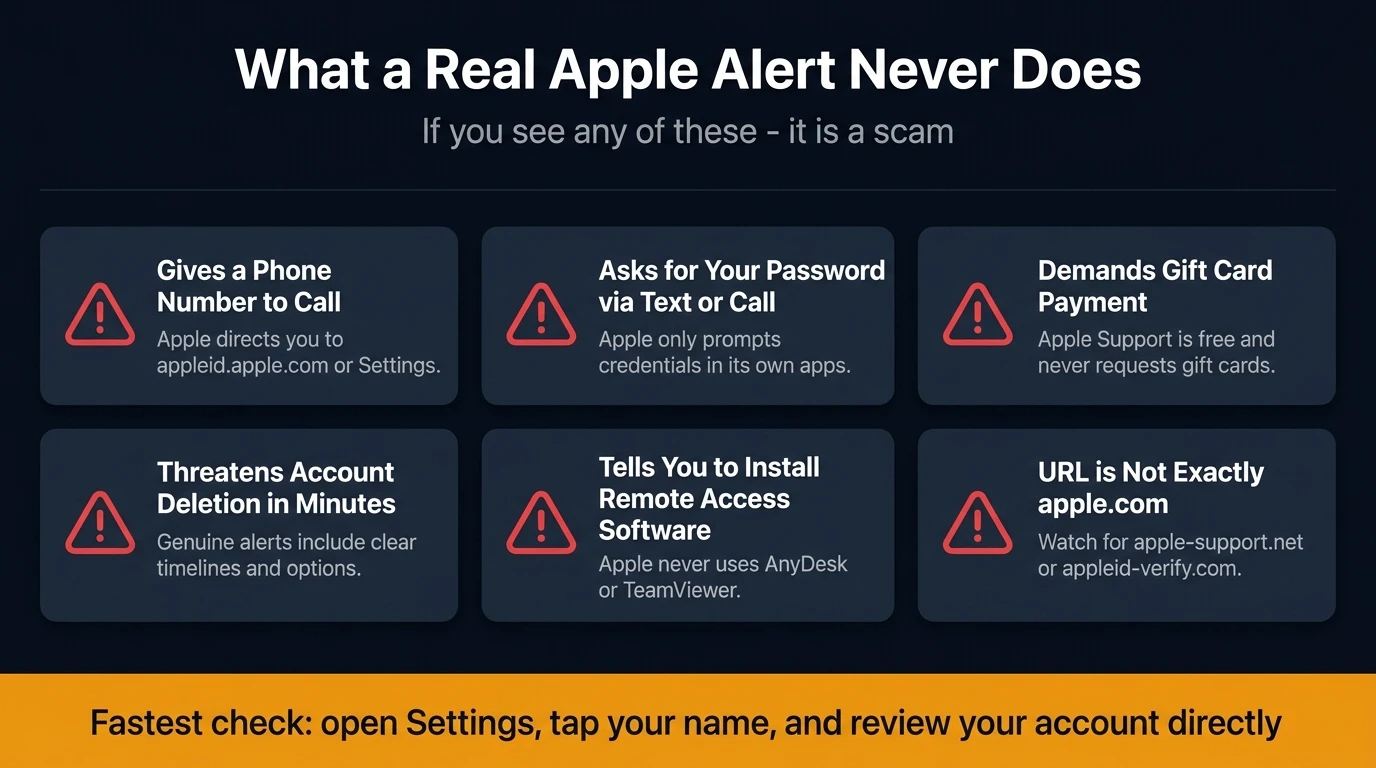
Knowing what Apple does, and doesn't, communicate makes these scams much easier to identify.
Apple does not send unsolicited pop-up alerts with a phone number to call. If a security notification includes a phone number and tells you to call immediately, it is not from Apple. Apple's genuine security alerts direct you to appleid.apple.com or to the Settings app.
Apple does not ask for your password, verification code, or payment details over the phone or via text. The only place Apple prompts you to enter credentials is within its own apps or on apple.com, never through a link in a message or in response to a call you did not initiate.
Apple does not request payment via gift cards, wire transfer, or cryptocurrency. This applies to any supposed fee for technical support, account recovery, or virus removal. Apple Support is free. Any request for payment through these channels is fraudulent regardless of how official the caller sounds.
Apple does not pressure you to act within minutes to avoid account deletion. Genuine security communications include clear timelines and options. They do not threaten immediate, irreversible consequences if you fail to call back within the hour.
Apple does not instruct you to download third-party remote-access tools. Apple Support does not use AnyDesk, TeamViewer, or any similar application to access your device. Any instruction to install such software should be treated as a direct red flag.
Beyond these specific tells, there are general warning signs that apply across all delivery methods:
- The URL in the browser or email link does not contain
apple.comexactly, look for variants likeapple-support.net,apple-security.co, orappleid-verify.com - The browser pop-up plays a loud alarm sound or displays a flashing warning: genuine operating system alerts do not behave this way
- The message contains unusual phrasing, formal language that feels slightly off, or grammar inconsistencies
- The caller knows your name but cannot confirm account details you would expect Apple to have on file
What to Do If You Receive an Apple High Alert Message
The correct response varies depending on how the scam reaches you, but the first step is always the same: do not engage with the alert on its own terms.
If it is a browser pop-up:
Close the browser tab. If the pop-up appears to have frozen your browser, force-quit the browser entirely using your phone or computer's app switcher. You do not need to call any number or click anything inside the pop-up. The pop-up itself cannot harm your device. The harm only starts when you interact with it.
If it is a text message:
Do not click the link. Do not reply. Forward the text to 7726 (SPAM), free on all UK networks, and report it to the NCSC by forwarding to [email protected]. Block the sender and delete the message.
If it is an email:
Do not click any link or open any attachment. Report the email as phishing using your email client's built-in reporting tool, then delete it. If you want to verify whether there is a genuine issue with your Apple ID, go directly to appleid.apple.com in a new browser window, never through the link in the email.
If it is a phone call:
Hang up. You do not need to explain yourself or stay on the line. If you are uncertain whether the call was genuine, hang up and call Apple Support yourself using the number from Apple's official website (support.apple.com), never call back a number the caller gave you.
To check whether your Apple ID is at risk:
Open the Settings app on your iPhone, tap your name, scroll down to see the devices signed into your account, and check for any you do not recognise. Visit appleid.apple.com to review recent account activity and sign-in locations. If something looks unfamiliar, change your Apple ID password right away from within Settings.
How to Protect Yourself Going Forward
Reacting correctly to scam attempts matters, but building habits that reduce your exposure in the first place is more valuable over time.
Enable two-factor authentication on your Apple ID. This means that even if a scammer obtains your password, they cannot access your account without the second factor: a six-digit code sent to a trusted device you physically hold. You can set this up under Settings → [Your Name] → Sign-In & Security → Two-Factor Authentication.
Use a strong, unique password for your Apple ID. If the same password is used on other services and one of those services suffers a breach, your Apple ID becomes vulnerable. A password manager makes maintaining unique passwords across every account practical without requiring you to memorise them.
Be conservative about which sites your real email address touches. Every sign-up that uses your primary email address is a potential entry into the data pipelines that phishing campaigns draw from. VanishInbox generates a working temporary inbox instantly with no account required, so you can use a disposable address for any sign-up where you don't need a long-term relationship. Your real email stays off the lists that eventually reach scammers.
Keep your Apple software up to date. Genuine security vulnerabilities in iOS and macOS are patched through software updates. Keeping your device up to date ensures you benefit from Apple's own security fixes, which removes one of the legitimate attack surfaces scammers sometimes reference to make their pitches sound credible.
Warn the people around you. Older adults and anyone less familiar with how software security works are disproportionately targeted by tech support scams. The three facts worth sharing: Apple never calls you unsolicited about a security issue, Apple never asks for payment via gift cards, and Apple never needs remote access to your device through a third-party app.
Who Gets Targeted, and Why It Matters
Tech support scams in general, and the Apple variant specifically, disproportionately affect older adults, people who are less familiar with how software security works, and anyone who is particularly worried about losing access to their device and the data on it. The FBI's Internet Crime Complaint Center has consistently reported that tech support fraud results in hundreds of millions of dollars in losses annually, with older victims accounting for the largest proportion of both complaints and financial harm.
This targeting is deliberate. Scammers know that anxiety about technology, combined with trust in well-known brands, creates a population more likely to act on an alarming alert without pausing to verify it. Understanding this doesn't make anyone at fault for being targeted. It makes awareness and simple protective habits more important, not less.
Frequently Asked Questions
Can Apple pop-up alerts appear on my screen uninvited?
Yes, but only through a browser, not from iOS itself. A website can trigger a browser pop-up that fills the screen and mimics a system alert. iOS itself will never display a genuine Apple security warning that includes a phone number or demands you call immediately. If the alert appeared while you were browsing, it is a browser-generated pop-up, not a system notification, and closing the browser is all you need to do.
The alert knew my name and email address. Does that mean it is real?
No. Phishing campaigns work from databases that include names, email addresses, and phone numbers, often compiled from data breaches or purchased from data brokers. Scammers frequently include your name to appear credible. A scam knowing your name is not evidence it is from Apple.
I called the number in the pop-up. What should I do now?
If you called but did not share any information or install any software, you are likely fine. Block the number and do not call back. If you shared personal information, change your Apple ID password right away, enable two-factor authentication if it is not already on, and monitor your financial accounts for unusual activity. If you installed remote-access software, uninstall it right away, change all passwords from a separate device, and contact your bank.
How do I tell if a website URL is Apple's?
Apple's legitimate services use domains ending in apple.com exactly, for example appleid.apple.com, support.apple.com, or www.apple.com. Watch for subtle variations: apple-id.com, support-apple.com, appleid-verify.net are all fraudulent. The domain directly before .com or .co.uk must be apple. Anything else is not Apple.
What is the fastest way to check whether my Apple ID is compromised?
Open Settings on your iPhone, tap your name at the top, and review the device list at the bottom of the screen. If you see a device you do not recognise, tap it and select "Remove from Account". Then go to the Sign-In & Security section to check for any recent password changes or added trusted phone numbers you did not make. This takes about two minutes and gives you a clear picture of your account status, no pop-up required.
Is there anything useful about receiving one of these scam messages?
Reporting it. Forwarding texts to 7726, reporting emails using your mail client's phishing button, and sending examples to the NCSC at [email protected] feeds directly into systems that help take down phishing infrastructure and protect others. A scam that reaches you but gets reported is one fewer campaign that reaches someone more vulnerable.
For a broader look at how phishing works across channels, including email variants of this type of attack, see how to spot a phishing email. If you have received fake emails claiming your iCloud or Google storage is full and your files are about to be deleted, that is a separate but related campaign; see the cloud services scam explained for a full breakdown. And if you have ever wondered how scammers get hold of your contact details in the first place, what actually happens when a website sells your email address explains the full data pipeline.