You're mid sign-up on an unfamiliar site. It wants your email. You don't want to give it your real one, but opening a new tab to grab a disposable address breaks the flow, and now you've got three tabs open and you've already forgotten which form you were filling in.
A browser extension solves this cleanly. Your disposable inbox lives in the toolbar. You click the icon, copy the address, paste it into the form, and wait for the confirmation email to appear in the same popup, no tab switch, no navigation, about 20 seconds start to finish.
This guide covers what to look for in a disposable email Chrome extension, walks through the VanishInbox extension in full, and compares it against the most widely used alternative so you can make an informed choice.
What to Look for in a Disposable Email Chrome Extension
Not all disposable email extensions are built the same. Before installing anything, these are the features that matter:
Inbox in the popup, not a new tab. The whole point of an extension is convenience. If clicking the icon opens a new tab with a website, you haven't gained anything over bookmarking the site. The inbox should live inside the popup itself.
Right-click autofill. The best extensions let you right-click any email field on any website and fill it with your disposable address in one click. This removes even the copy-paste step.
Desktop notifications. When you're waiting for a verification code, you shouldn't have to keep clicking the toolbar icon to check. A notification when mail arrives means you can carry on with what you were doing and only switch back when something lands.
Genuine deletion. The address and its emails should be deleted at the server level after expiry, not hidden from the UI. Check that the underlying service uses proper TTL expiry, not a soft-delete pattern that keeps the data in a database indefinitely.
Multiple domains. Some sites blocklist known disposable domains. An extension backed by a single domain leaves you stuck if that domain gets rejected. Five domains with a quick-switch option covers the vast majority of cases.
VanishInbox: the Best Free Disposable Email Extension for Chrome
The VanishInbox Chrome extension hits all five of those criteria. This is what each feature looks like in practice.
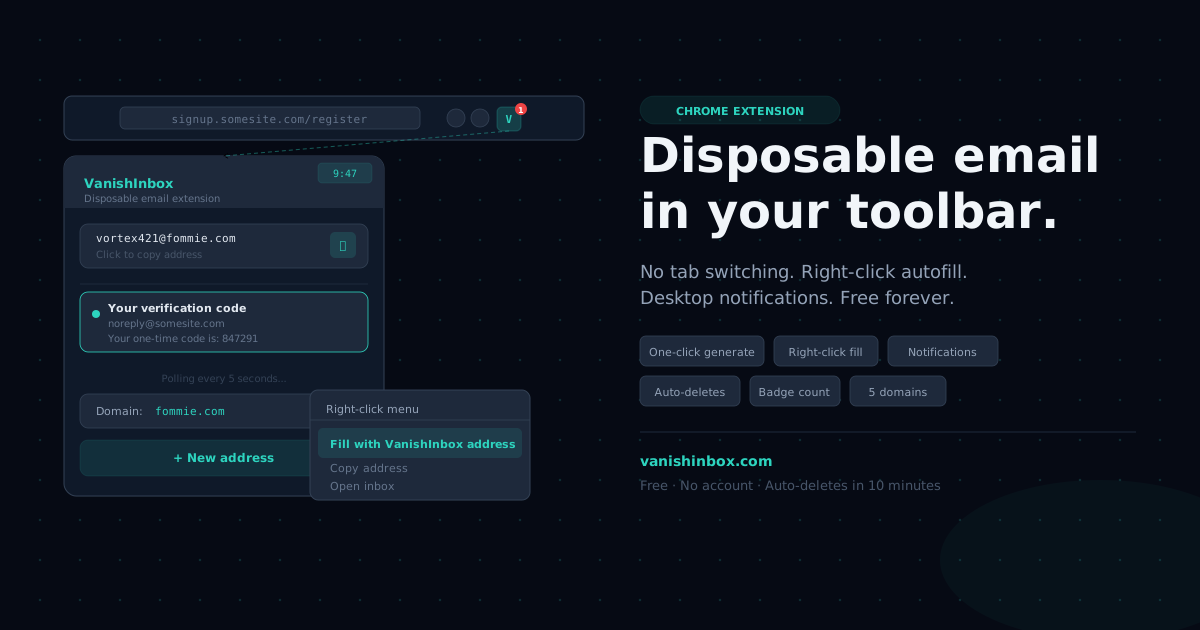
One-click address generation. Click the extension icon and a fresh disposable address is ready immediately, no page load, no button to press beyond opening the popup. The 10-minute countdown starts the moment it generates.
Live inbox in the popup. Incoming emails appear directly inside the popup. You can read the full message, copy a verification code using the built-in copy button, and move on without ever leaving the page you're on. The inbox polls for new mail automatically, so there's no manual refresh.
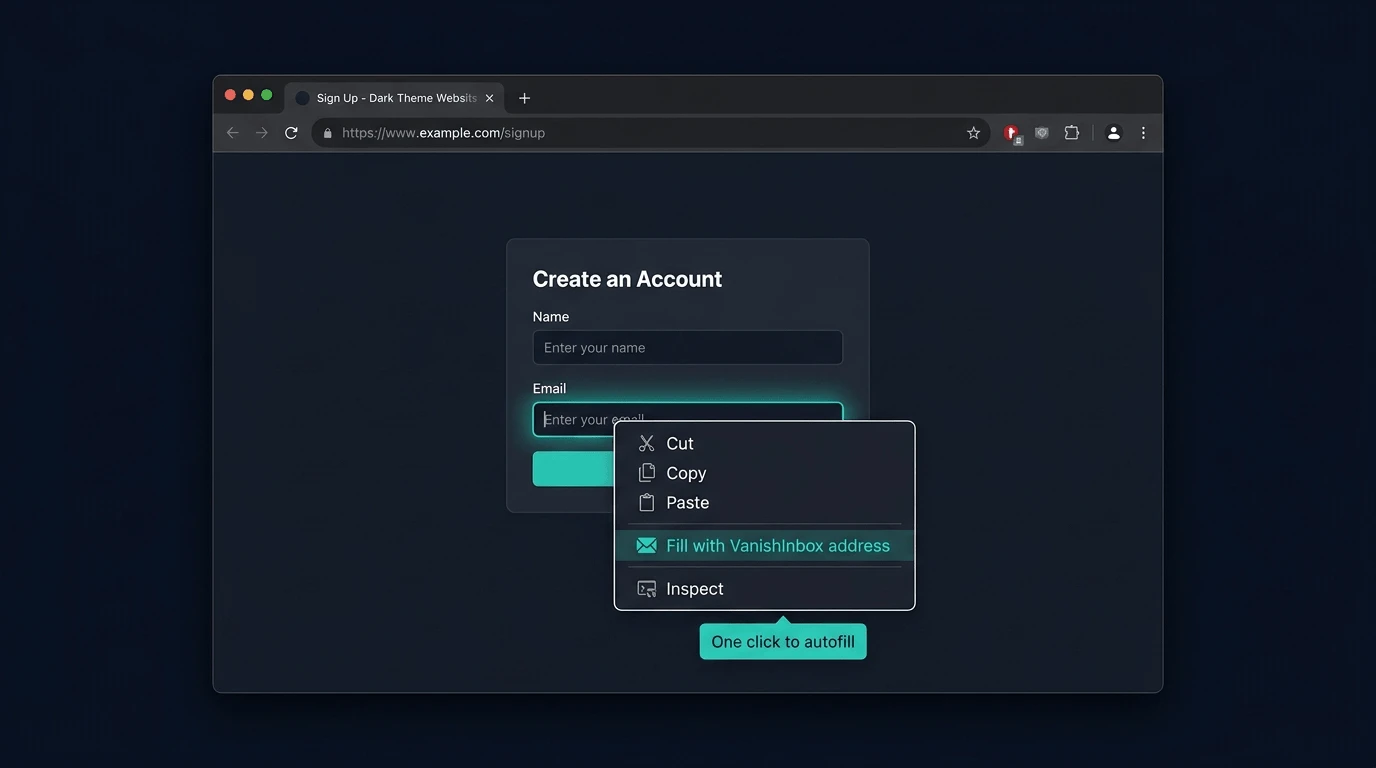
Right-click autofill. Right-click any email field on any website and the context menu shows a "Fill with VanishInbox address" option. One click and the field is populated. This is particularly useful for multi-step forms where you're moving quickly and don't want to break rhythm.
Desktop notifications. When a new email arrives, you get a browser notification, the same kind you'd see from any other Chrome extension. You don't need to keep the popup open or keep checking. The notification fires, you click it, and the email is there.
Unread badge count. The toolbar icon shows a badge with the number of unread emails in your current inbox. A quick glance tells you whether something has arrived without opening anything.
Auto-deletes in 10 minutes. This is handled at the infrastructure level, not the UI level. VanishInbox stores emails in Redis with a 10-minute TTL, so when the key expires, the data is gone and unrecoverable. There's no archive, no soft-delete, nothing to breach. For a full breakdown of how the deletion works, see is temp mail safe?
You can install it directly from the VanishInbox extension page or find it in the Chrome Web Store.
How to Install and Use It (Step by Step)
Step 1: Install from the Chrome Web Store
Head to the VanishInbox extension page and click the Chrome Web Store link, or go directly to the store listing. Click "Add to Chrome" and confirm the prompt. The whole process takes under 30 seconds.
Step 2: Pin the extension to your toolbar
Click the puzzle piece icon in Chrome's toolbar, find VanishInbox in the list, and click the pin icon. The VanishInbox icon will appear in your toolbar permanently so you can access it with one click from any tab.
Step 3: Generate your first address
Click the icon. A disposable address is generated immediately. You'll see the inbox below it, empty for now, but polling in the background.
Step 4: Use it on any site
Either copy the address from the popup and paste it wherever you need it, or right-click any email field on the page you're on and select "Fill with VanishInbox address" from the context menu. Complete the sign-up or form as normal.
Step 5: Wait for the email
Leave the popup open or close it; you'll get a desktop notification when something arrives. Click the notification or open the popup to read the email. Copy your verification code using the copy button and you're done.
Everything expires after 10 minutes. If you need more time before the verification email arrives, generate a new address from the popup before the window closes and use that address for the sign-up.
VanishInbox Extension vs Temp Mail Extension
Temp Mail is the most widely installed disposable email extension on the Chrome Web Store, so it's worth a direct comparison.
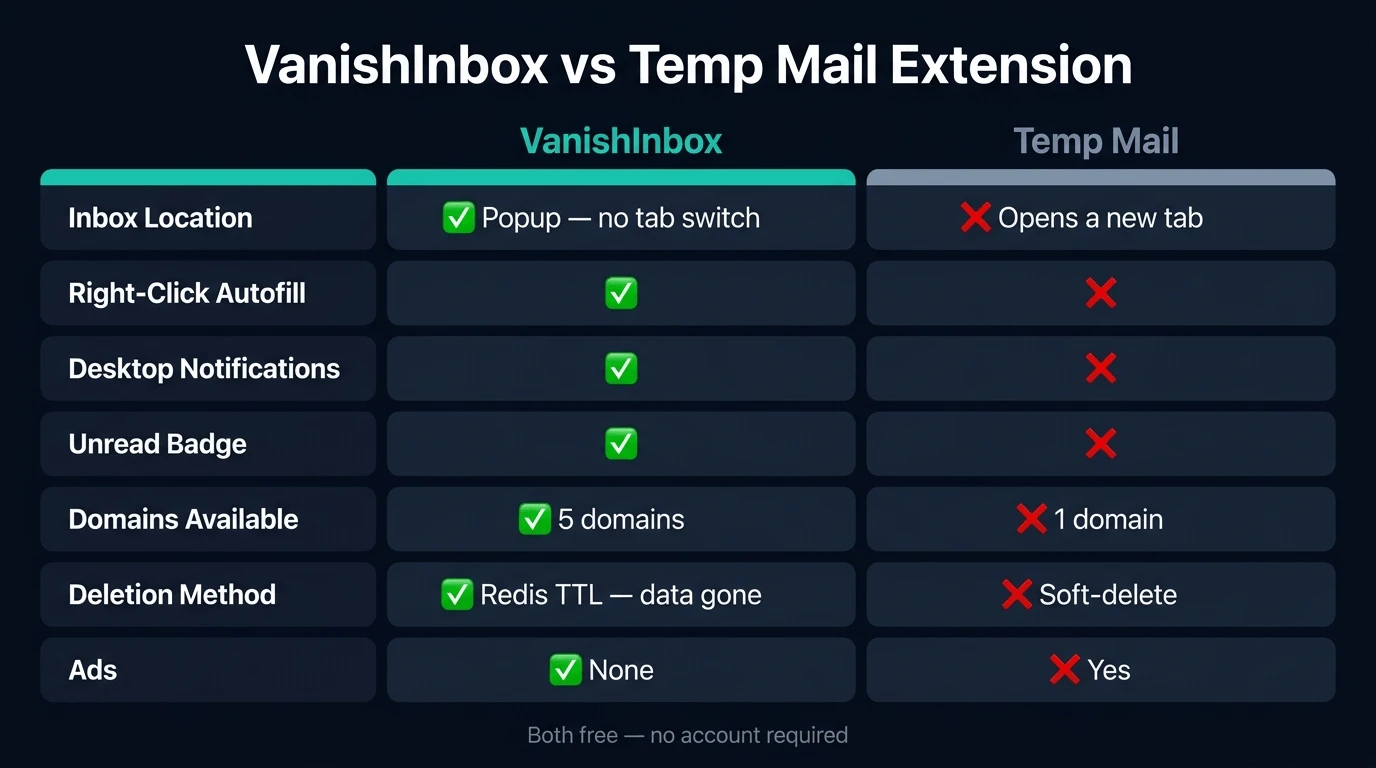
| Feature | VanishInbox | Temp Mail |
|---|---|---|
| Inbox location | Popup (no tab switch) | Opens a new tab |
| Right-click autofill | ✓ | ✗ |
| Desktop notifications | ✓ | ✗ |
| Unread badge | ✓ | ✗ |
| Domains available | 5 | 1 |
| Deletion method | Redis TTL (infrastructure level) | Database soft-delete |
| Cost | Free | Free (ads) |
| Account required | None | None |
The most meaningful difference in day-to-day use is the inbox location. Temp Mail opens a new tab every time you click the icon, which puts you back in the same situation you were trying to avoid. VanishInbox keeps everything in the popup.
The right-click autofill is the second big differentiator. It removes the copy-paste step entirely on any site that has an email field, which is most of them.
When the Extension Is the Right Tool (and When to Use the Website Instead)
Both the extension and the temporary email website it's built on do the same job, backed by the same service. The choice comes down to how you're working.
Use the extension when:
- You're on a desktop or laptop and sign up to things regularly
- You want right-click autofill across any site without thinking about it
- You want notifications without keeping a tab open
- Speed matters and you don't want to navigate to a new tab
Use the website when:
- You're on mobile or tablet: Chrome extensions don't run on mobile browsers
- You want the full inbox view with more screen space
- You need a temp edu email address: the .edu.pl domains are available on the website but not through the extension
- You're a first-time user and want to see the full interface before committing to an install
Neither is strictly better. Most desktop users who install the extension end up using both: the extension for quick one-off sign-ups, the website when they need a specific domain or more room to read a longer email.
Frequently Asked Questions
Is it free?
Yes, completely free. No subscription, no premium tier for the extension itself, no account required. It runs on the same free VanishInbox service as the website.
Does it work with all websites?
It works with the vast majority. A small number of sites maintain blocklists of known disposable email domains and will reject the address during sign-up. If that happens, switch to a different domain: VanishInbox gives you five. The dropdown to switch domains is inside the popup.
What happens to my address if I close the browser?
Your address is saved locally in the extension using Chrome's storage API. If you reopen the browser and click the icon within the 10-minute window, the same address is still active. If the 10 minutes has passed, a new address is generated automatically.
Is the extension safe to use?
Yes. The developer has disclosed to the Chrome Web Store that no user data is collected, sold, or transferred for any purpose outside the extension's core function. The underlying VanishInbox service stores emails in Redis with a 10-minute TTL, and nothing is written to permanent storage. For the full breakdown, see is temp mail safe?
Can I use it to receive verification codes?
Yes, this is the most common use case. The code arrives in the popup inbox within seconds of being sent. For a step-by-step walkthrough of the verification flow, see how to use a temporary email for verification.
The Bottom Line
A disposable email Chrome extension removes the last remaining friction from using a temp address. You don't need to navigate anywhere, keep a tab open, or manually check back for new mail. The inbox is in your toolbar, autofill handles the form, and a notification tells you when the email arrives.
The VanishInbox extension does all of this without an account and without data collection. It takes under 30 seconds to install.