The modern web is engineered to collect your email address at every possible opportunity, and most of the time it looks completely harmless. That's not a judgment on your decisions. It's how the system is built.
A free recipe. A software trial. A discount code. A webinar registration. A PDF download. An entry into a competition. Each one seems reasonable in isolation. But over months and years, each signup adds to a sprawling list of places that have your real email address, many of which you've completely forgotten about.
The result is an inbox that works against you: marketing emails, newsletters you half-remember subscribing to, promotional blasts from brands that acquired your address secondhand, all mixed in with the messages that actually matter.
There's a single rule that prevents this. It isn't complicated. Most people have simply never thought to apply it deliberately.
The Rule
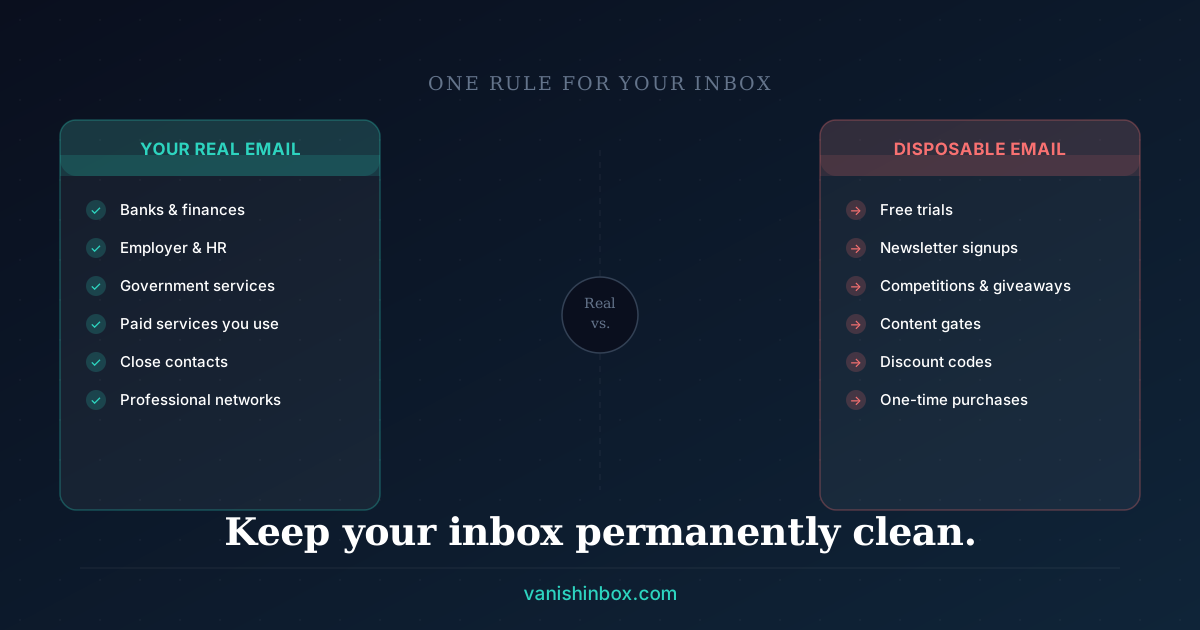
Give your real email address only to people and services you'd give your phone number to.
Everything else gets a disposable address.
One filter, applied consistently, keeps your inbox clean permanently.
Why This Rule Works
The problem with most inbox management advice is that it's reactive. Unsubscribe from lists. Set up filters. Mark things as spam. These approaches treat the symptom rather than the cause.
The cause is that your real email address has been distributed to too many places that don't need it. Once it's out there, you can't get it back. Every sign-up that doesn't need your real address is a potential data broker entry; see what actually happens when a website sells your email for how that pipeline runs.
The one-rule approach heads the problem off before it starts. It draws a clear line before you submit the form, not after the damage is done. Your real address goes to a small, trusted group. Everyone else gets an address that expires and carries nothing back to you.
The Two Categories of Email Recipients
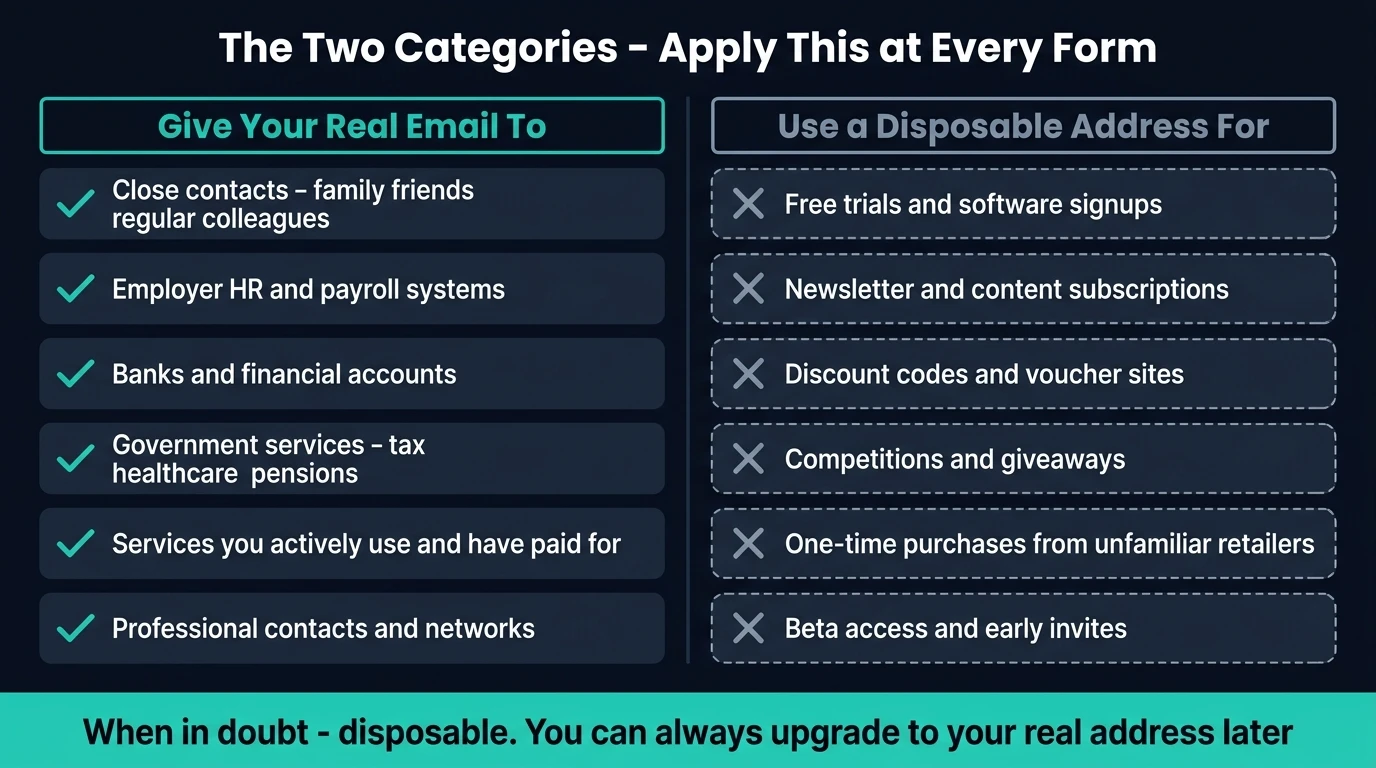
Category one: people and services that deserve your real address.
These are the contacts where ongoing, two-way communication matters, where you need to receive important updates reliably, and where losing access would cause real inconvenience.
The list is shorter than you think:
- Close contacts: family, friends, colleagues you work with regularly
- Your employer, HR systems, payroll
- Banks and financial accounts
- Government services: tax, healthcare, pensions
- Services you actively use and have paid for
- Professional contacts and networks
Notice what's not on this list: brands, apps, websites, tools, or services you're trying out.
Category two: everything else.
Free trials. Newsletter signups. Discount codes. One-time purchases from unfamiliar retailers. Competitions and giveaways. Paywalled content. Software downloads. Event registrations. Beta access.
This category is vast. It covers the majority of forms you fill out on the internet, and it's exactly the category that generates inbox noise.
Every item in category two gets a disposable address.
What Happens When You Apply the Rule
At first, very little changes. You receive your verification email, click the link, and move on. The experience matches using your real address.
A few weeks in, your inbox starts holding almost exclusively things you want. The signal-to-noise ratio improves fast.
Over the longer run, you've structurally separated your real identity from the marketing ecosystem. Even if a service you signed up for suffers a data breach, your real email address isn't in it. Even if they sell your data to third parties, there's nothing to sell that traces back to you.
The Grey Area: Services You're Not Sure About
Some services sit in between: a tool you might use regularly, a retailer you've bought from once and might buy from again, a newsletter you actually read.
Ask yourself one question: would I be annoyed if this service emailed me unexpectedly in six months?
If the answer is yes, or even maybe, use a disposable address. If you end up wanting ongoing communication with them, you can update your email address in account settings later. The initial signup, the moment your address enters their systems, is where the risk happens.
Default to the throwaway address. Upgrade to your real one intentionally, after you've decided the relationship is worth it.
How to Make This Effortless
The one objection to this approach is friction: opening a second tab, generating an address, copying it across sounds like extra steps.
In practice, it takes about ten seconds with VanishInbox. The how-to is simpler than it sounds; see our step-by-step guide to using a temporary email address for verification.
The mental model shift matters more than the mechanics. Once you've decided that your real address is reserved for category one contacts, the decision at each form becomes automatic. You stop deliberating and just open VanishInbox.
The Sites Most Likely to Misuse Your Address
Understanding where the risk concentrates helps you apply the rule with more confidence.
Content gates. "Enter your email to read the full article" or "Download the free report." These are lead generation tools. Your address goes directly into a marketing automation platform and you'll receive follow-up emails until you unsubscribe, or forever.
Free tool signups. Many free tools, particularly in the SaaS space, are freemium businesses with aggressive email sequences built to convert you to paid. Even if you never upgrade, you'll receive a steady stream of emails indefinitely.
E-commerce first-time purchases. One purchase from an unfamiliar retailer typically results in months of promotional emails. Most retailers make it hard to opt out fully; some re-subscribe you during future purchases.
Discount and voucher sites. The entire business model of deal aggregators often depends on email volume. These sites frequently share lists across affiliate partners. A single signup can result in emails from brands you've never heard of.
Competitions and giveaways. Almost universally, entering a competition involves your address being shared with every brand sponsoring the prize. You entered to win a coffee machine; you receive emails from twelve companies for the next two years.
Newsletter signups. These sit in a grey area. You chose to subscribe, but your address becomes part of a subscriber list that may be acquired, co-registered with sponsors, or shared with platforms in ways you didn't anticipate. The full picture is covered in the hidden cost of free newsletters.
Beta access and early invites. Startups collecting beta interest may later be acquired, at which point their email list transfers as a business asset. The company you signed up with may no longer exist, but your address lives on in the acquirer's systems.
What About Password Recovery?
Worth asking directly, since the answer matters.
Disposable addresses expire. You cannot use a VanishInbox address for password recovery because the inbox won't exist when you need it. That's intentional; it's part of what makes disposable email private in a way a forwarding alias isn't.
The practical implication: use disposable addresses for signups where you're not planning a long-term account. For one-time verification (click a link, get access), this is perfect. For an account you intend to keep, you have two options:
- Use your personal email for the account, but use a disposable address for the verification step if the two are separate
- Sign up with a disposable address, then update your email to a real one in account settings immediately after your account is created
For truly one-off interactions, a paywall you're accessing once, a competition entry, a free trial you're exploring, you may not need ongoing access at all. The account can expire along with the inbox.
Building a Clean System
The one rule becomes most powerful as part of a deliberate three-tier structure. This applies well beyond any single audience: it works for students protecting their .edu inbox, for professionals keeping their work email clean, and for anyone who wants a permanent solution rather than a reactive one. See how to protect your .edu email address for the same system applied to university inboxes.
Tier one, real contacts: your main email address, shared only with category one recipients. Banks, employers, close contacts, services you actively chose and trust.
Tier two, secondary personal: a separate personal address (a Gmail, a Proton account) for services where you've decided you want ongoing access but want to keep them out of your primary inbox. Online shopping you return to, newsletters you've chosen to follow, tools you actively use.
Tier three, disposable: everything else. VanishInbox, used automatically for every form that doesn't fit tier one or tier two.
Most people operate with just tier one, one inbox receiving everything. Adding tiers two and three is the structural change that makes your primary inbox useful again.
The Mindset Shift
The deepest change isn't technical. Your email address is a form of access to you, and you get to decide who has it.
Websites present the email field as a neutral input, as routine as a search box. In practice it's a request for ongoing access to your attention, potentially for years. Seen that way, the decision about what to enter becomes much clearer.
Your real address is for people and services that have earned it. Everything else gets the throwaway.
Frequently Asked Questions
Won't I miss important emails if I use a disposable address?
Only if you're waiting for follow-up communication. For one-time verifications, confirmation links, access codes, download links, you receive the email before the inbox expires. If you later decide you want ongoing emails from a service, update your address in account settings.
What if a site rejects disposable email addresses?
Some services, particularly student verification platforms and certain financial tools, actively block disposable domains. VanishInbox offers multiple domains: switch to a different one using the dropdown and try again. If all are blocked, use your secondary personal email as a fallback, not your primary one.
Is using a disposable email dishonest?
No. You're providing a real, working email address that receives email and can be used to verify your account. The fact that it expires is your business. Companies that demand your real email address are often doing so for marketing purposes rather than service purposes, and you have no obligation to provide it.
How is this different from unsubscribing from mailing lists?
Unsubscribing is reactive. It assumes your address is already in a system and tries to limit the damage. The one-rule approach heads that off entirely: your real address never enters those systems in the first place. Unsubscribing also doesn't remove your address from data broker lists; it just pauses one specific sender.
Does VanishInbox store my emails?
VanishInbox deletes all emails after 10 minutes using database-level TTL expiry. They're not archived, not reviewed, and not recoverable after deletion. There's no account, no login, and no personal data collected.
What about services I've already given my real email to?
You can't undo past signups, but you can stop adding to the list. Apply the rule going forward. Over time, as existing marketing subscriptions are unsubscribed or expire, your inbox gradually gets cleaner. The rule's benefit compounds: each new signup handled correctly is one less source of noise in your future inbox.
Can I use the same disposable address for multiple signups?
Yes, but it's not necessary. VanishInbox generates a fresh address each time, which is the safer approach, since each signup stays isolated from every other. If one service leaks your address, it's a throwaway that no other service is using.
Your inbox doesn't have to be a noise machine. Real email for people and services you trust, disposable email for everything else: it's the simplest way to keep it that way.