
A verified student email address is worth a significant amount of money — free professional software, cloud credits, streaming discounts, and developer tools that would otherwise cost hundreds of pounds or dollars a year.
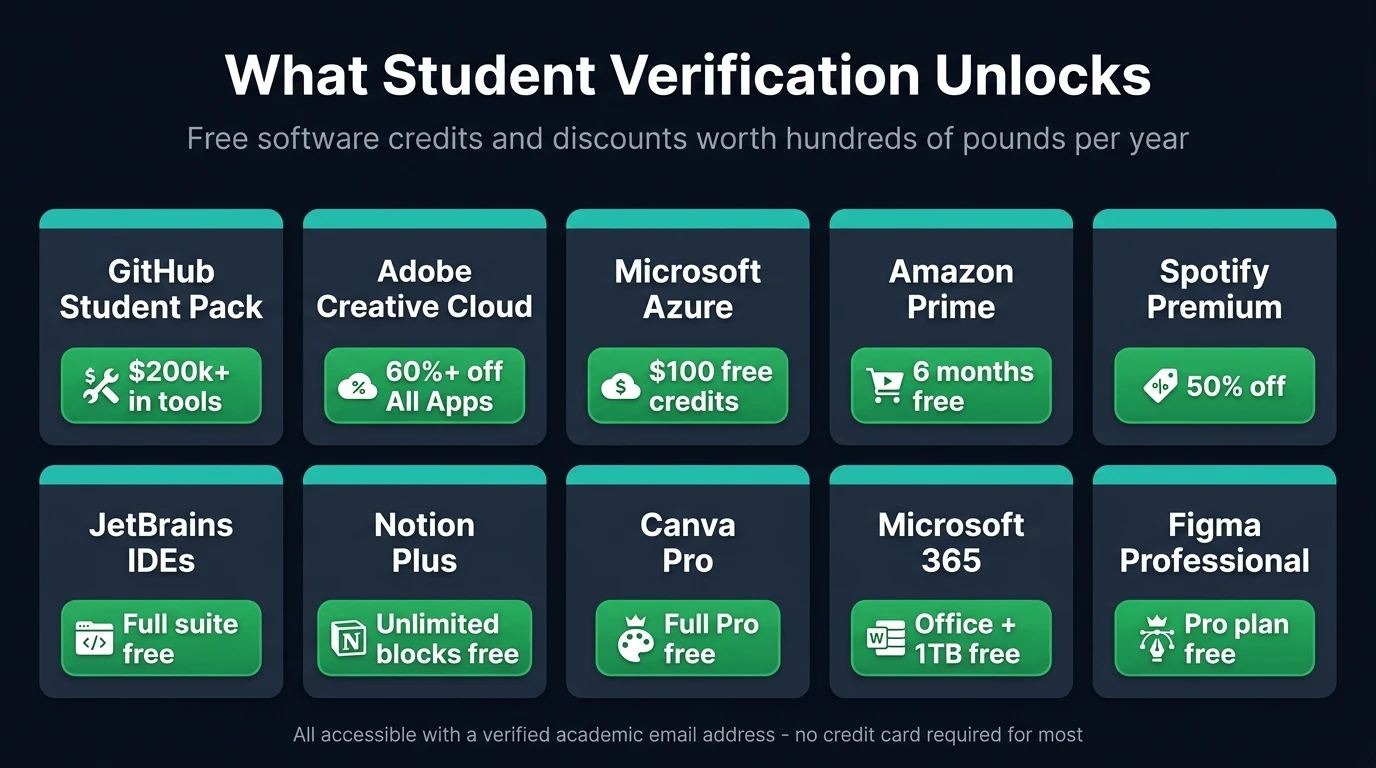
GitHub's Student Developer Pack alone bundles over $200,000 in partner offers. Adobe Creative Cloud drops by more than 60%. Amazon Prime is free for six months. Notion, Figma, JetBrains, Canva, and Microsoft 365 all have fully free tiers for students.
The catch is that most people either don't have an academic email address, or don't want to hand their real university inbox to every platform they sign up to. That's where a temp edu email comes in.
A temp edu email is a disposable inbox on an academic domain — in VanishInbox's case, addresses ending in .edu.pl — that works exactly like a real email address for receiving verification codes and confirmation links. You generate one instantly, no account required, verify whatever you need to verify, and the address self-destructs after 10 minutes leaving nothing behind.
This guide covers ten platforms in detail — what you get, how to verify with a temp edu email, and what to expect from each one. It also covers what to do when a platform pushes back. If you have a real university inbox, it's also worth reading how to protect your .edu address from spam and data brokers — student sign-ups are one of the most common ways a university inbox gets compromised.
What Is a Temp Edu Email and Why Does It Work?
Most platforms that offer student discounts do so by checking whether your email address belongs to a recognised academic domain. They're not cross-referencing a database of enrolled students — they're looking at the domain suffix. An address ending in .edu, .ac.uk, .edu.pl, or similar signals to their system that you're affiliated with an educational institution.
VanishInbox offers three .edu.pl domains for your temp mail: reason.edu.pl, realize.edu.pl, and remind.edu.pl. The .edu.pl namespace is the Polish academic domain extension — the same structure used by real universities and colleges in Poland. These domains pass the domain-suffix check that most platforms rely on.
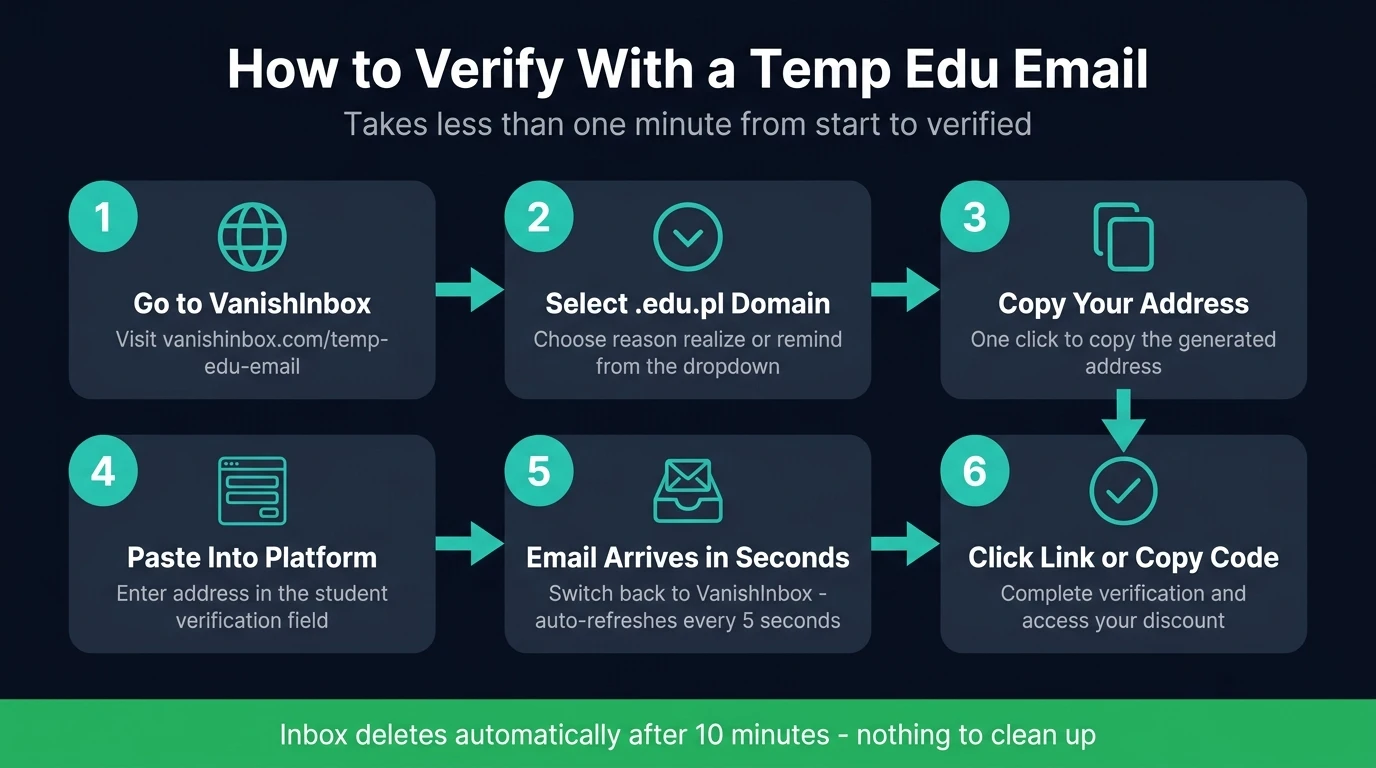
The process is straightforward:
- Go to vanishinbox.com/temp-edu-email
- Click the domain dropdown and select one of the
.edu.ploptions - Copy your generated address
- Use it to sign up or verify on whichever platform you're targeting
- Watch for the verification email — it arrives within seconds
- Click the link or copy the code and complete verification
For a step-by-step walkthrough of exactly how the verification process works — what happens when the email arrives, how to copy an OTP, how to handle a confirmation link — see how to use a temporary email address for verification.
That's it. No account needed. No personal details required. The inbox auto-deletes after 10 minutes.
GitHub Student Developer Pack
The GitHub Student Developer Pack is arguably the most valuable collection of free resources available to students on the internet. It bundles together free domains, cloud hosting credits, developer tools, and professional software — all at no cost.
What you get: Free .me domain from Namecheap, $200 in DigitalOcean credits, free JetBrains IDEs, GitHub Pro, free Canva Pro access, and over 100 other tools.
How to use a temp edu email:
- Generate your temp edu email at VanishInbox and select a
.edu.pldomain - Go to education.github.com and click "Get student benefits"
- Sign in to your GitHub account (or create one)
- When prompted to verify your academic status, enter your temp edu email address
- GitHub will send a verification email — switch to VanishInbox and copy the link or code
- Complete the application
Success rate: High for the initial email verification step. Some applications pass immediately on domain check alone; others enter a review queue. Having a .edu.pl address puts you in the right category for the system to consider your application.
Spotify Student Discount
Spotify offers a 50% discount on its Premium plan to verified students, bringing the monthly cost down significantly. Verification is handled through a third-party service called SheerID, which checks your academic email domain.
What you get: Spotify Premium at half price for up to four years of study.
How to use a temp edu email:
- Head to the Spotify student page and click to get the discount
- Fill in your details and enter your temp edu email from VanishInbox
- SheerID sends a verification email — check your VanishInbox tab and click the confirmation link
- Once verified, the discount is applied to your account
Important: The discount renews annually and requires re-verification each year. You'll need a working email address at each renewal point, so if you want to keep the discount long-term, note that the temp address will have expired by then. For the initial sign-up and first verification, it works cleanly.
Microsoft Azure for Students
Microsoft Azure for Students gives you $100 in cloud credits and free access to a range of Azure services — no credit card required. It's one of the most straightforward student benefits to activate.
What you get: $100 in Azure credits, free Azure services for 12 months, and access to developer tools through Azure Dev Tools for Teaching.
How to use a temp edu email:
- Go to azure.microsoft.com/free/students
- Click "Activate now" and sign in with a Microsoft account
- When prompted for your academic email, enter your VanishInbox
.edu.pladdress - Microsoft sends a verification code — check VanishInbox and enter the code
- Your $100 credit is added to the account
This is one of the cleaner activations. Microsoft's student verification for Azure relies on email domain rather than database lookup for most regions, so the .edu.pl domain passes the check reliably.
Amazon Prime Student
Amazon offers a six-month free trial of Prime followed by a 50% discount on the annual subscription to verified students. That's free next-day delivery, Prime Video, Prime Music, and all other Prime benefits at half price.
What you get: Six months free, then 50% off Prime membership.
How to use a temp edu email:
- Go to the Amazon Prime Student page
- Sign in to your Amazon account
- Enter your temp edu email from VanishInbox when prompted for a student email
- Amazon sends a verification email — open it in VanishInbox and click the confirmation link
- Your free trial begins immediately
Canva Pro for Education
Canva Pro normally costs around £100 per year. Through its education programme, verified students and educators get access to the full Pro feature set completely free.
What you get: Full Canva Pro — premium templates, background remover, brand kits, and more.
How to use a temp edu email:
- Go to canva.com and navigate to the Education section
- Sign up or log in and select "I'm a student"
- Enter your VanishInbox
.edu.pladdress when prompted - Confirm the verification email that arrives in your VanishInbox inbox
- Canva Pro is applied to your account
JetBrains Student Licence
JetBrains makes some of the most widely used developer tools in the industry — IntelliJ IDEA, PyCharm, WebStorm, PhpStorm, and more. Their professional licences normally cost hundreds of pounds per year. Students get them free.
What you get: Free access to the entire JetBrains suite for as long as you're a student, renewable annually.
How to use a temp edu email:
- Go to jetbrains.com/student
- Choose "Apply with your university email"
- Enter your VanishInbox
.edu.pladdress - JetBrains sends a confirmation email — check VanishInbox and click the link
- Create a JetBrains account linked to your verified status
JetBrains uses email domain verification for most applicants. The .edu.pl suffix satisfies this check in most cases.
Notion for Students
Notion is one of the most popular productivity and note-taking tools among students, used for lecture notes, project management, essay planning, and personal organisation. The free tier has block limits that can become frustrating quickly. The student plan removes them entirely.
What you get: Free Notion Plus plan — unlimited blocks, unlimited file uploads, and version history. Normally £9.50/month.
How to use a temp edu email:
- Go to notion.so/product/notion-for-education
- Click "Get Notion free" and sign up or log in
- Enter your VanishInbox
.edu.pladdress when prompted for an educational email - Check VanishInbox for the confirmation email and click the verification link
- Your account is upgraded to Plus immediately
Notion uses a straightforward email domain check for student verification. The .edu.pl suffix passes reliably.
Adobe Creative Cloud Student Discount
Adobe Creative Cloud — which includes Photoshop, Illustrator, Premiere Pro, InDesign, After Effects, and the full suite — normally costs upwards of £600 per year. The student and teacher edition brings that down by more than 60%, making it one of the highest-value discounts available with a student email.
What you get: Full Adobe Creative Cloud All Apps plan at over 60% off the standard price for the first year.
How to use a temp edu email:
- Go to adobe.com/uk/creativecloud/buy/students.html
- Click "Buy now" on the student plan
- When prompted, enter your VanishInbox
.edu.pladdress for student verification - Adobe routes verification through SheerID — check all three
.edu.pldomains if the first is rejected - Complete the purchase at the discounted price
Important: Adobe's verification uses SheerID, which cross-references institutional databases in addition to domain suffix. Results vary — try all three VanishInbox domains (reason.edu.pl, realize.edu.pl, remind.edu.pl) before concluding it won't work. Some users pass on the first attempt; others may need to use an alternative verification method such as a student ID.
Microsoft 365 Education
Microsoft 365 Education is separate from the Azure for Students offer covered above, and it's genuinely free — not a credit, not a trial. Verified students get Word, Excel, PowerPoint, OneNote, and 1TB of OneDrive cloud storage at no cost.
What you get: Full Microsoft 365 apps (Word, Excel, PowerPoint, OneNote) plus 1TB OneDrive storage, free.
How to use a temp edu email:
- Go to microsoft.com/en-gb/education/products/office
- Enter your VanishInbox
.edu.pladdress in the eligibility check box - Microsoft verifies the domain and sends a confirmation email
- Check VanishInbox, click the link, and complete setup
- Sign in with your Microsoft account — 365 Education is now active
Microsoft's domain verification for 365 Education is reliable with .edu.pl addresses for most regions. This activation is separate from and complementary to the Azure for Students $100 credit — you can claim both.
Figma Education
Figma is the industry-standard UI/UX and design tool used by professional designers at companies worldwide. The Education plan gives students the full Professional tier free — the same plan teams pay for.
What you get: Free Figma Professional plan — unlimited projects, version history, and team features. Normally $15/month per editor.
How to use a temp edu email:
- Go to figma.com/education
- Click "Apply for the Education plan"
- Fill in the application form and enter your VanishInbox
.edu.pladdress - Figma sends a verification email — check VanishInbox and click the confirmation link
- Your account is upgraded to the Professional Education plan
Figma's education verification is email domain-based for most applicants. If your application requires additional review, a student ID or enrolment letter can be used as an alternative.
What to Do If a Platform Rejects Your Edu Domain
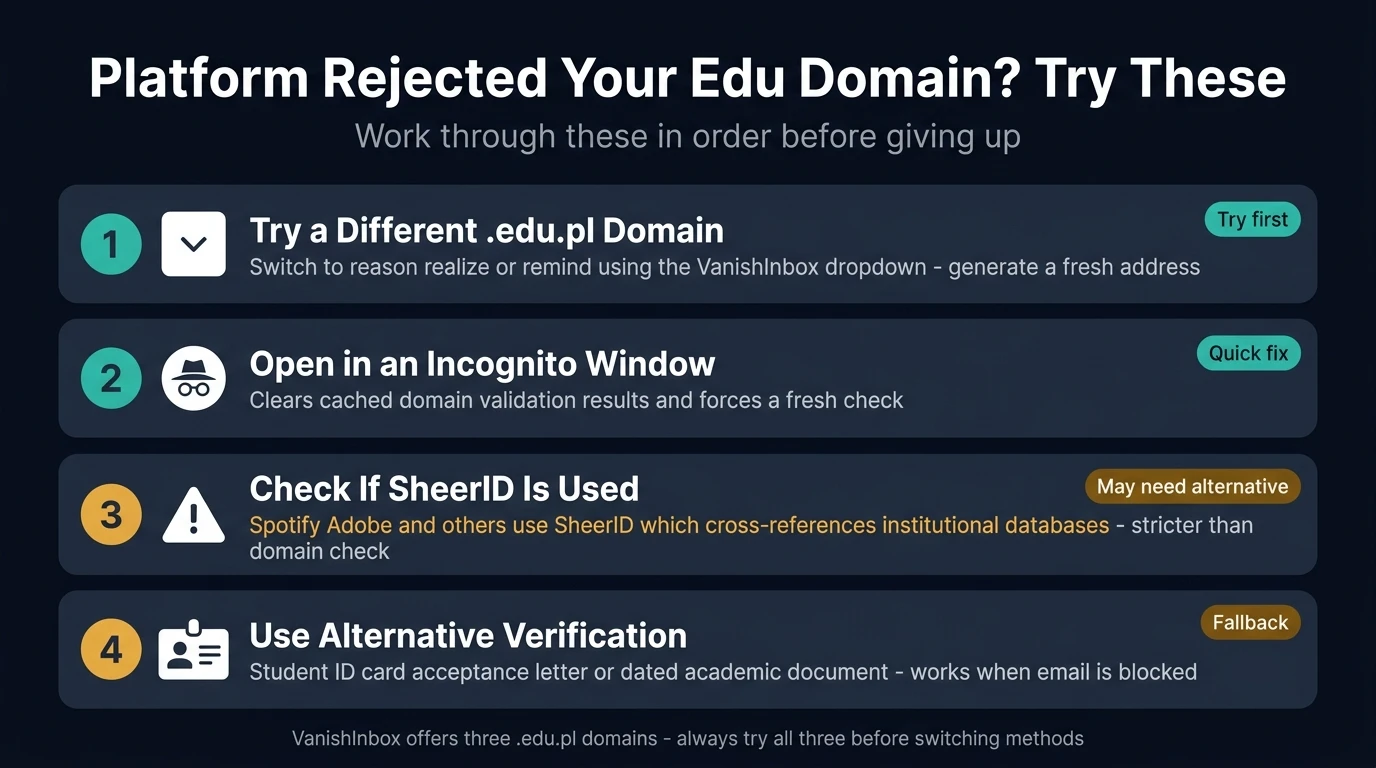
Not every platform accepts every academic domain. Some maintain tighter blocklists; others cross-reference their own database of known institutions. If you enter your temp edu email and get a rejection message, here are your options:
Switch to a different .edu.pl domain. VanishInbox gives you three to choose from: reason.edu.pl, realize.edu.pl, and remind.edu.pl. Switch using the dropdown and try the sign-up again with a fresh address on the new domain.
Try in an incognito window. Some platforms cache domain validation results. An incognito session clears that and forces a fresh check.
Check whether the platform uses SheerID or a similar service. Platforms that outsource verification to SheerID, Student Beans, or UNiDAYS often have stricter database checks that go beyond domain suffix. In those cases, a temp edu email may not be sufficient on its own.
Use a different verification method. Many platforms accept multiple forms of student verification — a photo of a student ID, an acceptance letter, or a dated academic document. If the email method is blocked, these alternatives often work without requiring a student email at all.
Is It Safe to Use a Temp Edu Email?
If you're wondering whether a temporary inbox is safe to use for verification, we break down the risks and protections in detail. The short answer: yes for one-time verification steps, with some important caveats around accounts you need long-term access to.
Platform Comparison at a Glance
Here's a quick summary of all ten platforms covered in this guide:
GitHub Student Developer Pack — $200k+ in partner offers, email domain check, occasional manual review required.
Spotify Student — 50% off Premium, verified through SheerID, annual re-verification needed.
Microsoft Azure for Students — $100 free cloud credits, email domain check, clean activation.
Amazon Prime Student — Six months free then 50% off, email link verification, fast confirmation.
Canva Pro — Full Pro features free, email domain check, activates quickly.
JetBrains — Full IDE suite free, email domain check, renewable annually.
Notion — Free Plus plan (unlimited blocks), email domain check, instant upgrade.
Adobe Creative Cloud — 60%+ off All Apps plan, SheerID verification, try all three domains.
Microsoft 365 Education — Free Word/Excel/PowerPoint + 1TB OneDrive, email domain check, separate from Azure.
Figma Education — Free Professional plan, email domain check, occasional manual review.
How to Get Your Temp Edu Email Right Now
The whole process takes less than a minute:
- Go to vanishinbox.com/temp-edu-email
- Click the domain dropdown and select reason.edu.pl, realize.edu.pl, or remind.edu.pl
- Click Copy next to your generated address
- Head to whichever platform you want to verify with and paste your address
- Come back to VanishInbox — your verification email will be waiting
Your inbox refreshes automatically every five seconds, so you won't miss anything. Once the code or link arrives, copy it and complete the verification. Everything in your inbox deletes automatically after 10 minutes — there's nothing to clean up.
Frequently Asked Questions
Do I need an account to use VanishInbox? No. Your temp edu email is generated the moment you open the page. No registration, no password, no personal details of any kind.
Can the same address be used on multiple platforms? Yes, within the same 10-minute session. If you need to verify on multiple platforms, open each one while your session is active. For platforms that need different email addresses, click "New Email" to generate a fresh address.
What if the verification email doesn't arrive?
Wait 30 seconds and refresh. If it still hasn't arrived, check whether the platform may have flagged the domain. Switch to a different .edu.pl domain using the dropdown, generate a new address, and try again.
Is using a temp edu email for student discounts against the rules? This depends on the platform. Some require you to be an enrolled student and use a temp edu email to circumvent that. Others simply perform a domain check with no enrolment requirement. Read the terms of service for each platform before proceeding. VanishInbox provides the tool — how you use it is your responsibility.
How long does the inbox stay active? Exactly 10 minutes from when your address is generated. A countdown timer is visible at all times. If you need more time, click "New Email" before the timer runs out to get a fresh 10-minute window on the same domain.
Does this work for Adobe Creative Cloud?
Sometimes — Adobe uses SheerID for verification, which cross-references institutional databases in addition to checking the email domain. Results vary by region and timing. Try all three VanishInbox .edu.pl domains (reason, realize, remind) before giving up. If none pass SheerID, Adobe also accepts alternative proof such as a student ID or enrolment letter.
What's the highest-value discount to claim first? The GitHub Student Developer Pack is the highest-value single offer — it bundles over $200,000 in partner software, credits, and tools into one application. Claim that first if you do any kind of development work. If you're not a developer, Microsoft 365 Education (free Office apps) and Notion (free Plus plan) are the most universally useful starting points, followed by Adobe Creative Cloud if you do any design or creative work.
Student email benefits represent real money — free software, credits, and discounts that add up to hundreds of pounds a year. A temp edu email from VanishInbox is the fastest way to access them, with no account needed and no data left behind.