A stranger, or someone from a server you share, messages you on Discord. They accidentally reported your Steam account. They're sorry. Now your account has a pending ban, and only a Valve employee they know can fix it.
None of that is true. Steam doesn't issue pending bans, reports don't trigger suspensions, and Valve has no support presence on Discord. This guide covers how the scam plays out step by step, why it keeps working on experienced players, and what to do whether you just got the first message or already sent a screenshot.
What the Discord Steam Scam Actually Is
The scam runs on one false premise: that a report from another user can put your Steam account on the edge of a ban, and that a "Valve employee" reachable only through Discord can save it.
Steam bans work nothing like that. VAC bans, community bans, and trade bans get issued after Valve's own systems detect a violation, and you find out through your account status, not a warning countdown from a stranger. There's no such thing as a pending ban on Steam, and Valve doesn't communicate about your account through Discord or any other chat platform. A report from another player starts nothing on its own, it just adds a data point Valve may or may not ever look at.
The scam borrows the shape of a real support interaction, urgency, a ticket number, a named employee, to get you to skip that check.
How the Scam Plays Out, Step by Step
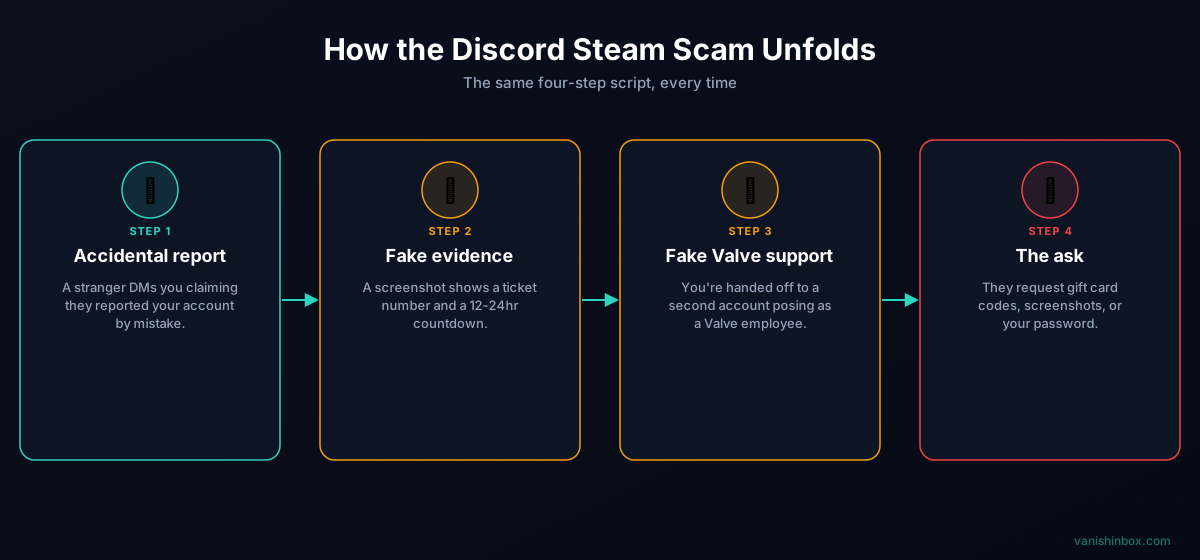
The script barely changes from report to report. Steam Community threads describing it in 2020 read almost the same as the ones from this year.
Step 1 — The accidental report
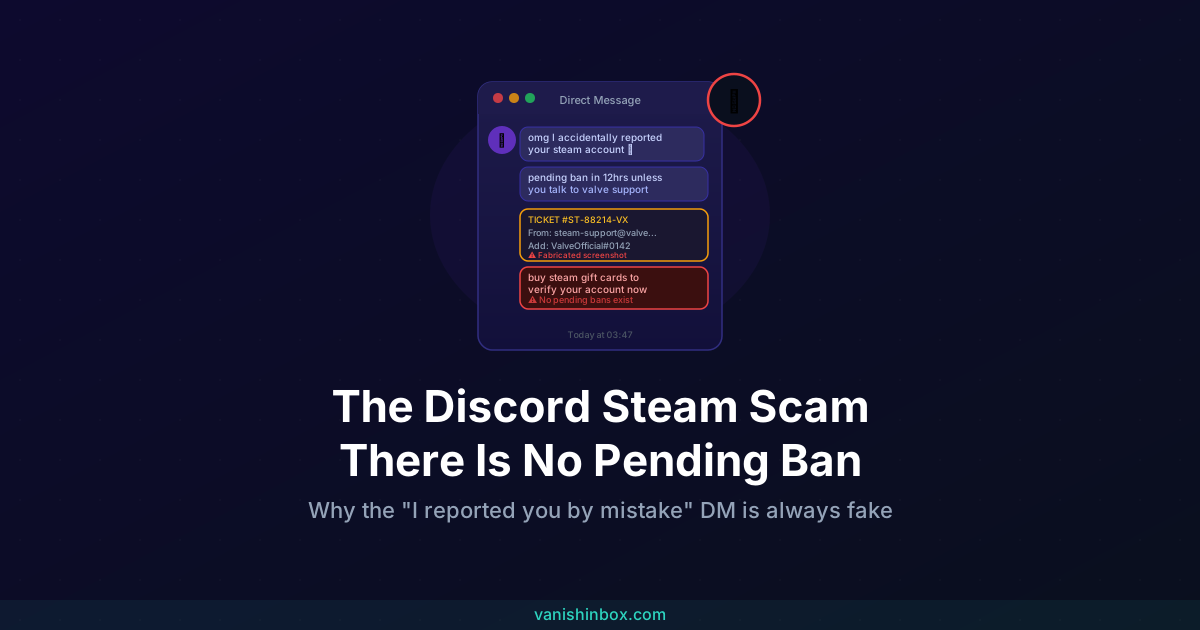
A DM arrives, often from an account that shares a server with you. The message: they reported you by mistake, meant to report someone else with a similar name or profile picture, and now you're both at risk. One version reads, "i accidentally report your account for doing illegal buying product instead of someone else and the steam moderator said that there is a higher chance your account will be suspended."
Step 2 — The fake evidence
To back up the claim, they send a screenshot. It shows a ticket number, an official-looking sender address, sometimes a countdown of 12 to 24 hours before the ban locks in. The formatting mimics real Steam or Discord support emails closely enough to pass a glance.
Step 3 — The handoff to "Valve support"
The scammer says they can't fix it themselves, but they know someone who can, a Valve employee, sometimes with a name like "ValveOfficial" or a variation on a real staff member's name. They walk you through adding this second account, sometimes even scripting your side of the introduction: "ok so here is the profile of the steam admin, if he accepts just file a ticket to him that you are not involved in the report." That second account belongs to the same scammer or a partner working the same script.
Step 4 — The ask
Once you're talking to the fake employee, the request shows up. It might be a screenshot of your purchase history, your phone number, or your account password. In the version aimed at your wallet, they'll claim there are glitched purchases on your account and tell you to buy Steam wallet gift cards and send the codes to "validate" and reverse them. There are no glitch purchases. A gift card code, once sent, is gone, there's no clawing it back.
Why This Keeps Working
The scam survives because it's built entirely from things that feel plausible. You do share servers with strangers on Discord. Steam does ban accounts. Support tickets do have reference numbers. Each individual piece checks out, and the scammer counts on you not stepping back to question the premise connecting them.
The people running it come prepared with a script for the objections they expect, and they lean on hijacked accounts with a clean history to make the initial contact look ordinary. If you hesitate, they push on the fear of losing years of purchases and inventory rather than on curiosity or greed, which is why it catches people who'd never click a "you've won a prize" link.
Security researchers flagged in March 2026 that fake game invitations were being used to spread malware and steal accounts across Steam, Discord, and other platforms, and the same false-urgency structure has started showing up on other platforms too. A near-identical scam now targets Reddit users, with a fake suspension email, a ticket number, and a countdown, sometimes pointing the target toward a "Reddit employee" on Discord. The report-then-rescue script travels well because the emotional lever, losing an account you've invested in, doesn't depend on which platform it's aimed at.
The same authority-impersonation pattern shows up elsewhere on Discord too, just with a different costume. The MrBeast Discord scam uses a celebrity's name instead of Valve's to build the same false credibility.
Red Flags You Can Check in Under a Minute
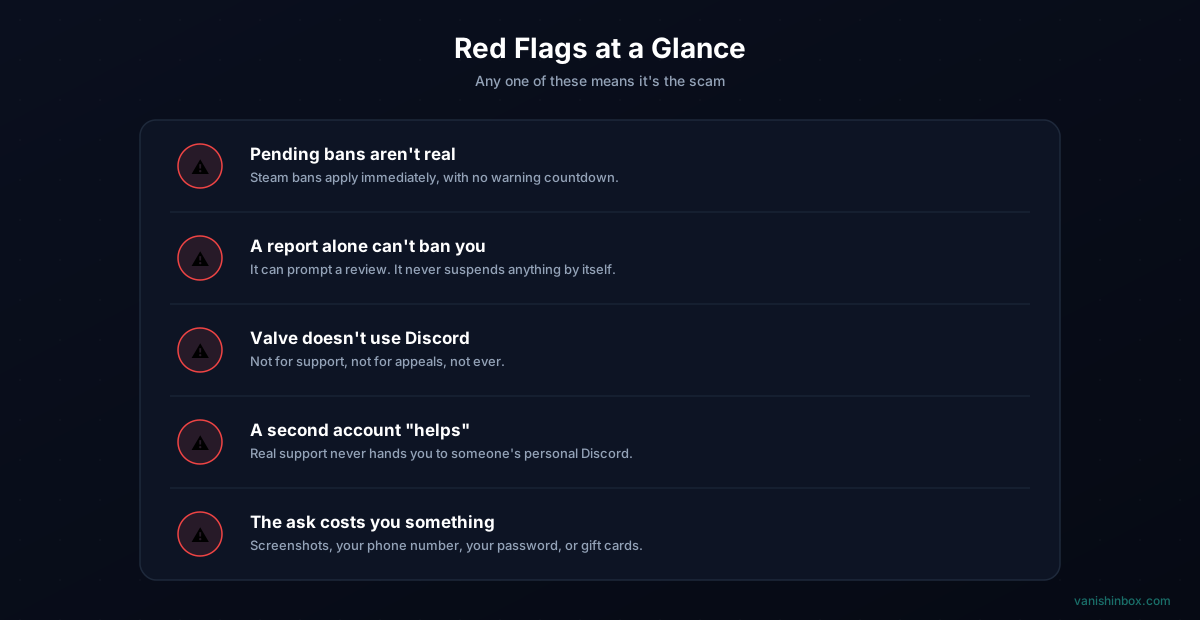
Pending bans aren't a real thing. Steam bans apply immediately once issued. There's no warning period, no grace window, no countdown you can talk your way out of.
A report from another user doesn't ban you. It can prompt Valve to look into your account. It can't suspend it by itself, and it never comes with a deadline attached.
Valve doesn't use Discord. Not for support, not for appeals, not for anything involving your account. If the conversation happens outside the official Steam Support site, it isn't Valve.
A second account gets brought in to "help." Genuine support never routes you to another person's personal Discord to resolve a ticket that already exists in a ticketing system.
The ask eventually costs you something. Screenshots of your purchase history, your phone number, your password, or gift card codes. Legitimate account recovery never needs a gift card.
What to Do If You Get This Message
Start the same way regardless of how far the conversation went: verify independently, without involving anyone who messaged you first. Go directly to steamcommunity.com in your browser, not a link anyone sent you, sign in, and check your account status and any notices on your profile. Confirm any ban or restriction through Steam Support's help site, no ticket number required from a stranger. If nothing shows up there, your account is fine. The DM you received is the only threat in this story.
From there, what you do next depends on how far things went.
If you haven't replied or sent anything yet:
Block the account and report it to Discord (right-click the message, select Report Message, choose Scam or Fraud).
If you replied but haven't shared anything sensitive:
Stop the conversation. Don't send screenshots, your phone number, or move to a second account. Report both accounts to Discord.
If you sent a screenshot of your purchase history or personal details:
Change your Steam password immediately and revoke active sessions from Steam's account security settings. If your phone number went out, watch for follow-up phishing attempts that reference it directly, that's usually the next move.
If you sent gift card codes or your password:
Those codes are gone the moment you send them, but secure the account fast anyway. Change your Steam password, then check for and revoke any suspicious API keys or authorized devices under your account settings. If you reused that Steam password anywhere else, change it there too.
Reduce Your Exposure Going Forward
A few habits make you a harder target for this and similar Discord scams.
Restrict who can DM you. In Discord, go to User Settings → Privacy & Safety and turn off "Allow direct messages from server members" for servers you don't fully trust. This alone blocks most cold-contact scam attempts before they reach you.
Enable Steam Guard and Discord 2FA. Both add a second factor that a stolen password alone can't get past.
Keep the email tied to your gaming accounts separate from your main inbox. Discord and Steam sign-ups sit in databases that eventually leak or get sold, and once your real email is attached to one of those accounts, it becomes another detail scammers can use to make an approach look more personal (see what happens when a website sells your email address for how that pipeline works). A disposable inbox from VanishInbox works for game key giveaways, community server sign-ups, and any registration you're not fully certain about, so a breach on that end goes nowhere near your real address. For the full signup walkthrough, see using a temp email for Discord.
Treat any Discord message that references your account status as suspicious by default, regardless of how convincing the screenshots look or how many mutual servers you share with the sender. For a broader look at how these approaches work across platforms, see how to spot a phishing email. If you want to see how the fake friendship version of this same playbook works, our guide on the Infinity Kingdom Discord scam covers a variant that ends in malware instead of gift cards.
Frequently Asked Questions
Can someone actually get my Steam account banned by reporting me?
No. A report can prompt Valve to review your account, but the review, not the report, decides whether anything happens. There's no automatic suspension triggered by another player flagging you, and no countdown attached to it.
Is there such a thing as a pending ban on Steam?
No. Bans on Steam apply immediately once Valve issues them. If someone tells you your ban is "pending" and can be avoided by acting fast, that's the scam talking, not Steam.
How do I know if a Discord account claiming to be Valve support is fake?
Assume it's fake. Valve has no support presence on Discord at all, official or otherwise. The only legitimate way to reach Steam Support is through help.steampowered.com, accessed by typing the address yourself.
I already sent a gift card code. Can I get it back?
No, once a gift card code is sent to someone else, it's spent the moment they redeem it. Focus on securing the rest of your account instead, change your password and check for unfamiliar devices or sessions.
Why do scammers use gift cards instead of asking for money directly?
Gift card codes are close to untraceable once redeemed and can't be reversed the way a bank transfer or card payment sometimes can. That makes them a common request across many scam types, not just this one.
What if the scammer already has my phone number?
Watch for follow-up phishing attempts, texts or calls referencing the number to seem more credible. See how to cut down on spam calls if they start coming in. Consider whether that number is tied to 2FA on other accounts, and keep an eye on those accounts for unusual login attempts.
Does this scam only target Steam users with valuable inventories?
Valuable accounts make more attractive targets, but scammers send the opening message broadly. Anyone active in shared Discord servers with a visible Steam connection can receive it, regardless of what's actually in their inventory.
For more on how phishing and social engineering work across gaming platforms, see how to spot a phishing email and the Infinity Kingdom Discord scam, which uses the same accidental-report opener to deliver malware instead.