You open a marketing email. You don't click anything. You don't reply. Thirty seconds later, the company sends a follow-up: "Looks like you saw our message — here's a reminder."
That's not a coincidence. They knew you opened it because they were watching.
This is email tracking — and it's in the majority of marketing emails sitting in your inbox right now. Here's exactly how it works, what data it collects, and how to make it stop.
The Tracking Pixel: The Invisible Tool in Almost Every Marketing Email
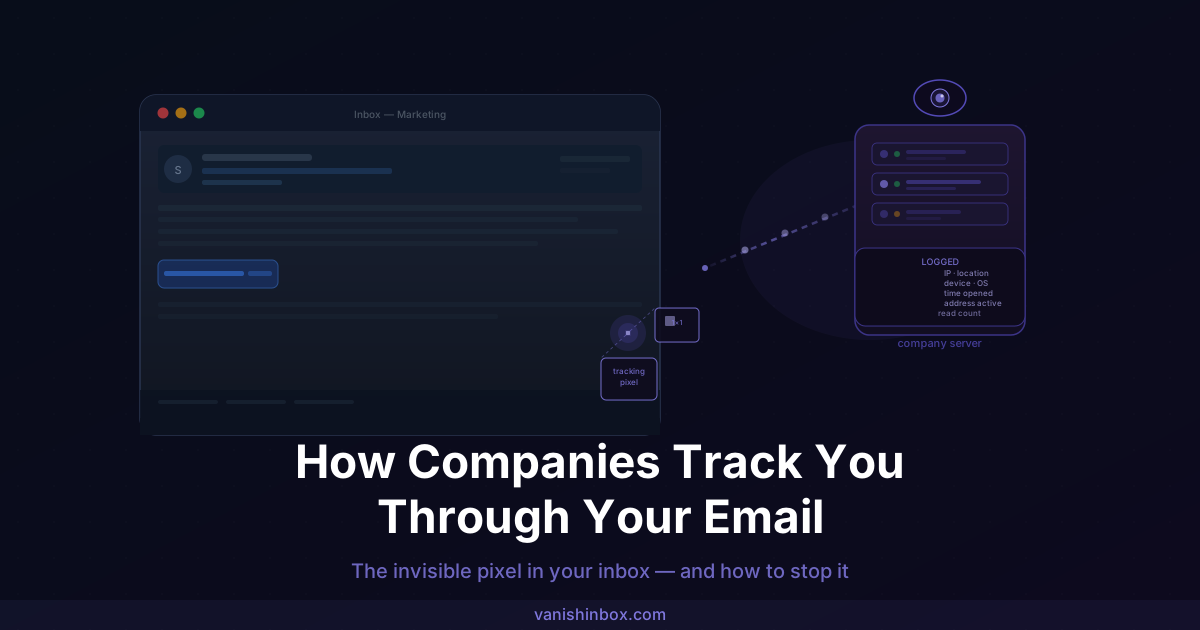
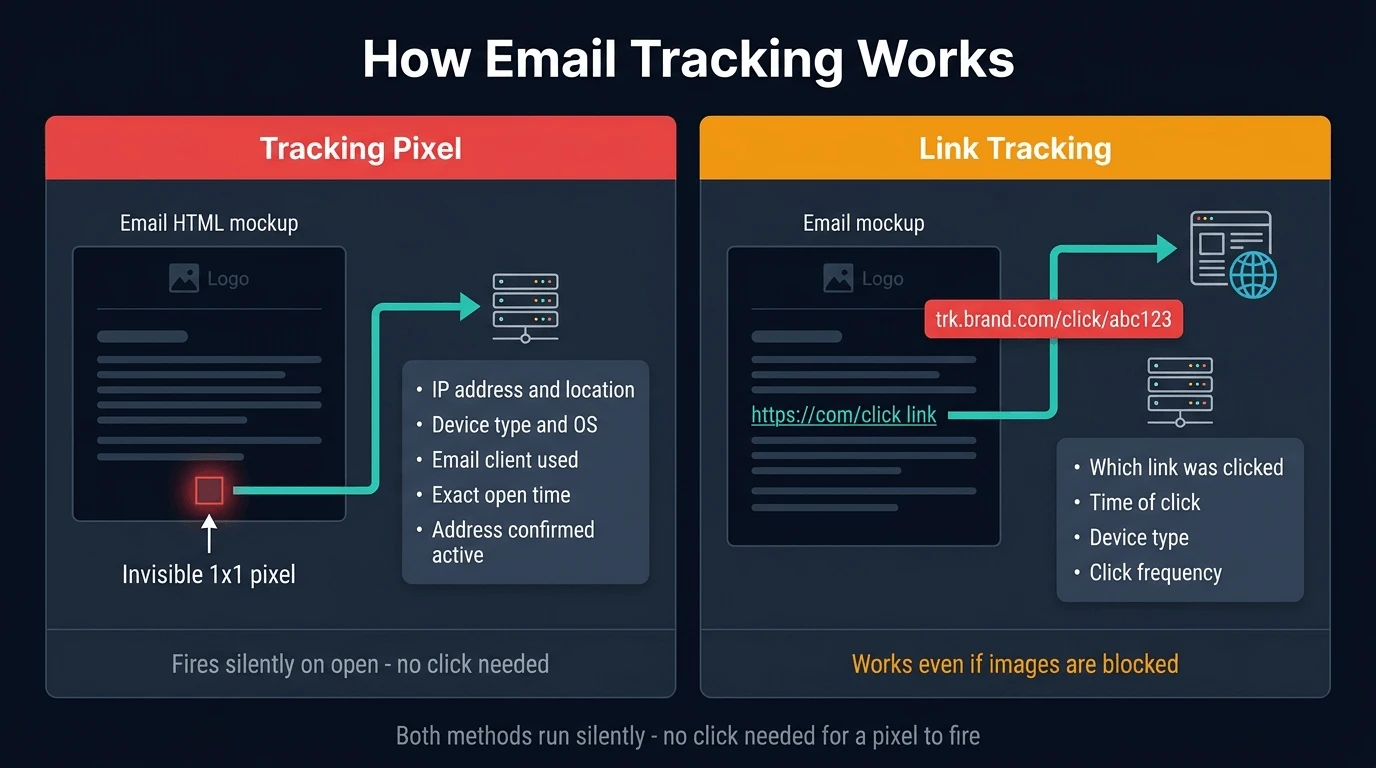
The most common tracking method is something called a tracking pixel — an image so small it's invisible to the naked eye. Typically 1×1 pixels in size, it's embedded into the email's HTML and looks like any other image element.
The difference is what happens when that image loads.
When you open an email and your client fetches the image, a request is sent to the company's server. That request carries a surprising amount of information:
- Your IP address — which reveals your approximate city and country
- Your device type — whether you're on a phone, tablet, or desktop
- Your operating system and email client — iOS Mail, Gmail, Outlook, and so on
- The exact time you opened the email
- Confirmation that your email address is active and monitored
All of this fires silently, in the background, without you clicking a single thing. You don't consent to it. You often can't see it. And by the time you close the email, the data has already been logged.
Link Tracking: Every Click Is Logged Too
If tracking pixels feel invasive, link tracking is even more direct.
Most links inside marketing emails don't go straight to the destination. Instead they route through a redirect URL — something like email.brand.com/click/abc123 — which logs the click before bouncing you to the actual page. This happens in a fraction of a second, invisible to you.
What gets recorded with each click:
- Which link you clicked
- What time you clicked it
- How many times you clicked (repeat clicks are tracked too)
- Which device you were on
This is separate from the tracking pixel — it works even if your email client blocks images entirely. If you click a link in an email, that click is almost certainly being logged.
| Tracking method | What it captures | Works if images are blocked? |
|---|---|---|
| Tracking pixel | Opens, time, IP, device | No |
| Link tracking | Clicks, time, device, frequency | Yes |
| Read receipts | Open confirmation (some clients) | Varies |
What Companies Actually Do With This Data
The data from email tracking feeds directly into marketing automation systems. Here's how it gets used in practice:
Refining send times. By logging exactly when you open emails, companies build a model of when you're most likely to engage. Future emails are scheduled to hit your inbox at those peak moments.
Identifying warm leads. In B2B and sales contexts, anyone who opens an email multiple times or clicks a specific link gets flagged as a "hot prospect" and handed to a sales rep for follow-up. Your curiosity becomes a sales trigger.
Suppressing and selling inactive addresses. Addresses that never open emails get removed from active lists — but they don't disappear. They're often sold as "unengaged" segments to other marketers or data brokers.
A/B testing on unknowing recipients. Companies send slightly different subject lines to different groups, measure open rates via tracking pixels, and optimise future campaigns. You're a data point in an experiment you didn't agree to.
Retargeting ads. Open data is sometimes used to sync with ad platforms. If you opened an email about running shoes but didn't buy, you may start seeing running shoe ads across the web. Your email behaviour is feeding your ad profile.
How to Tell If an Email Is Tracking You
You can't spot a tracking pixel by eye — that's the whole point. But there are reliable ways to check.
View the email source. In most email clients, you can right-click and select "View source" or "Show original." Look for small image URLs that don't match the company's main domain — particularly anything from domains like trk., em., click., track., or third-party platforms like Mailchimp, HubSpot, or SendGrid. A 1×1 <img> tag buried in the footer is a classic sign.
Check the links before clicking. Hover over any link and look at the URL in your status bar. If it goes to a redirect domain rather than directly to the destination, it's tracked.
Use a browser extension. Tools like PixelBlock (Gmail) or Ugly Email flag known tracking pixels before you even open a message, letting you see which senders are watching.
The honest reality is that most tracking is deliberately well-hidden. You won't catch all of it manually. The better strategy is blocking it at the source.
How to Block Email Tracking
There are four practical methods, ranging from effortless to more involved.
1. Apple Mail Privacy Protection
If you use Apple Mail on iPhone, iPad, or Mac, this is the easiest win. Under Settings → Mail → Privacy Protection, enable "Protect Mail Activity." Apple pre-fetches all images through a proxy server, masking your IP address and making open tracking far less accurate. It's not perfect — the email still counts as "opened" — but it strips out your real location and device data.
2. Disable automatic image loading
Every major email client lets you turn off automatic image loading. With images disabled, tracking pixels can't fire on open — they only load if you manually choose to display images. This is more disruptive (you won't see product photos either) but it's the most reliable technical block available in a standard email client.
3. Use a privacy-focused email client
Proton Mail and Tutanota both block remote content by default and are designed with tracking prevention built in. If you're already thinking about switching email providers for privacy reasons, either is a solid choice.
4. Use a disposable email address for sign-ups
This is the most effective long-term approach — and the one that protects you before the tracking even starts.
If a company never had your real email address, any data their tracking pixel collects is worthless. It can't be tied to your identity, linked to your ad profile, or used to follow you across the web. The tracked address expires in ten minutes and connects to nothing.
VanishInbox generates a free disposable address instantly. Use it for newsletters, free trials, and any sign-up where you don't need an ongoing relationship. The email arrives, you get what you need, and the address disappears — taking the tracking data with it.
This doesn't just stop pixel tracking. It also means your real address never joins the data broker ecosystem that feeds spam, profiling, and eventual phishing attempts. It's prevention rather than damage control.
Putting It Together
Email tracking is not a rare practice from a few bad actors. It's standard behaviour across the marketing industry — built into every major email platform and running silently in the majority of promotional emails you receive.
The good news is that you don't need to go off-grid to protect yourself. Enabling Mail Privacy Protection takes thirty seconds. Switching to a disposable address for sign-ups takes ten. Combined, they remove most of the data these systems are designed to collect.
For the wider picture of how your email ends up tracked, profiled, and sold in the first place, see what actually happens when a website sells your email address. And if you're thinking about a more systematic approach to keeping your inbox clean, one simple rule covers the full strategy.
Generate a free disposable address →
Frequently Asked Questions
Can companies tell exactly where I am when I open an email?
Not exactly — but closer than most people expect. The tracking pixel captures your IP address, which maps to an approximate location: typically your city and ISP, sometimes your neighbourhood. It's not precise enough to identify your home address, but it's accurate enough to know your city, region, and country. If you're on a mobile network, it may reflect your carrier's location rather than your physical position.
Does blocking images stop all email tracking?
It stops tracking pixels, which rely on image loading. It does not stop link tracking — any link you click in an email is still routed through a redirect that logs the click, regardless of whether images are enabled. For complete protection you'd need both image blocking and to avoid clicking links directly (navigating to the site manually instead).
Is email tracking legal?
In most jurisdictions, yes. Marketing emails sent to people who've consented to receive them (e.g. by signing up to a newsletter) are generally permitted to include tracking. Under GDPR in the UK and EU, there's an argument that tracking pixels require explicit consent as a form of data processing — but enforcement has been inconsistent, and most marketers include tracking as a default. The legality is murky; the practice is ubiquitous.
Can I tell if a specific email tracked me?
Not reliably after the fact. You can check the email source for tracking image URLs, but that tells you the tracking was present — not whether the pixel successfully fired. If you opened the email with images enabled and no protection active, assume the data was collected.
Do all marketing emails contain tracking pixels?
Not every single one, but the overwhelming majority do. Platforms like Mailchimp, HubSpot, Campaign Monitor, and Klaviyo include open tracking by default in every campaign. Senders have to actively disable it. Plain text emails can't carry tracking pixels — but most marketing emails are HTML, and HTML emails almost always have them.
Does using a VPN help with email tracking?
A VPN masks your real IP address, which stops the tracking pixel from identifying your true location. It doesn't prevent the pixel from firing or stop link tracking. It also doesn't address the core issue — that your real email address is in the sender's system in the first place. A VPN and a disposable email address protect different things; for a full comparison see temp email vs VPN: when you need both.