You get an email from Uphold's security team. There's been a data breach, or a new device just logged into your account from Singapore. Your funds may be at risk. Call the Security Hotline now.
Do not call that number.
The email is fake. There is no breach matching the claims, no unknown device, and no security team waiting on the other end of that phone line. The person who answers will be a scammer whose entire job is to talk you out of your Uphold account and drain the crypto inside it.
Is the Uphold Data Breach Email Real?
No. Two fake Uphold emails have been circulating in volume since December 2025, and neither corresponds to any confirmed security incident.
The first claims a third-party provider suffered a data breach affecting Uphold users. The second claims someone logged into your account from an unrecognised device. Both end the same way: a phone number to call, framed as Uphold's security team.
Uphold has stated plainly that it will never call to ask you to move your funds, and will never ask you to forward or read out a 2FA code. Any message steering you toward a phone conversation about "securing" your account is a scam, whatever the branding looks like.
If you have an Uphold account and want to check it, type wallet.uphold.com into your browser yourself. Do not use any link, number, or QR code from the email.
The Two Emails in Circulation
Variant One: The Fake Data Breach Notice
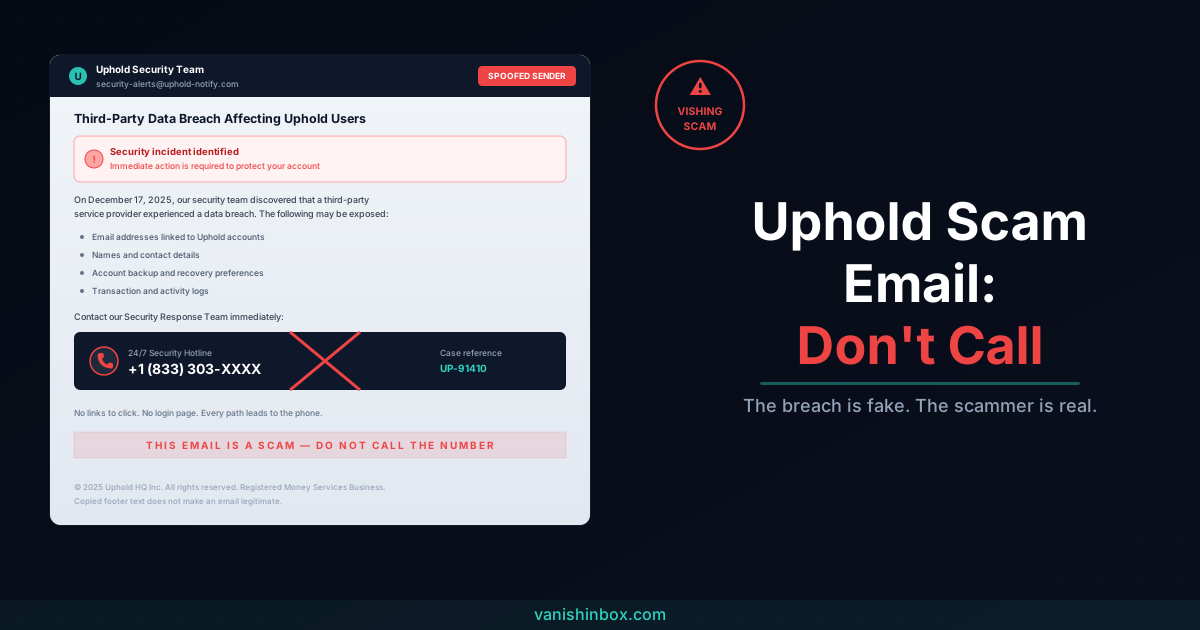
Subject line: "Third-Party Data Breach Affecting Uphold Users."
The email claims Uphold's security team discovered a breach at an unnamed third-party service provider on a specific recent date (documented copies cite December 17, 2025). It then lists the data supposedly exposed: email addresses linked to Uphold accounts, names and contact details, account backup and recovery preferences, and transaction logs. The recommended action is to contact the "Security Response Team" on a US phone number.
Notice what the email does not contain: a link. No button, no login page, nothing to click. Security researchers who analysed the campaign found that every call to action pushes the recipient toward the phone, sometimes with a fake "verification code" included to make the eventual call feel official.
That absence of links is deliberate, and I'll come back to why.
Variant Two: The Fake New Device Alert
Subject: a security alert claiming "New Device Login Detected."
This one mimics the login notification every real platform sends. It includes fabricated details to sell the story: an unknown Android device, an IP address, a location (Singapore in documented copies), and a case reference number in the format UP-9XXXX. If the login "wasn't you," the email directs you to a 24/7 Security Hotline on a +1 (833) toll-free number.
The footer is dressed up with real-sounding compliance language, including a claim that Uphold is a registered Money Services Business with FinCEN and a New York office address. Scammers copy this text from legitimate Uphold emails. A real-looking footer proves nothing.
The Twist: Uphold Did Have a Real Data Leak
This is the part that makes the scam land, and the part most warnings skip.
In July 2022, Customer.io, a third-party firm Uphold used for customer emails, had a genuine security incident. A senior engineer with administrator access at Customer.io handed customer email addresses to a bad actor. Uphold published a full written notice about it in January 2023.
The facts of that real incident matter:
- Uphold itself was not hacked. No customer funds were stolen and accounts stayed secure.
- Login credentials were not exposed.
- First names, last names, and email addresses likely were.
So if you googled "uphold data breach" after receiving the scam email, you found a real event and concluded the email must be legitimate. That is exactly the reaction the scammers are counting on. They wrapped a fake 2025 breach in the clothing of a real 2022 one.
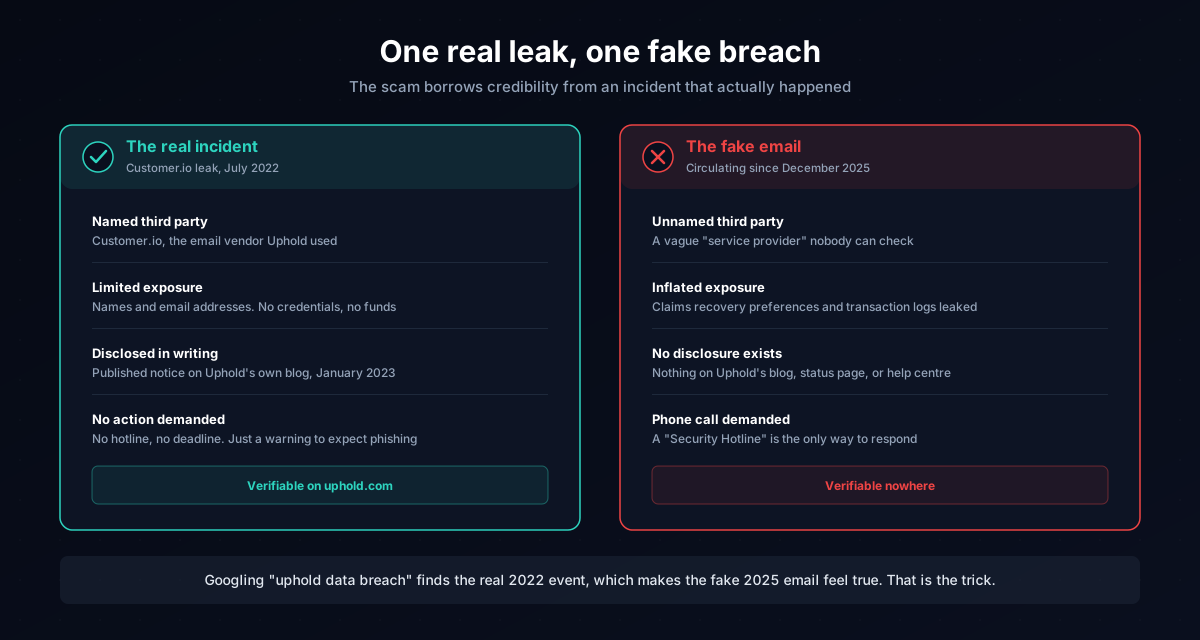
The real leak also explains the targeting. Scammers hold lists of names and email addresses confirmed to belong to Uphold users, sourced from that incident and from the combo lists and breach datasets traded on criminal forums. An email that reaches a real Uphold customer, addresses them plausibly, and references a breach they can half-verify is far more convincing than a generic blast.
Uphold warned about precisely this in its own disclosure: the leaked data does not compromise your account, but it makes you a target for phishing. Four years on, that warning is playing out.
Why There Is No Link to Click
Most phishing emails want you on a fake website. These want you on the phone. The technique is called vishing (voice phishing), and the design choice solves two problems for the scammer.
First, email security filters hunt for malicious links. An email containing only a phone number sails past defences that would catch a lookalike login page.
Second, a phone call gives the scammer control. A phishing page is static; if you hesitate, it can't respond. A human on the phone can reassure you, escalate the urgency, answer your objections, and adapt the script in real time. The email's only job is to scare you into dialling. Everything after that, the fake authority and the pressure toward a specific action, happens in conversation, where a script can bend around your doubts.
What Happens If You Call
The person who answers sounds calm and professional. They "look up" your case reference, confirm the breach affected your account, and offer to secure it. From there, the call moves toward one or more of these:
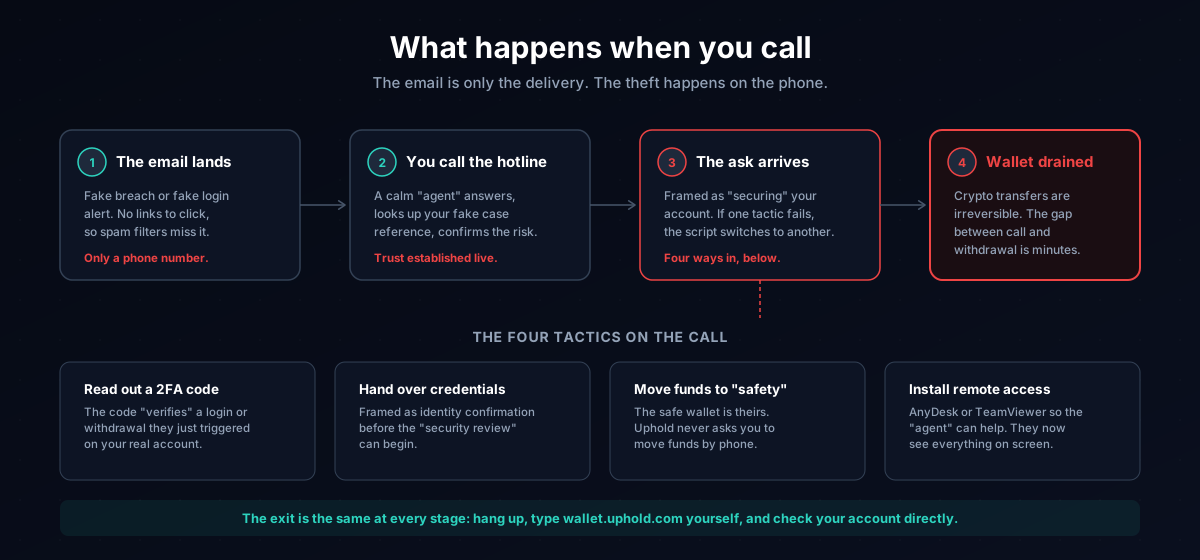
- Reading out a 2FA code. They trigger a real login or withdrawal on your actual account, and the code they ask you to "verify" is the one authorising it.
- Handing over credentials. Framed as identity confirmation before they can "process the security review."
- Moving your funds to a "safe" wallet. The wallet is theirs. Crypto transfers are irreversible, so once the assets move, they are gone.
- Installing remote access software. Tools like AnyDesk or TeamViewer, requested so the "agent" can help you directly. Once installed, they see everything on your screen.
Uphold's own security guidance rules out every one of these. Uphold will never invite you to send funds to a blockchain address, never call you without a support request you opened yourself, never ask for your username and password, and never request remote control of your computer.
Six Red Flags That Give the Email Away
1. The only way to respond is a phone call. Real security notices from financial platforms direct you to log into your account through the official site. An email whose sole call to action is a phone number is engineered to get you talking to a scammer.
2. It references a breach you cannot verify anywhere official. Search Uphold's blog and status page. The 2022 Customer.io incident is documented there. The breach described in these emails is not, because it did not happen.
3. Urgency plus fear. "Immediate action is required." "Your account may be compromised." Deadlines and threats exist to stop you pausing long enough to check.
4. A case reference number. Fake case IDs like UP-91410 add bureaucratic texture. Uphold did not open a case for you. If you want to test it, contact Uphold through the help centre at support.uphold.com and ask; you will find no such case exists.
5. Fabricated login details. A device type, IP address, and city you don't recognise feel like evidence. They are set dressing typed into a template. Check your actual login history inside your Uphold account instead.
6. The sender address is off. Check the full address behind the display name, and be aware this check alone is not enough here. Some copies of this campaign were relayed through compromised third-party mail systems, so the technical headers can look cleaner than a typical phish. Treat the phone-only call to action as the decisive signal. For the full method of reading sender domains and authentication results, see how to tell if an email is legitimate.
What Uphold Will and Won't Do
Uphold's published security guidance draws hard lines. Uphold will never:
- Call to ask you to move your funds
- Ask you to forward or read out a 2FA code
- Ask you to move money to an "alternative Uphold account"
- Ask for your password, PIN, full card number, or the 3-digit code on the back of your card
- Invite you to send funds to a Bitcoin or other blockchain address
- Call you without an active support request you raised yourself
- Request remote access to your computer
When you log in, check that the URL reads exactly https://uphold.com or https://wallet.uphold.com. Uphold recommends bookmarking the address rather than reaching it through search results, because scammers buy ads and build lookalike domains to intercept people searching for the login page.
If you use Uphold, enable two-step verification with an authenticator app. With 2SV active, a scammer who tricks you out of your username and password still cannot withdraw funds without the rotating code on your phone. That protection collapses the moment you read a code out to someone on a call, which is why the scripts push so hard for exactly that.
What to Do If You Received the Email
If the Uphold scam email arrived and you haven't called or replied, the situation is fully contained.
1. Do not call the number. Nothing about your account changes if you ignore the email, because nothing in it is real.
2. Report it as phishing in your email client. Gmail, Outlook, and Apple Mail all have a built-in report option.
3. Report it to Uphold. Use the help centre at support.uphold.com and include the sender address, the phone number in the email, and a description of the message. Uphold asks users to report these directly so it can act on active campaigns.
4. Check your account through the official site. Type the URL yourself, log in, and review recent activity. Expect to find nothing wrong.
5. Delete the email.
What to Do If You Already Called
Act on the assumption that everything shared on that call is now in a scammer's hands.
If you gave them a 2FA code or your login details: change your Uphold password immediately from a device you trust, revoke active sessions, and re-enrol two-step verification so any token the scammer captured becomes useless. Then contact Uphold support and tell them the account may be compromised.
If you moved funds or approved a transaction: contact Uphold immediately and report the destination address. Be realistic about recovery: crypto transactions are irreversible, and once assets leave your wallet they very rarely come back. Reporting fast matters anyway, because exchanges can sometimes freeze funds that land on their platforms.
If you installed remote access software: disconnect the device from the internet, uninstall the software, run a full malware scan, and change your passwords from a different, clean device. Treat every password stored or typed on the affected machine as burned.
Report the fraud to Action Fraud (actionfraud.police.uk) in the UK or the FTC (reportfraud.ftc.gov) in the US. Recovery through these channels is unlikely, but reports build the case files that get campaigns shut down.
The Root Problem: Your Email Is on a Crypto List
Step back from this specific campaign and look at how it reached you. The scammers did not guess your address. They bought or traded a list, and that list marked you as someone connected to cryptocurrency. The 2022 Customer.io leak fed those lists. So do exchange breaches, wallet vendor breaches, and every crypto newsletter or airdrop signup that later leaked or sold its database.
Once your real address carries the "crypto holder" label in those datasets, campaigns like this one keep arriving. Ledger customers have lived the same cycle since 2020, with phishing waves still running on data leaked six years ago; our guide to the Ledger email scam covers how long that tail really is.
Using a disposable address for crypto-adjacent signups keeps your real email off those lists in the first place. VanishInbox generates a working inbox in seconds with no account required. Use it to register for the airdrop, the newsletter, or the exchange promo, collect the confirmation email, and let the address vanish. When that service's database eventually leaks, your real address is not in it, and you never enter the targeting pool this scam draws from.
For the mechanics of how an address travels from a signup form to a scammer's list, see what actually happens when a website sells your email address.
Frequently Asked Questions
Is the Uphold data breach email real?
No. The "Third-Party Data Breach Affecting Uphold Users" email describes a breach that has no confirmed public existence and does not appear in any official Uphold disclosure. It is a phishing email designed to get you to call a scammer-controlled phone number.
Did Uphold ever have a real data breach?
Uphold itself has not been hacked, but a third-party email vendor it used, Customer.io, had an incident in July 2022 in which customer email addresses were given to a bad actor. Uphold disclosed it in writing in January 2023: no funds were stolen, credentials stayed secure, and the exposed data was limited to names and email addresses. Scammers exploit that real event to make their fake breach emails sound plausible.
What is the "New Device Login Detected" Uphold email?
A phishing variant that fakes a login alert, complete with an invented device, IP address, location, and case reference number. Its goal is identical to the breach version: get you to call the "Security Hotline" listed in the email, where a scammer will try to extract your credentials, 2FA codes, or funds.
What happens if I called the number in the email?
You spoke to a scammer. If you shared any credentials or codes, change your Uphold password from a trusted device, revoke sessions, re-enrol two-step verification, and contact Uphold support immediately. If you moved funds, report the destination address to Uphold and file a report with Action Fraud or the FTC.
Will Uphold ever call me?
Only in connection with a support request you opened yourself. Uphold will never cold-call you, never ask you to move funds, and never ask you to forward or read out a 2FA code. An unexpected call about your account security is a scam by definition.
How do I report an Uphold phishing email?
Report it as phishing in your email client, then report it to Uphold through the help centre at support.uphold.com with the sender address and the phone number from the message. UK recipients can also forward it to [email protected]; US recipients can file at reportfraud.ftc.gov.
Why am I getting Uphold emails if I closed my account years ago?
Because your address is on a list, not in Uphold's active mailing system. Data from the 2022 third-party leak and from unrelated breaches circulates in traded datasets for years. Closing an account does not remove your address from lists a scammer already holds.
For a broader look at how phishing works across email and other channels, see how to spot a phishing email. The same fear-then-phone-call playbook drives the fake renewal invoices covered in our Geek Squad scam email guide. If you hold crypto in a hardware wallet, the Ledger email scam guide covers the campaigns targeting seed phrases directly. And for the manipulation patterns scammers rotate through subject lines, see the phishing subject lines catching people out in 2026.