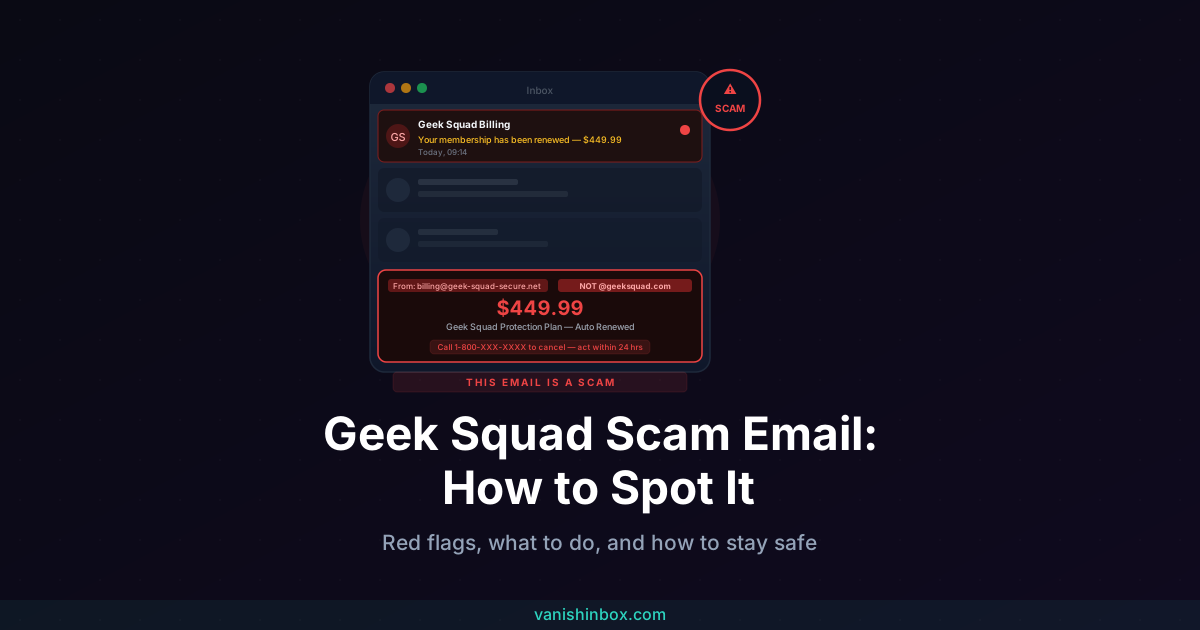
You open your inbox and see it: "Your Geek Squad Membership Has Been Renewed — $449.99 has been charged to your card on file." Your stomach drops. You don't remember signing up for anything. There's a phone number to call if you want to cancel.
Don't call it.
Is This Geek Squad Email Real?
No. If you received an unexpected email claiming Geek Squad has charged or is about to charge you for a subscription renewal, it is a phishing scam. Geek Squad did not charge you. Your card has not been billed. The phone number in the email connects you to a scammer, not to Geek Squad support.
Delete the email without calling the number, clicking any links, or opening any attachments. That single action is all you need to do. Everything below explains how the scam works, what to watch for, and what to do if you have already engaged with it.
What Is the Geek Squad Scam Email?
Geek Squad is a legitimate tech support service. The scam borrows its name and branding to trick people into handing over personal information or money.
Scammers send out fake emails impersonating Geek Squad — complete with logos, fake invoice numbers, and professional formatting — claiming you have been billed for a service you never purchased. The emails are designed to cause panic: the charge is large enough to alarm you, and the message urges you to act immediately to cancel. According to the FTC, scammers impersonating Geek Squad generated approximately 52,000 reports in 2023, making it the most impersonated brand that year — ahead of Amazon and PayPal combined. The scam has continued to grow since.
The Four Main Variants in 2026
The core mechanic is consistent across all versions, but the framing changes depending on which variant finds your inbox.
Auto-renewal or fake invoice
The most common version. You receive an email claiming your Geek Squad membership has automatically renewed for somewhere between $300 and $500. It includes a fake invoice number, a transaction date, and a phone number to call if you want to dispute the charge. This variant works on Geek Squad subscribers — who may be surprised by the amount — and on non-subscribers alike, who want to cancel a service they never signed up for.
Fake antivirus alert
This version tells you that Geek Squad's antivirus software has detected a threat on your device and that your protection plan is either expiring or needs to be reactivated. It prompts you to download an update or call for assistance. The download is malware. The phone number connects to a scammer.
Overpayment or refund scam
You are told that Geek Squad accidentally charged you too much and that a refund is waiting. To process it, you need to call or provide bank details. Once on the phone, the scammer walks you through a "refund process" that ends with you sending money — often via bank transfer, gift card, or cryptocurrency.
Password reset or account compromise
A message claims your Geek Squad account password has been changed or that suspicious login activity was detected. It includes a phone number or link to secure your account. The link leads to a phishing page built to capture your login credentials. The phone number connects directly to a scammer.
How the Scam Works — Step by Step
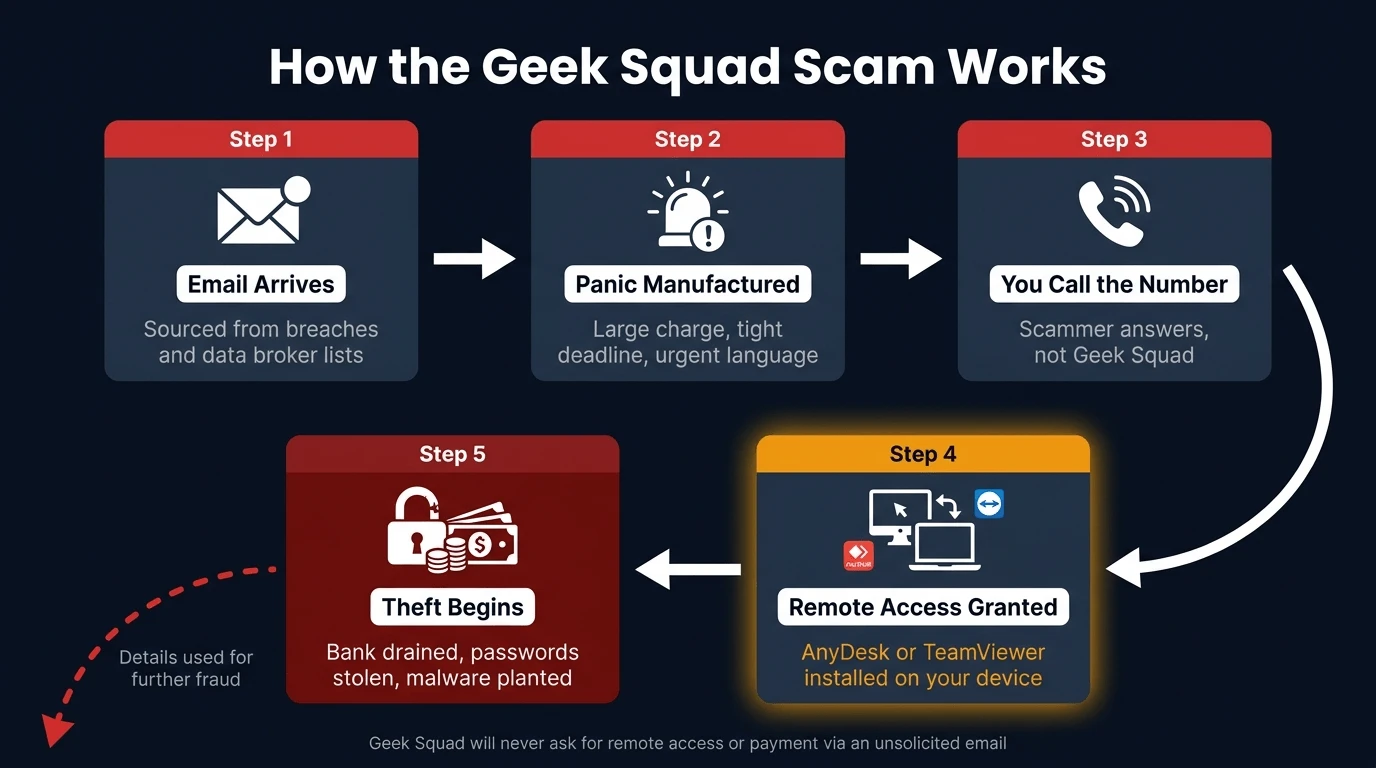
Understanding the full sequence makes the scam far easier to recognise, whatever form it takes.
Step 1 — The email arrives. Scammers source email addresses from data breaches, data broker databases, and lists scraped from websites. The email is sent in bulk to thousands of addresses simultaneously — you don't need any connection to Geek Squad to receive it.
Step 2 — The panic is manufactured. A large charge, a tight deadline ("respond within 24 hours or the renewal is final"), and professional-looking branding combine to shut down your critical thinking. The urgency is intentional — scammers know that a victim who pauses to verify will usually realise the email is fake.
Step 3 — You call the number. The attack shifts to voice phishing. A calm, professional-sounding agent answers. They apologise for the confusion, confirm your "account details," and offer to help you cancel or process a refund.
Step 4 — Remote access is requested. To "process the refund" or "verify your device," the agent asks you to download a tool like AnyDesk or TeamViewer. These are legitimate remote-access applications — which is exactly why scammers use them. Once installed, the scammer can see everything on your screen, open your files, access saved passwords, and plant malware.
Step 5 — The real theft begins. Depending on the variant, the scammer may drain a bank account through a fake "refund" that transfers your money out, steal credentials from your browser or password manager, or lock your device and demand payment to restore access.
Geek Squad will never ask for your password, payment details, or remote access to your device through an unsolicited email or phone call. If any message asks you to do any of those things, it is not from Geek Squad.
Eight Red Flags to Spot a Fake Geek Squad Email
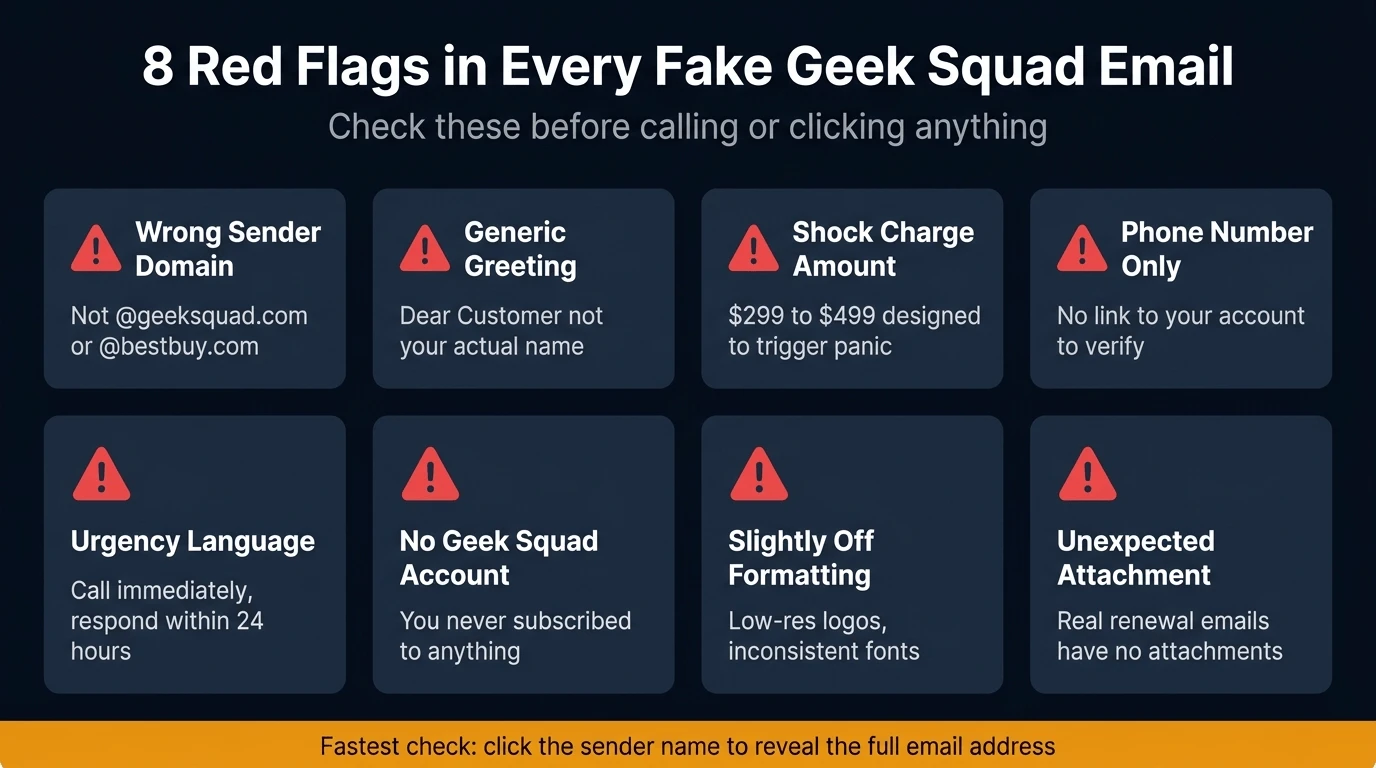
Check these in order when a Geek Squad email lands in your inbox.
1. The sender address is wrong. Click on the display name to reveal the full email address. Legitimate Geek Squad emails come from @geeksquad.com or @bestbuy.com. Any other domain — particularly a Gmail address, a string of random characters, or a domain that looks almost right — is a scam. Watch for subtle variations like geek-squad.com or geeksquad-billing.net.
2. The greeting is generic. "Dear Customer," "Dear Sir/Madam," or your email address used as a name are all signs the message was sent in bulk. Real Geek Squad communication uses your account name.
3. The charge is designed to shock you. Scammers use amounts like $299.99, $349.99, or $449.99 — large enough to create alarm, small enough to feel like a plausible subscription fee.
4. There is a phone number to call, not a link to your account. Legitimate service notifications direct you to log into your account and manage your subscription there. A message that gives you only a phone number to call — with no way to verify the charge yourself — is engineered to get you talking to a scammer.
5. Urgency language is everywhere. "Call immediately," "respond within 24 hours," "your card will be charged today" — this language is designed to prevent you from thinking clearly or verifying the email before acting.
6. You have no Geek Squad account. If you have never purchased a Geek Squad protection plan or membership, a renewal notice is impossible. The scam works anyway because many people aren't certain what services they're subscribed to.
7. The formatting is slightly off. Low-resolution logos, inconsistent fonts, broken footer links, or copy that reads naturally but contains unusual phrasing are all signs the email is a template rather than genuine Geek Squad communication.
8. There is an unexpected attachment. Real Geek Squad renewal notices do not arrive with attachments. Any file attached to an unsolicited billing email should be treated as suspicious and left unopened.
What to Do If You Received One
If the email arrived and you haven't clicked or called anything:
1. Do not call the number, click any links, or open any attachments. The phone number connects to a scammer. Links lead to phishing pages or malware downloads. Attachments may install malware silently.
2. Report it as phishing to your email provider. In Gmail, open the email, click the three-dot menu, and select "Report phishing." In Outlook, right-click and choose "Report" then "Report phishing." Most providers have an equivalent option.
3. Forward it to Geek Squad directly. Send the email to [email protected] to report it to the company being impersonated.
4. Report it to the FTC. File a report at reportfraud.ftc.gov. The FTC uses these reports to investigate large-scale scam operations.
5. File with the IC3 if money was involved. The Internet Crime Complaint Center at ic3.gov accepts complaints about financial harm from cybercrime and shares them with law enforcement.
6. Mark it as spam and delete it. Empty your trash to remove it entirely.
What to Do If You Already Fell For It
If you called the number, clicked a link, or provided any information, act quickly.
If you are still on the phone: Hang up immediately. You do not need to explain yourself.
If you gave remote access to your device: Disconnect from the internet straight away. Then uninstall any remote-access software (AnyDesk, TeamViewer, or anything you were instructed to download). Run a full antivirus scan. Change your passwords — starting with your email account and bank login — from a separate, clean device.
If you entered payment card details or transferred money: Call your bank immediately. Explain what happened and ask them to freeze the card and flag the account for fraud. The "renewal charge" shown in the email is not real, but anything entered into a phishing form is now in the hands of a scammer. Banks familiar with this scam can move quickly to limit the damage.
If you entered your Geek Squad or email login credentials: Change those passwords immediately, enable two-factor authentication if it is not already active, and check whether the same password is used on any other account. If it is, change those too.
Report to the FTC and IC3 regardless. Creating an official record supports any bank dispute and helps investigators track the campaign.
How a Disposable Email Address Prevents This
The root of the problem is how scammers get your email address in the first place. Phishing campaigns like this one are sent to lists — and those lists are compiled from data breaches, data broker databases, and the accumulated trail of sign-ups your primary email address has made over the years.
Every time you use your real email address to register for a service, enter a competition, or create an account on a site you're unsure about, that address enters a system. When that system is breached or sells its data, your address ends up on targeting lists that scammers eventually buy.
Using a disposable email address for any sign-up where you don't need a permanent relationship breaks that chain. VanishInbox generates a working inbox instantly — no account required — so you can receive whatever confirmation email you need and then discard the address. Your real email never enters that service's database, which means it's never in the breach when that database leaks.
This doesn't eliminate phishing entirely, but it substantially reduces how widely your real address circulates. The fewer places your primary email appears, the less likely it is to surface on a scammer's targeting list. For a full explanation of how that data pipeline works, see what actually happens when a website sells your email address.
Frequently Asked Questions
Is the Geek Squad email a scam?
If you received an unsolicited email claiming Geek Squad has charged or is about to charge you for a renewal, yes — it is a phishing scam. Geek Squad does send renewal notices to actual subscribers, but these come from @geeksquad.com or @bestbuy.com and direct you to log into your account, not to call a phone number.
Does Geek Squad send renewal emails?
Geek Squad does send renewal notices to customers with active protection plans, but genuine emails come from @geeksquad.com or @bestbuy.com, address you by name, reference your actual account, and direct you to your account dashboard — not to a phone number. If the email you received does not match all of those criteria, it is not from Geek Squad.
What happens if I call the number in a Geek Squad scam email?
You reach a scammer, not Geek Squad. The person who answers will sound professional and helpful, and will attempt to gain your trust before requesting remote access to your device, payment card details, or a bank transfer to "process your refund."
What if I already clicked a link in the email?
If you clicked but did not enter any information, run an antivirus scan as a precaution and monitor your accounts for unusual activity. If you entered any credentials or payment details, change affected passwords immediately from a separate device and call your bank.
How do I report a Geek Squad scam email?
Report it as phishing to your email provider, forward it to [email protected], and file a report with the FTC at reportfraud.ftc.gov. If financial harm occurred, also file with the IC3 at ic3.gov.
Why am I getting these emails if I have never used Geek Squad?
Because the emails are sent in bulk to lists of addresses, not to known Geek Squad customers. Scammers purchase or compile email lists from data brokers and breach databases. You don't need any relationship with Geek Squad to end up on one of those lists.
How can I stop getting scam emails like this?
Using a disposable email address for online sign-ups keeps your real address out of the databases these campaigns draw from. VanishInbox lets you generate a temporary inbox in seconds — use it for any registration or sign-up where a long-term relationship isn't needed.
The same brand-impersonation playbook shows up with retail names too — see our Bunnings email scam guide for the fake gift card and prize version of the same trick. The same call centers running this scam also run it under other names, most notably our Webroot scam email guide, which covers the identical renewal-panic playbook with different branding. For a broader look at how phishing works across email and other channels, see how to spot a phishing email. If you want to verify a sender's address technically — checking the real domain and reading authentication results in Gmail — see how to tell if an email is legitimate. If you have received scam messages by text as well, our guide to the DPD text message scam covers the same psychological playbook applied to delivery fraud. For a different but equally alarming scam — one where the email appears to come from your own address — see the note to self email scam explained. And if you have received fake emails claiming your Google Drive or iCloud storage is full and files are about to be deleted, see the cloud services scam explained.