You open your inbox and find an urgent message from what looks like Google, Apple, or Microsoft. Your cloud storage is full. Your photos are about to be deleted. You have until Friday to act.
Don't click anything.
This is one of the fastest-growing phishing campaigns of 2026, and the emails are convincing enough to catch people who consider themselves scam-savvy. This guide covers exactly how it works, what every fake alert has in common, and what to do whether you caught it in time or already engaged with it.
Is That Cloud Storage Warning Real?
Almost certainly not. If you received an unsolicited email warning that your iCloud, Google Drive, OneDrive, or Dropbox storage is full, that a payment failed, or that your files will be deleted on a specific date unless you act, it is almost certainly a phishing scam.
Legitimate cloud providers do not delete your files without warning. Google says it gives you two years before any deletion occurs if you exceed your storage. Microsoft OneDrive follows a similar approach. Neither sends emails demanding you click a link or pay within hours to prevent data loss.
Delete the email without clicking anything. That is all you need to do. Everything below explains the mechanics, the warning signs, and your options if you have already interacted with one.
What Is the Cloud Services Scam?
The cloud services scam is a large-scale phishing campaign in which criminals impersonate major cloud storage providers, primarily Google, Apple, and Microsoft, to trick recipients into handing over credit card details or purchasing unnecessary software subscriptions.
Researchers at BleepingComputer documented the campaign in detail in early 2026, noting that it had escalated rapidly, with some recipients receiving multiple variants per day. The emails originate from a wide range of randomly generated domains and use an array of subject lines, all built around the same core threat: your files are about to disappear.
Subject lines seen in the campaign include things like "Immediate Action Required. Payment Declined", "Your Account Has Been Blocked! Your Photos and Videos Will Be Removed", and personalised variants that include your name and a specific deletion date to make the threat feel concrete and real.
The goal is not to steal your password. It is to push you into purchasing a subscription or entering card details on a fake checkout page that benefits the scammers through affiliate fraud.
How the Scam Works, Step by Step
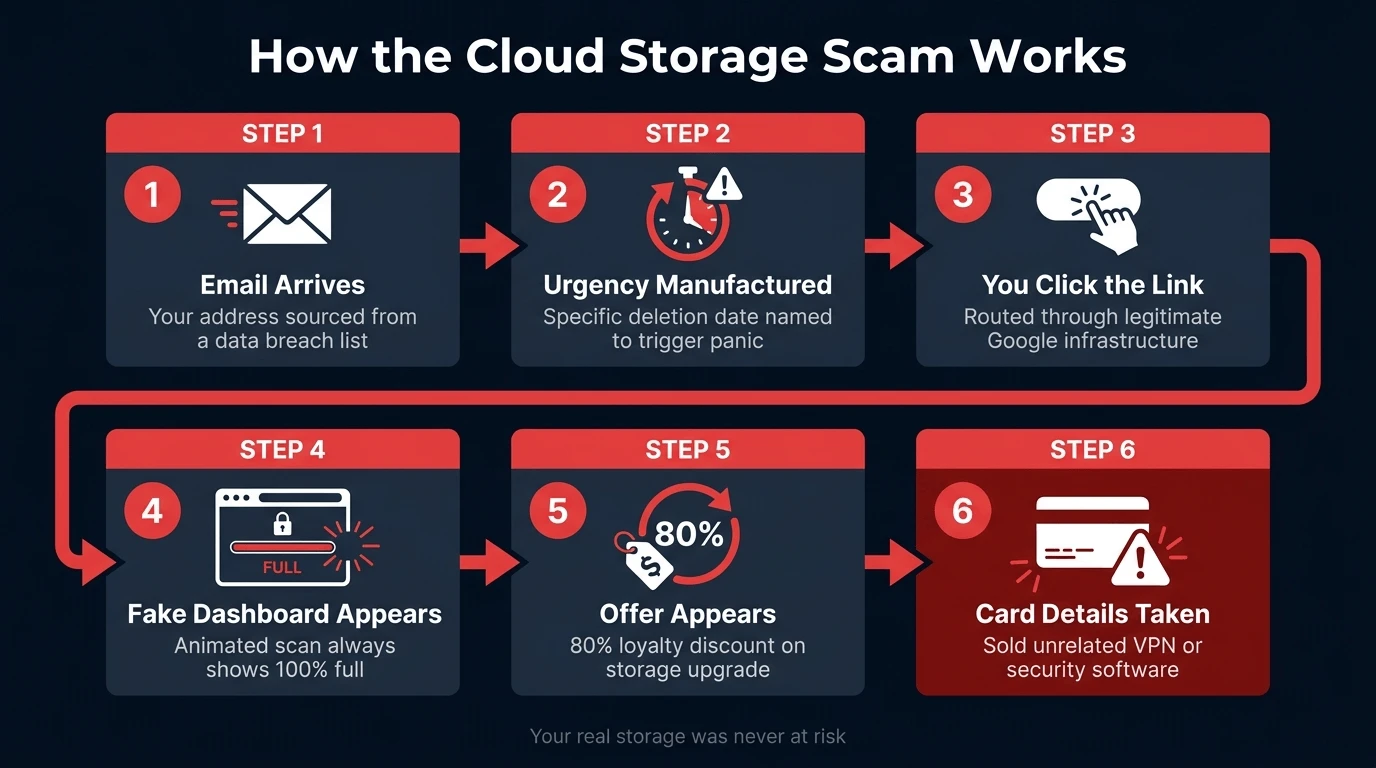
The campaign follows a consistent sequence regardless of which variant reaches you.
Step 1: The email arrives. Your address was sourced from a data breach, a data broker database, or a list compiled from leaked sign-up records. The email is sent in bulk. You do not need any relationship with Google, Apple, or Microsoft to receive it. You need an email address on one of those lists, nothing more.
Step 2: Urgency is manufactured. The email includes a specific date on which your photos, documents, and device backups will supposedly be permanently deleted. Some versions add your name and account identifier to make it seem targeted. The goal is to shut down your critical thinking before you stop to verify.
Step 3: You click the link. The link in the email routes through a file hosted on genuine Google Cloud Storage infrastructure, a technique scammers use to bypass corporate spam filters since the domain looks legitimate. From there, you are redirected to a phishing page hosted on a random domain.
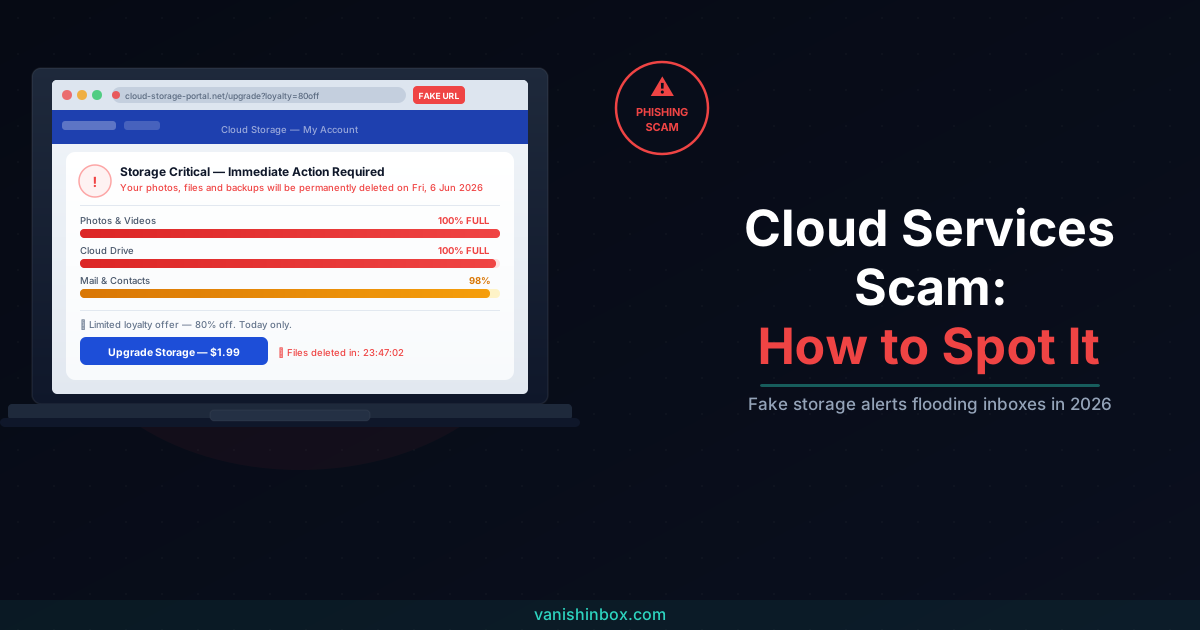
Step 4: A fake dashboard appears. The landing page impersonates a cloud service portal using Google Cloud branding. An animated "scan" runs and reports, every time, for every visitor, that Photos, Drive, and Mail are all 100% full. A countdown timer warns that your data will be lost without immediate action.
Step 5: The offer appears. The page claims you are eligible for an 80% loyalty discount on a storage upgrade. Clicking through takes you to a checkout page designed to collect your card details.
Step 6: Your money is taken for something unrelated. The "upgrade" you are sold is not cloud storage at all. It is a VPN subscription, an obscure security software package, or another subscription-based product with no connection to your actual storage. The scammers earn affiliate commission on the sale. Your card details are now in their hands.
The Five Variants in 2026
The phishing infrastructure is shared, but the email framing changes.
Payment failure warnings. The most common version claims that your cloud subscription renewal failed and that storage and backups have been paused. It prompts you to update your payment method before a deadline to avoid data loss.
Storage full alerts. These tell you your storage has hit capacity and that backups, photos, and documents are no longer syncing. A discounted upgrade is offered to resolve the issue.
Account lockout notices. These claim your account has been blocked due to suspicious activity or an overdue payment, and that your photos and videos will be removed on a specific date.
Personalised deletion threats. A more targeted variant includes your full name, your email address, and a date, "Your account has been locked on Mon, 26 Jan-2026. Your photos and videos will be removed," to make the threat feel individual and credible.
Free storage offers. Less common but worth knowing: some variants offer free or heavily discounted storage upgrades that require signing up with personal details. The data collected is used for identity profiling or resold to data brokers.
Seven Red Flags in Every Fake Cloud Alert
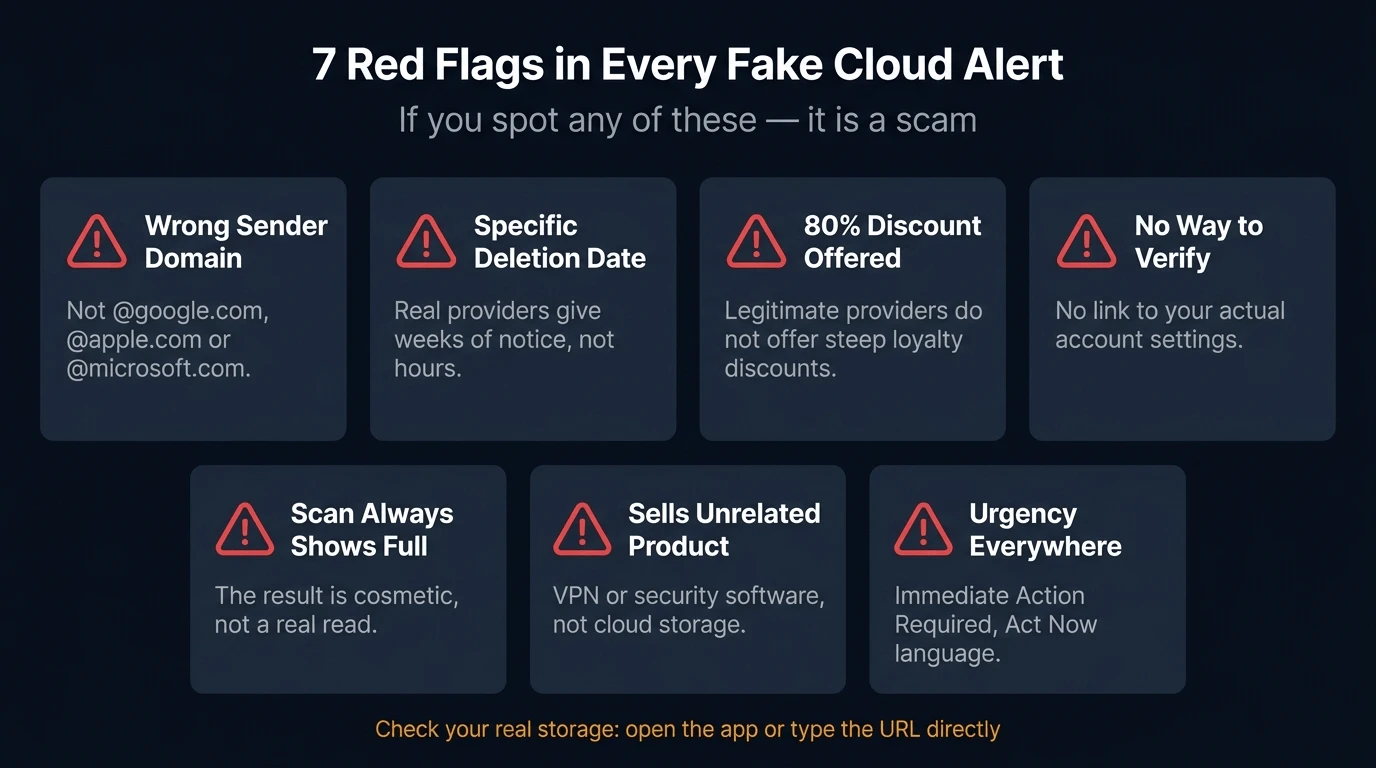
Check these whenever a cloud storage warning appears in your inbox.
1. The sender domain is not the real company's domain. Google sends storage emails from @google.com. Apple uses @apple.com or @icloud.com. Microsoft uses @microsoft.com. Any other domain, however convincing the display name looks, is a scam. Click on the sender name to reveal the full address.
2. A specific deletion date is named. Real cloud providers do not give you a 72-hour window before permanently deleting your files. The inclusion of a specific date ("your files will be deleted Fri, 30 Jan-2026") is a psychological pressure tactic, not how storage enforcement works.
3. The offer is too steep. An "80% loyalty discount" on a storage upgrade from a company you already pay is not how cloud billing works. Legitimate upgrades are available at standard pricing, in your account settings, at any time.
4. There is no way to check the claim without clicking. Real cloud alerts direct you to log into your account, where you can see the actual storage status yourself. A message that offers only a link, with no way to independently verify the situation, is designed to funnel you somewhere.
5. The animated scan always shows 100% full. If you reach the landing page and see a storage scan run, the result will always be full regardless of your actual storage status. The scan is cosmetic, a prop built to trigger alarm, not a genuine read of your account.
6. The checkout page sells something unrelated to cloud storage. Any page that offers to solve your cloud storage problem by selling you a VPN, an antivirus product, or a "security suite" is not a cloud storage upgrade. Legitimate providers sell more storage, and nothing else.
7. Urgency language is everywhere. "Immediate Action Required", "Your data will be lost", "Click now before it's too late": this language exists to prevent you from pausing long enough to question what you're looking at. Real cloud providers use clear, calm notifications with timelines measured in weeks, not hours.
What Real Cloud Providers Do
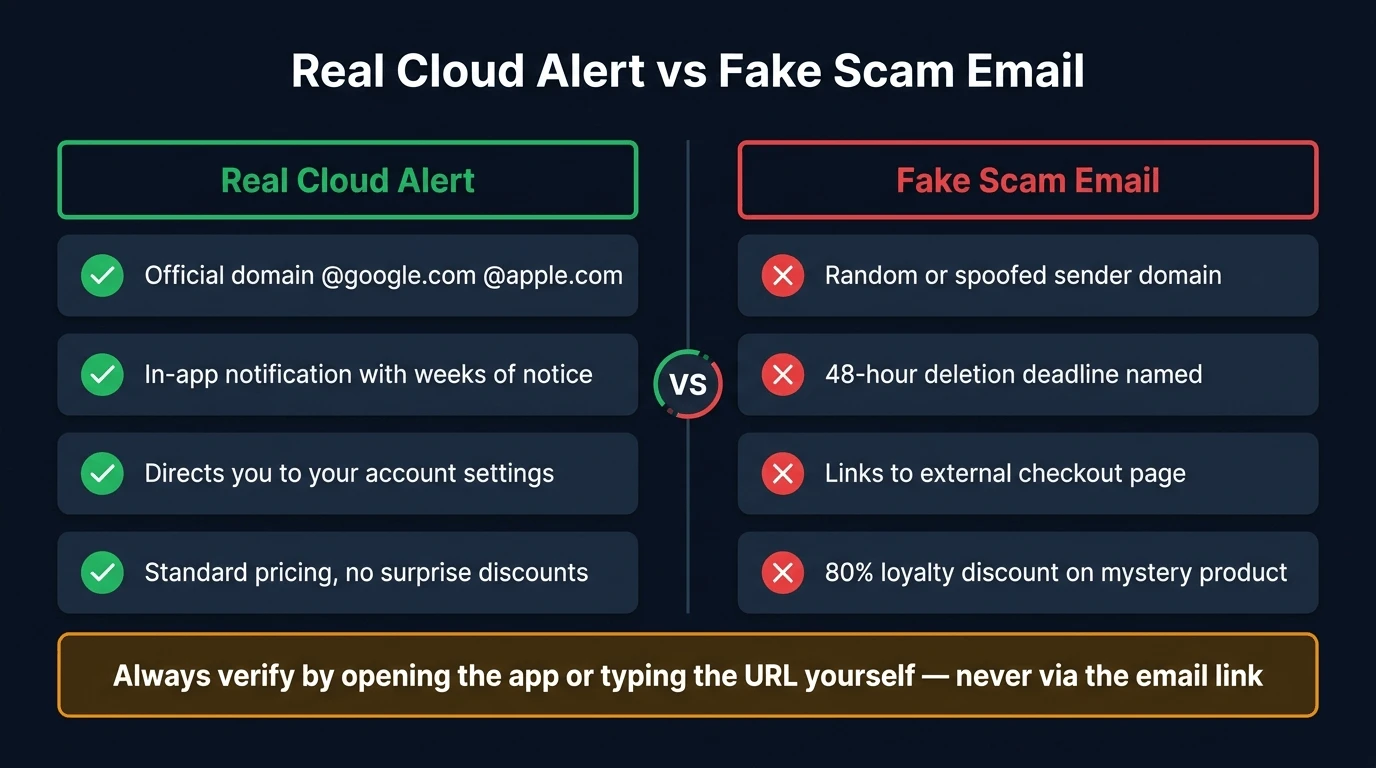
Understanding what legitimate providers do when storage runs out makes the scam much easier to spot.
Google gives you a warning well in advance when you are approaching your storage limit, visible in your Google account. If you exceed your limit and do not upgrade within two years, they begin a deletion process, but only after extended notice. They do not send emails with 48-hour deadlines.
Microsoft OneDrive notifies you in-app and via email when you are over quota, with clear timelines and options. Files are not deleted immediately and certainly not without repeated advance notice.
Apple's iCloud sends storage warnings visible in your iPhone's Settings app under your name. Legitimate Apple storage emails come from @apple.com and direct you to the Settings app to manage your plan, not to an external website.
None of these providers send emails that route through random redirectors, display fake storage scans, or sell third-party security software to resolve billing issues.
What to Do If You Received One of These Emails
If you have not clicked anything:
Do not click any link or open any attachment. Report the email as phishing using your email client's built-in tool (Gmail, Outlook, and Apple Mail all have one). Delete it. If you want to check your actual storage status, go directly to your provider's website or app.
If you clicked the link but did not enter any information:
Close the browser tab. Run an antivirus scan as a precaution, since some phishing pages can attempt drive-by downloads. Check your cloud account by navigating directly to it in a new browser window to confirm nothing is wrong.
If you entered card details:
Call your bank right away. Explain that you entered card details on a phishing page. Ask them to freeze the card and flag the account for fraud. The storage upgrade you thought you purchased does not exist, but the subscription charge from the affiliate product is real and recurring. Act quickly.
If you created an account or signed up for something:
Contact the subscription service and cancel it. Check your bank statements for any charges made. If you used the same password you use elsewhere, change it across all accounts where it appears.
Report it regardless of outcome:
- Report to your email provider as phishing
- In the UK, forward to the NCSC at [email protected]
- In the US, report to the FTC at reportfraud.ftc.gov
- If financial harm occurred, file with Action Fraud (UK) or the IC3 at ic3.gov
How Your Email Address Got on the List
You do not need a Google, Apple, or Microsoft account to receive these emails. The campaigns draw from purchased lists, and those lists come from data breaches, data broker databases, and the accumulated sign-up history of your primary email address.
Every time your real email address is used to register for a service, it enters a system. When that system is breached or sells its user data, your address moves along a pipeline that eventually reaches the people running these campaigns. The more widely your real address has circulated, the more likely it is to appear on a targeting list.
Using a disposable email address for any sign-up where you do not need a long-term relationship breaks that chain. VanishInbox generates a working inbox instantly with no account required, so you can register for anything, receive whatever confirmation you need, and then discard the address. Your real email never enters that service's database. When that database is breached, there is nothing in it that leads back to you.
This does not stop phishing reaching addresses already in circulation. But it prevents your real address from accumulating further exposure, which compounds over time. For the full picture of how email data moves from sign-up to phishing list, see what actually happens when a website sells your email address.
Protecting Your Cloud Accounts Going Forward
Reducing exposure to the scam is one thing. Keeping your cloud accounts secure is another.
Enable two-factor authentication on every cloud account. If a scammer does obtain your password through a separate phishing attack, 2FA prevents them from accessing your account without the second factor. Set it up in your Google, Apple, and Microsoft account settings.
Know what your storage looks like. Spend two minutes checking your real storage usage right now, in your Google account, your iPhone Settings, and your OneDrive. If you know where you stand, a fake alert claiming you are over limit will not create the same uncertainty the scam depends on.
Use a password manager. Password managers do not autofill on fake domains. If you land on a phishing page impersonating Google's login, your credentials will not populate automatically, an important safety net when the URL looks almost right.
Use disposable email for untrusted sign-ups. Each new sign-up with your real address is another potential entry point into the pipeline that fuels campaigns like this one. VanishInbox makes using a throwaway address fast enough to be a default habit rather than an inconvenience.
For a broader look at how phishing works and the patterns that appear across all variants, see how to spot a phishing email. And if you have wondered whether a disposable email address prevents phishing in a meaningful way, can disposable emails prevent phishing covers what the protection does and doesn't.
Frequently Asked Questions
Are all "cloud storage full" emails scams?
Not all of them. Legitimate cloud providers do send storage warnings, but these come from official domains, direct you to log into your account directly, and do not offer steep discounts or link to third-party products. The safest approach is always to check your storage status by opening the provider's app or typing the URL yourself, not by clicking the email's link.
Why does the email include my name and a specific date?
These details are sourced from breach databases and data broker records. Including your name and a plausible date makes the email feel targeted rather than generic. It is a persuasion technique, not evidence that the scammer has access to your account.
The link in the email went to a Google Cloud Storage URL. Does that mean it is legitimate?
No. Scammers deliberately host redirect files on Google Cloud Storage infrastructure because the domain looks legitimate and passes corporate spam filters. The Google Cloud Storage link is only a redirect; where it sends you is a phishing page on a random domain.
I already purchased the upgrade. What now?
Contact your bank and dispute the charge. The product you purchased, typically a VPN or security software subscription, has no connection to your cloud storage. Cancel the subscription with the provider directly if possible, and monitor your card for recurring charges. Report the fraud to your bank and to Action Fraud (UK) or the FTC (US).
How do I check my actual cloud storage without clicking the email?
For Google: go to one.google.com/storage in your browser. For iCloud: open Settings on your iPhone, tap your name, then iCloud. For OneDrive: go to onedrive.com and sign in directly. Each shows your real usage with no link-clicking required.
Can I get my money back?
Potentially, yes. Contact your bank right away and explain that you were tricked into purchasing a product through a phishing site. Banks treat phishing-related fraud seriously and can often reverse charges, especially if you act quickly. The sooner you call, the better your chances.
For a broader look at phishing across all channels, not just cloud storage, see how to spot a phishing email. If crypto is part of your setup, the Ledger email scam is one of the most persistent and damaging phishing campaigns currently running, worth knowing even if you haven't received one yet. If you have received suspicious text messages alongside scam emails, our guide to the DPD text message scam covers the same psychological playbook applied to delivery fraud. For a different but equally deceptive variant, see the Apple High Alert scam, which uses fake device security warnings to achieve the same result.