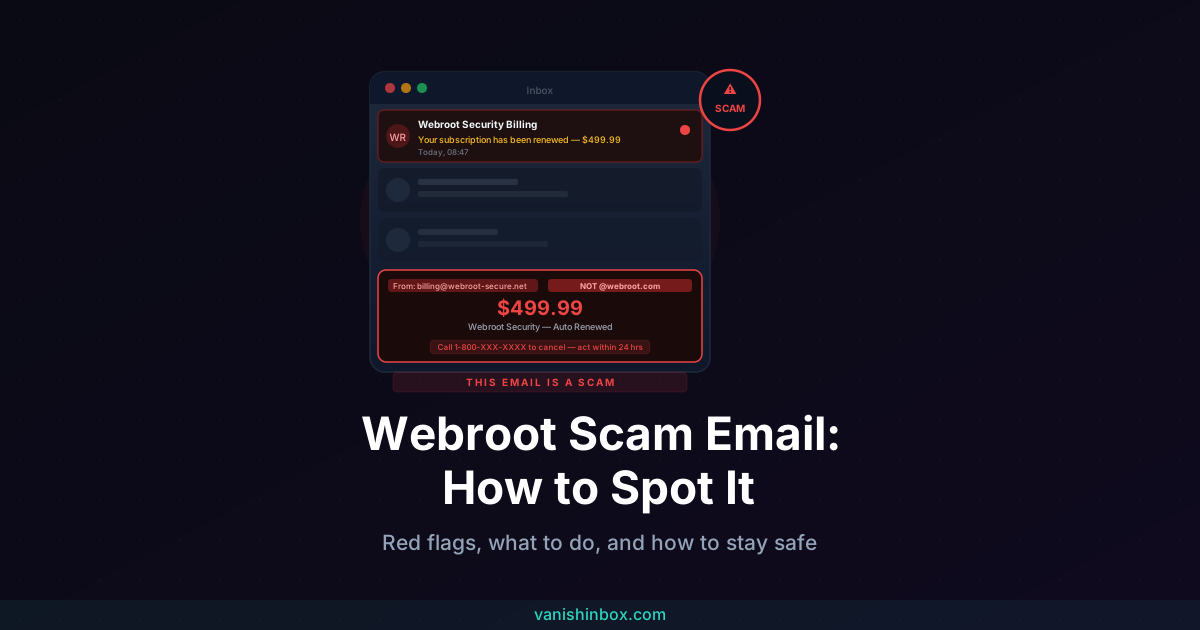
You open your inbox and see it: "Your Webroot Security subscription has been renewed. $499.99 has been charged to your card." There's a phone number to call if you didn't authorize it.
Don't call it.
Is This Webroot Email Real?
No. If you received an unexpected email claiming Webroot has charged or is about to charge you for a subscription renewal, it's a phishing scam. Your card hasn't been billed. The phone number connects you to a scammer, not to Webroot.
Delete the email. Don't call the number, click any links, or open any attachments. That's the only action required. Everything below explains how the scam works and what to do if you've already engaged with it.
What Is the Webroot Scam Email?
Webroot is a real cybersecurity company, now owned by OpenText, best known for its lightweight cloud-based antivirus software. That real reputation is exactly what makes it a useful disguise. Scammers send fake renewal notices dressed in Webroot's logo and formatting, claiming you've been billed for a subscription you never bought, betting that the brand name alone will make the charge feel plausible.
This isn't an isolated Webroot problem. Security researchers tracking these campaigns have found the same call centers running the identical script under rotating brand names: Webroot one week, Geek Squad the next, then Norton, then McAfee. Only the logo and the dollar figure change. The scammers don't care whether you've ever used Webroot. They only need a small percentage of recipients to pick up the phone.
The Four Main Variants
Auto-renewal or fake invoice. The most common version. An email claims your Webroot subscription auto-renewed for somewhere between $249.99 and $499.99. It includes a fake invoice number, a transaction date, and a phone number to call if you want to dispute the charge. Confirmed reports put actual amounts at $488 and $499.99. That precision is deliberate: a specific figure reads like a real bill, not a scare number pulled from a template.
Fake threat-detected alert. This version claims Webroot's antivirus found malware on your device and that your protection has lapsed. It pushes you to download an "update" or call for help, and either path leads somewhere bad: the download installs malware, and the number connects to a scammer.
Overpayment or refund scam. You're told Webroot overcharged you and a refund is waiting, but you need to call or hand over bank details to receive it. The call ends with a scammer walking you through a "refund" that actually moves money out of your account.
Account compromise alert. A message claims your Webroot account password changed or unusual login activity was detected. It includes a link to secure your account, which leads to a credential-harvesting page, or a phone number that connects to the same script.
How the Scam Works
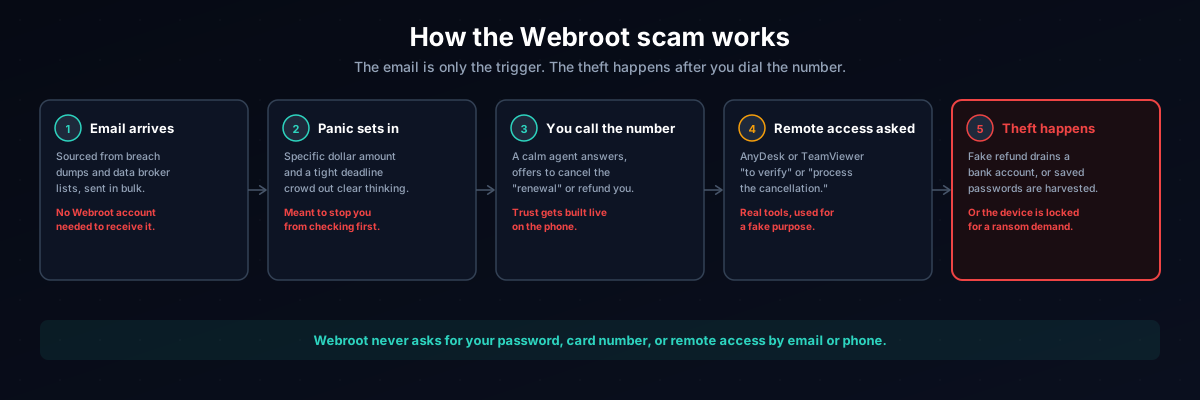
Step 1: The email arrives. Addresses come from data broker lists and breach dumps, not from any Webroot customer database. You don't need a Webroot subscription, or any antivirus subscription at all, to receive one.
Step 2: Panic sets in. A specific dollar amount, a tight deadline, and convincing branding are designed to override the instinct to check your bank statement first.
Step 3: You call the number. The attack moves to voice phishing. Someone answers sounding calm and professional, thanks you for calling, and offers to help cancel the "renewal" or process your "refund."
Step 4: Remote access gets requested. To "process the cancellation" or "verify the account," the agent asks you to install AnyDesk or TeamViewer. Both are legitimate tools, which is exactly why scammers use them. Once installed, the scammer sees your screen, your files, and anything your browser has saved.
Step 5: The theft happens. Depending on the script, the scammer drains a bank account through a fake refund, harvests saved passwords, or locks the device and demands payment.
Webroot will never ask for your password, your full card number, or remote access to your device through an unsolicited email or call.
Seven Red Flags to Spot a Fake Webroot Email
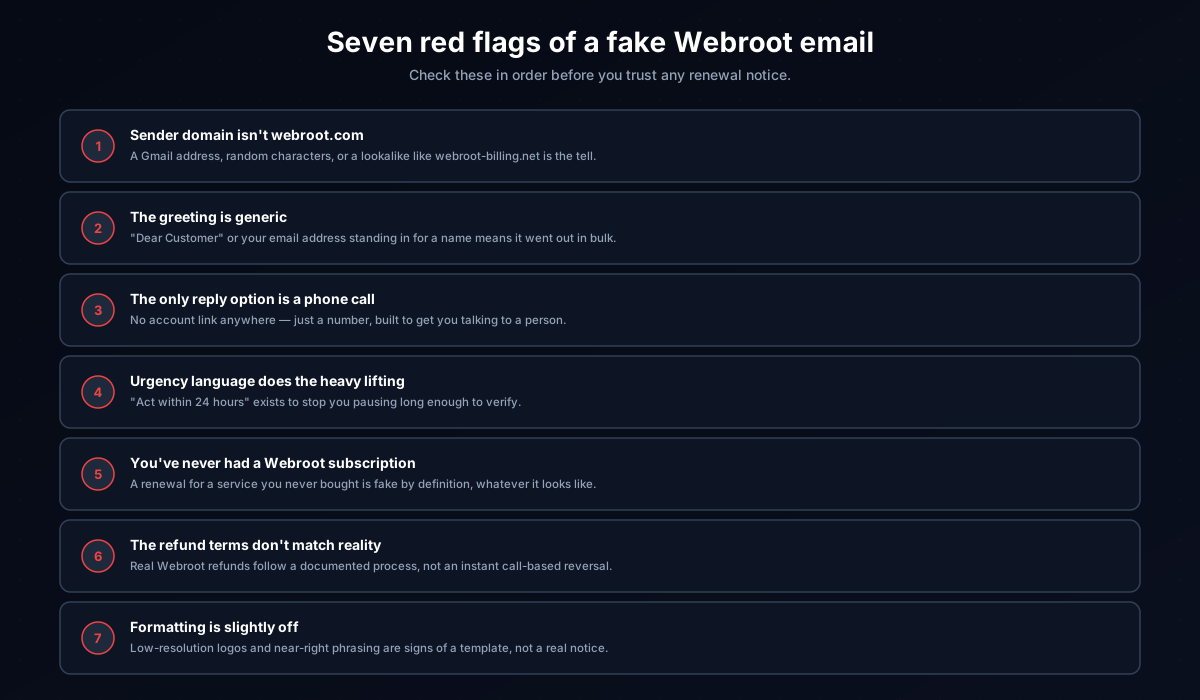
1. The sender domain isn't webroot.com. Click the display name to reveal the full address. A Gmail address, a random string of characters, or a lookalike domain like webroot-billing.net is the tell. Legitimate Webroot correspondence comes from webroot.com or the parent company's domain, opentext.com.
2. The greeting is generic. "Dear Customer" or your email address standing in for a name means the message went out in bulk, not to a known subscriber.
3. The only way to respond is a phone call. A real subscription platform lets you manage billing by logging into your account. An email whose entire call to action is a phone number, with no account link anywhere, is built to get you on the phone with a stranger instead of checking your own account.
4. Urgency language does the heavy lifting. "Act within 24 hours," "your card will be charged today," "avoid service interruption." The deadline exists to stop you from pausing to verify.
5. You've never had a Webroot subscription. A renewal notice for a service you never bought is, by definition, fake. Many people aren't fully sure what they're subscribed to, which is exactly the uncertainty the scam exploits.
6. The refund terms don't match reality. Real Webroot refunds go through a documented process with a defined window, not an instant phone-based reversal. A caller offering to refund you on the spot, especially by asking you to install remote software first, is not following any real Webroot policy.
7. Formatting is slightly off. Low-resolution logos, inconsistent fonts, or phrasing that reads almost right but not quite are signs of a template, not genuine correspondence.
What to Do If You Received One
1. Don't call, click, or open anything. The number reaches a scammer, any link leads to a phishing page, and any attachment may carry malware.
2. Report it as phishing to your email provider. In Gmail, open the email, click the three-dot menu, and choose "Report phishing." In Outlook, right-click the message and select "Report" then "Report phishing."
3. Verify through Webroot's official site if you're unsure. Type webroot.com into your browser yourself and check your account or billing history there. Never use a link or number from the email to do this.
4. Report it to the FTC. File at reportfraud.ftc.gov.
5. File with the IC3 if money changed hands. The Internet Crime Complaint Center at ic3.gov takes reports involving financial harm from cybercrime.
6. Mark it as spam and delete it.
What to Do If You Already Fell For It
If you're still on the phone: hang up. You don't owe the person on the other end an explanation.
If you gave remote access to your device: disconnect from the internet, uninstall the remote-access software, run a full antivirus scan, and change your passwords, starting with email and banking, from a separate clean device.
If you entered payment details or transferred money: call your bank immediately, explain what happened, and ask them to flag the account for fraud. Anything typed into a phishing form is now compromised even though the original "charge" in the email was never real.
If you entered login credentials: change that password immediately, turn on two-factor authentication, and change the password anywhere else you reused it.
Report to the FTC and IC3 regardless. A filed report supports any bank dispute and helps investigators connect the campaign to others.
How a Disposable Email Address Prevents This
Scammers don't guess your address. They buy or scrape lists compiled from data breaches and data broker databases, and your address ends up on one the moment it appears in a system that eventually gets breached or sells its data.
Every account you create with your real email is another entry point. Using a disposable address for sign-ups that don't need a lasting relationship keeps your real inbox off those lists. VanishInbox generates a working inbox instantly, with no account required, so you can receive a confirmation email and then let the address disappear. Your real address never enters that service's database, which means it's never part of the breach when that database eventually leaks.
This won't stop every phishing attempt, but it shrinks the pool of places your primary address can be harvested from. For the full mechanics of how an address moves from a signup form to a scammer's list, see what actually happens when a website sells your email address.
Frequently Asked Questions
Is the Webroot renewal email a scam?
If you received an unsolicited email claiming Webroot charged or is about to charge you for a renewal, yes. Webroot does bill actual subscribers, but genuine correspondence comes from webroot.com or opentext.com and directs you to your account, not to a phone number.
Does Webroot send renewal emails?
Yes, to real subscribers, but those emails reference your actual account and direct you to log in and manage billing yourself. An email whose only instruction is to call a number is not one of them.
What happens if I call the number in a Webroot scam email?
You reach a scammer, not Webroot support. The person answering will sound professional and helpful before asking for remote access, payment details, or a bank transfer framed as processing your refund.
What if I already clicked a link in the email?
If you didn't enter any information, run an antivirus scan and watch your accounts for unusual activity. If you entered credentials or payment details, change the affected passwords right away from a separate device and contact your bank.
How do I report a Webroot scam email?
Report it as phishing to your email provider, then file a report with the FTC at reportfraud.ftc.gov. If money was involved, also file with the IC3 at ic3.gov.
Why am I getting these emails if I've never used Webroot?
Because the emails go out in bulk to purchased or scraped lists, not to known Webroot customers. No prior relationship with Webroot is needed to end up on one.
How can I stop getting scam emails like this?
Use a disposable email address for sign-ups where you don't need a permanent inbox. VanishInbox creates a temporary address in seconds for exactly that purpose.
The same call centers running this Webroot campaign also run it under other names, most notably our Geek Squad scam email guide, which covers the identical playbook with different branding. For a broader look at how phishing works across email, see how to spot a phishing email. To check a sender's real domain and authentication results yourself, see how to tell if an email is legitimate. And if you've received similar renewal-panic messages by text rather than email, our guide to the DPD text message scam covers the same psychology applied to delivery fraud.