"Your payslip for May is now available."
If that landed in your inbox this afternoon, most people would open it. The absence of spelling mistakes, odd formatting, or anything that triggers the usual alarm is exactly why it's on this list.
Phishing subject lines have changed. The grammatically broken scam email, the Nigerian prince, the urgent account notice full of typos, no longer represents what reaches most inboxes. Roughly 3.4 billion phishing emails arrive every day in 2026, and the subject lines driving the most clicks are clean, specific, and built to feel routine.
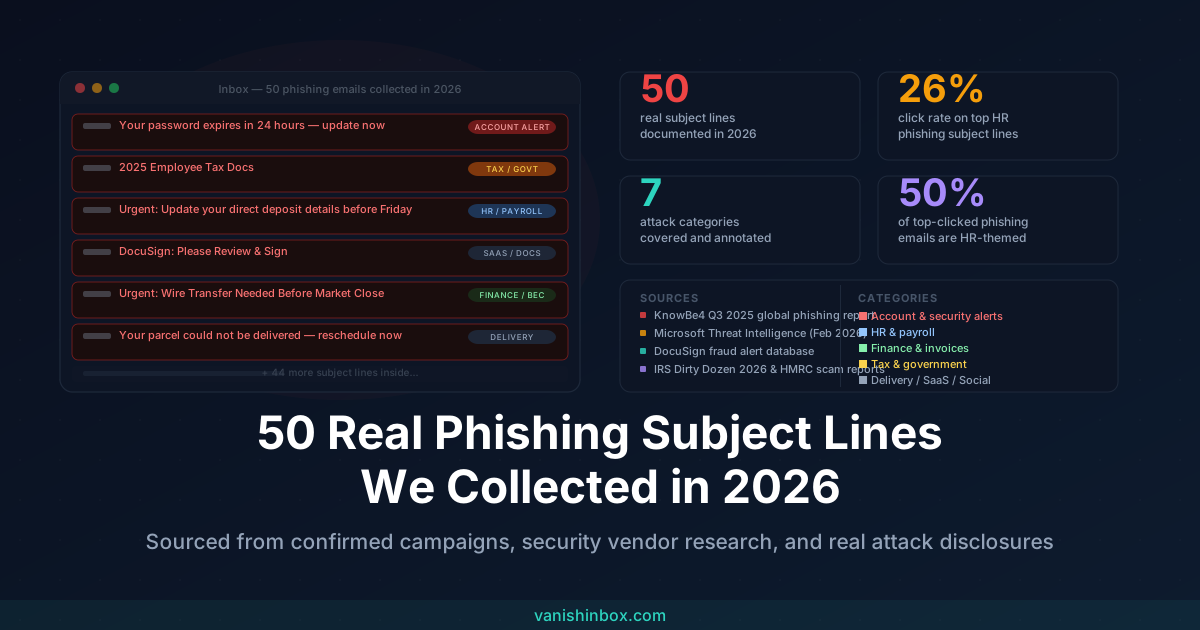
This post documents 50 subject lines drawn from confirmed 2026 phishing campaigns, security vendor research (including KnowBe4's Q3 2025 global phishing report, Microsoft Threat Intelligence disclosures, Proofpoint research, and DocuSign's live fraud alert database), and real attack disclosures from HMRC and the IRS. Where a subject line comes from a confirmed named campaign, we say so. Where it represents a documented pattern across multiple campaigns, we note that too.
This is a reference you can return to, and share with anyone who still thinks phishing is easy to spot.
What the data tells us before the list
Before the 50 examples, three findings from the research are worth sitting with.
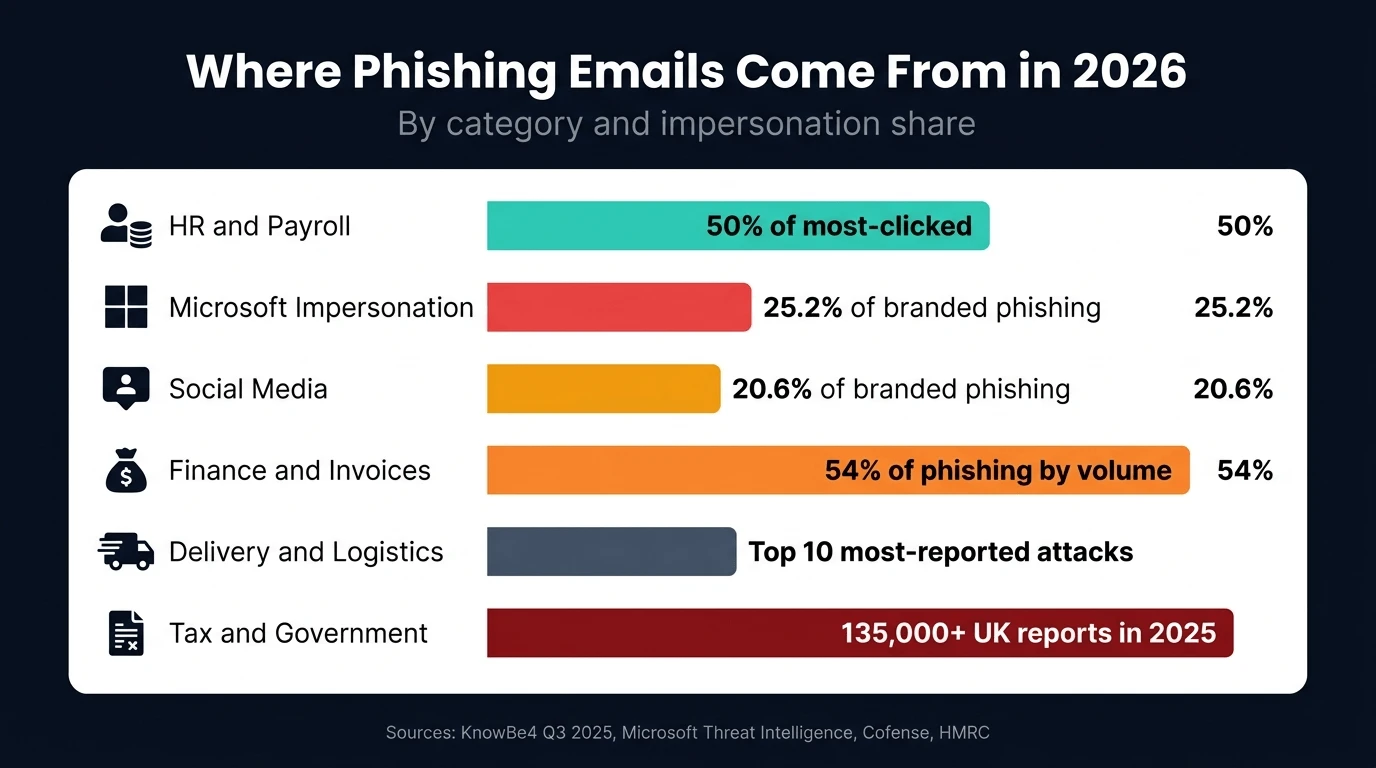
Click rates are higher than you'd expect. "Change of Password Required Immediately" carries an approximate 26% click rate in simulated phishing environments. HR-themed subject lines, payroll, benefits, policy updates, now account for around 50% of the most-clicked phishing emails in controlled tests. These are normal people responding to subject lines that look exactly like emails their employer sends, not naive users falling for crude tricks.
The grammar tell is gone. Around 67% of phishing attacks in 2024 used some form of AI assistance, and by 2026 that figure has only grown. Fully AI-generated phishing emails are now indistinguishable from legitimate email in tone, structure, and personalisation. Spelling mistakes and awkward phrasing were never reliable indicators. Now they're essentially absent from targeted campaigns.
Impersonation is concentrated. Microsoft was the most-impersonated brand in Q3 2025, appearing in 25.2% of branded phishing landing pages. Social media platforms collectively appeared in 20.6%. HR departments, HMRC, the IRS, DocuSign, FedEx, and Google round out the most abused identities. Attackers use familiar names because familiarity reduces suspicion. Every subject line below is designed to feel like something you've received before.
The psychological mechanisms are consistent. Regardless of industry or target, the subject lines below fall into four categories: urgency and scarcity, authority impersonation, personal relevance, and normalisation of everyday formats. Understanding those four levers is more useful than memorising any specific line, because attackers rotate wording constantly while the psychology stays the same.
The 50 subject lines
Account and security alerts
These are the highest-volume category and among the highest click rates. They exploit one specific fear: losing access to something you depend on. Microsoft, Apple, and Google are impersonated most often, but any service requiring a login is fair game.
- "Your password expires in 24 hours — update now" Combines urgency with a plausible IT policy. Commonly spoofs Microsoft 365 or corporate IT.
- "Unusual sign-in detected on your Microsoft account" Microsoft's real security alerts use almost identical language. The spoofed version redirects to a credential-harvesting page.
- "Action required: Verify your identity or your account will be locked" The lockout threat triggers immediate action before the recipient stops to check the sender.
- "Security alert: New device signed in to your account" Targets the fear of unauthorised access. Often paired with a spoofed Google or Apple sender address.
- "Your Apple ID has been disabled — verification required" A perennial Apple impersonation. The fake page collects Apple ID credentials and payment details.
- "Two-step verification request — if this wasn't you, click here" Exploits 2FA familiarity. The link disables 2FA on the real account rather than flagging a threat.
- "Change of password required immediately" Documented 26% click rate in KnowBe4 simulations. The word "immediately" does the work.
- "Your Google account was accessed from a new location" Convincing because Google sends near-identical legitimate alerts. The spoofed sender domain is the only tell.
- "Critical: Unauthorised access attempt — confirm your identity" The word "critical" combined with urgency suppresses the instinct to verify the sender.
- "Your account will be suspended unless you act within 48 hours" The countdown creates artificial scarcity. Used across banking, email, and social media impersonation.
HR and payroll
Half of the most-clicked phishing emails in 2025 and 2026 use HR-related subject lines, according to KnowBe4 research. The reason is straightforward: anything touching salary, performance, or employment status feels too important to ignore and too sensitive to forward to IT for a second opinion.
- "Important update to your employee benefits — action required" Generic enough to reach any employee, specific enough to feel personal.
- "Your payslip for [month] is now available" One of the cleanest phishing subjects in circulation. Zero alarm signals. Clicks almost universally.
- "Urgent: Update your direct deposit details before Friday" The deadline and the financial stakes combine to drive immediate action. Commonly leads to a fake payroll portal.
- "Employee satisfaction survey — your response is overdue" Low stakes framing that still prompts clicks from employees wanting to appear engaged.
- "Your annual performance review document — please sign" Performance anxiety does the work. Typically delivers a DocuSign-spoofed page.
- "2025 Employee Tax Docs" Confirmed by Microsoft Threat Intelligence in February 2026. Sent to approximately 100 organisations with an attachment containing a malicious QR code pointing to a spoofed Microsoft 365 login.
- "Policy update: New remote work guidelines require your acknowledgement" Post-pandemic framing that remains credible. The acknowledgement mechanism feels like a compliance step.
- "Payroll department: Please verify your banking information" Direct and alarming. Shorter subjects like this one outperform longer ones in campaigns targeting employees with high email volume.
- "HR notice: Dress code policy update — review required" Appeared in KnowBe4's most-clicked list multiple quarters running. Employees open it partly out of curiosity, partly out of compliance instinct.
- "Confidential: Compensation review for [first name]" The personalisation and the word "confidential" make this one of the most effective spear phishing subjects in the HR category.
Finance and invoices
Finance-themed phishing accounted for 54% of all email phishing by volume in 2025, according to Cofense. Invoice requests, wire transfer approvals, and vendor payment changes are the dominant formats. Each represents a routine action with high financial stakes if an employee hesitates to act quickly.
- "Invoice #INV-4821 — payment overdue" The specific invoice number adds false authenticity. Finance teams receive dozens of these legitimately every week.
- "Your recent transaction has been flagged — confirm or dispute" Banking impersonation that creates both urgency and a fear of fraud. Ironic given the email itself is the fraud.
- "Wire transfer confirmation needed before end of day" Business email compromise classic. Typically appears to come from a senior executive or known finance contact.
- "Quarterly Financial Review Needed Immediately" Cited in a confirmed business email compromise attack against a US logistics firm, where a finance manager processed a transaction based on this email alone.
- "Urgent: Wire Transfer Needed Before Market Close" Used in a confirmed BEC attack sent at 4:47 PM on a Friday. The timing was deliberate; end-of-day pressure reduced verification time. The transfer was $180,000.
- "Your refund of £340.00 is waiting — claim within 7 days" The specific amount adds credibility. Commonly spoofs HMRC, PayPal, or utility companies.
- "Payment receipt — review attached document" The neutral framing makes this one hard to dismiss without opening. The attachment typically delivers malware or credential phishing.
- "Action required: Outstanding invoice from [vendor name]" The vendor name is usually pulled from public data or previous breach databases. Specificity raises the click rate substantially.
Tax and government
Tax-themed phishing peaks between January and April, but HMRC and IRS impersonation runs year-round. In early 2026, Microsoft identified a tax-themed phishing wave targeting over 29,000 users across 10,000 organisations. The IRS received over 600 social media impersonation reports in fiscal year 2025 alone, and HMRC logged over 135,000 scam reports across the same period.
- "Your tax refund of £892 is waiting — claim now" The specific amount and the deadline language are consistent across HMRC phishing campaigns spanning multiple years.
- "HMRC: Self Assessment — action required before deadline" Timed to Self Assessment filing periods. HMRC states plainly that it will never contact customers by email to offer a refund.
- "IRS: Unclaimed Refund Notice — verify your identity" The IRS does not initiate contact by email. This subject line appears in mass campaigns every tax season targeting US taxpayers.
- "2025 Employee Tax Docs" Confirmed Microsoft Threat Intelligence campaign, February 2026. Customised W-2 attachment with recipient's name; QR code led to SneakyLog PhaaS platform spoofing Microsoft 365.
- "Your Form 1099-R is ready — [RF] 12123123" Direct quote from a confirmed Microsoft Threat Intelligence disclosure. The reference number mimics legitimate tax document notifications.
- "Important: Your tax return has an error requiring correction" Fear of an IRS or HMRC penalty drives immediate action. The "correction" link goes to a credential harvesting page.
- "Final notice: HMRC tax rebate notification" The "final notice" framing suggests repeated prior contact, implying the recipient has already missed earlier warnings.
Delivery and logistics
Delivery phishing works because everyone is expecting a parcel. The expectation creates a default assumption of legitimacy. FedEx's "Reschedule Your Delivery" ranked among the top ten most-reported real phishing attacks in KnowBe4's Q3 2025 data, alongside Royal Mail and DHL variants.
- "Your parcel could not be delivered — reschedule now" Triggers action immediately because a missed delivery feels fixable. The reschedule link collects card details to pay a fake redelivery fee.
- "FedEx: Reschedule Your Delivery" Confirmed top-ten most-reported real phishing attack, KnowBe4 Q3 2025.
- "Action required: Confirm your delivery address" No brand specified, which means it can be sent to any inbox without obvious inconsistency.
- "Royal Mail: Your package is on hold — customs fee outstanding" Post-Brexit customs fees made this format credible to UK recipients in a way that wouldn't have worked before 2021.
- "DHL: Your shipment requires attention" Vague by design. "Requires attention" prompts opening without specifying what action is needed, increasing curiosity clicks.
Document signing and SaaS platforms
DocuSign impersonation is documented extensively enough that DocuSign operates a live fraud alert page and a dedicated abuse reporting address. The format works because DocuSign requests arrive unexpectedly by design: you have to sign something someone else initiated, so an unsolicited notification feels normal.
- "DocuSign: Please Review & Sign" Top-ten most-reported real phishing attack, KnowBe4 Q3 2025.
- "New Employee Benefit and Compensation & Salary Increment for your Review" Documented in DocuSign's official fraud alerts as a confirmed phishing subject line used in HR impersonation campaigns.
- "A document has been shared with you via Google Drive" Mimics Google's exact notification format. The shared document contains a link to a credential harvesting page rather than a real file.
- "IT: Copilot AI License Activation" Second most-reported real phishing attack in KnowBe4 Q3 2025. Exploits the rapid rollout of Microsoft Copilot across enterprises in 2025.
- "Zoom: Action Required — Project Invitation Access" Seventh most-reported real phishing attack, KnowBe4 Q3 2025. Targets remote workers in environments where Zoom is a primary communication tool.
- "Your Adobe Sign request is awaiting your signature" Adobe Sign impersonation follows the same pattern as DocuSign: unsolicited requests feel legitimate because the genuine product works the same way.
Social media and miscellaneous
Social media impersonation accounted for 20.6% of branded phishing landing pages in Q3 2025, nearly matching Microsoft. Verification badge scams targeting business pages, comment notification spoofs, and profile view alerts are the dominant formats.
- "Facebook: Your page is eligible for the Verified Badge" Confirmed most-reported real phishing category, KnowBe4 Q3 2025. Business page owners click immediately; the "verification" process collects login credentials.
- "Someone mentioned you in a comment — see what they said" Curiosity is the primary driver. No urgency required when the mechanism is social.
- "Your LinkedIn profile appeared in 47 searches this week" LinkedIn sends real versions of this email. The phishing variant links to a spoofed login page that harvests professional credentials.
- "Microsoft: Reserve Your Attendance" The most-reported real phishing attack in KnowBe4 Q3 2025. Vague enough to apply to any Microsoft product; the landing page adapts to the recipient's organisation.
The psychology behind why these work
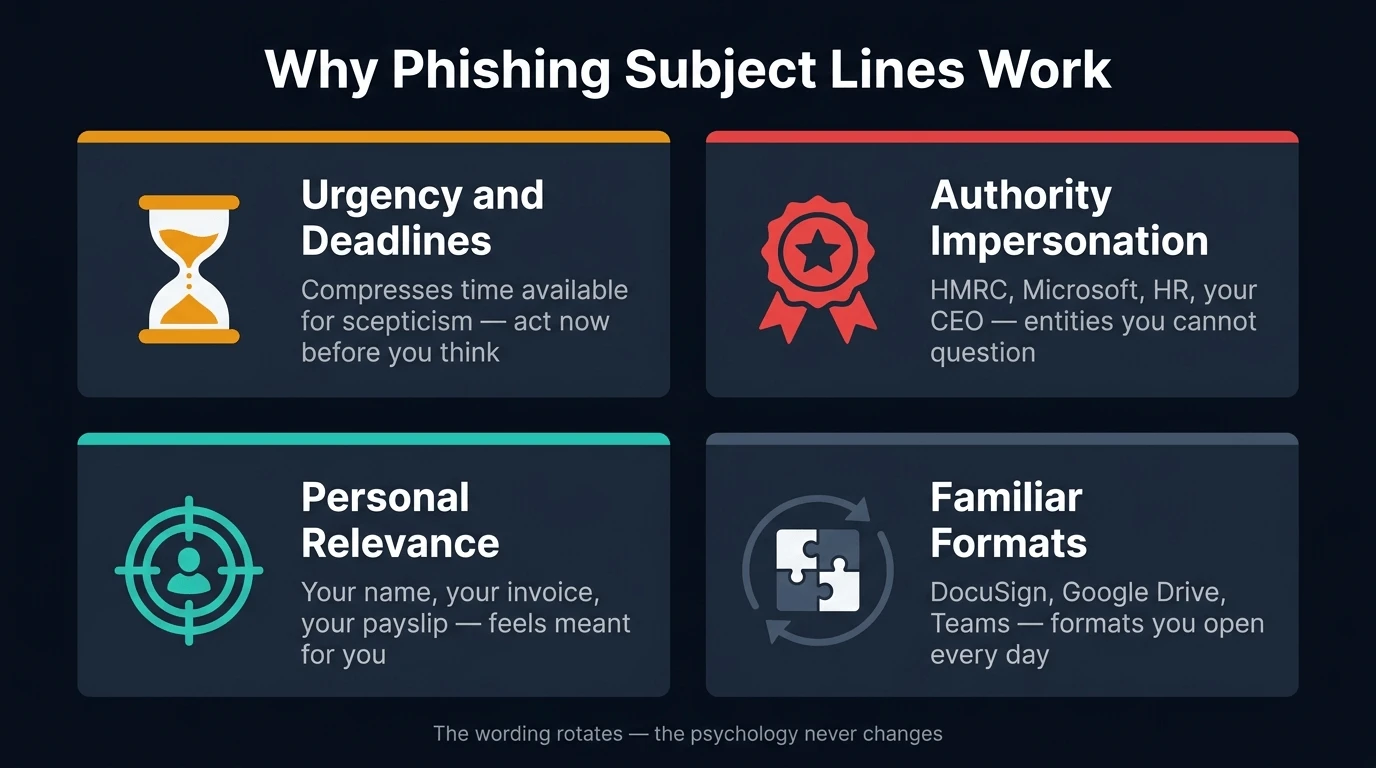
Reading the list, a pattern becomes clear. These subject lines aren't random. They are engineered around four specific psychological mechanisms, and attackers iterate on them constantly to find the highest-performing variants.
Urgency and artificial deadlines. "Before end of day," "within 48 hours," "expires in 24 hours." Each one compresses the time available for scepticism. When someone believes they need to act right now, verification feels like a risk they can't afford. The 21-second median time between a phishing email arriving and a recipient clicking a link is the product of this design.
Authority impersonation. Microsoft, HMRC, the IRS, HR, your CEO. These aren't chosen at random. They are the entities people feel least able to question or delay responding to. An email from a known authority carries a compliance instinct that an email from an unknown sender doesn't. Attackers study organisational hierarchies and brand trust before building campaigns.
Personal relevance. Your name in the subject line, your company, a reference to your role, a specific invoice number. The most successful attacks make the target feel personally implicated rather than part of a mass mailing. An email about your payslip, your performance review, or your tax refund doesn't feel like spam. It feels like something meant specifically for you.
Normalisation of familiar formats. DocuSign requests, Google Drive shares, Microsoft Teams notifications: these arrive in legitimate inboxes dozens of times a week. Attackers hide phishing emails inside these formats because you've been trained to open them. The format carries an implicit trust that the content doesn't need to earn on its own.
How your email address ends up on phishing lists in the first place
The subject lines above are effective because they reach real, active email addresses. Attackers don't guess. They buy lists, assembled from data breaches, data broker databases, and the accumulated trail of sign-ups your real email has made over the years.
Around 82% of phishing victims had their email addresses leaked in a previous data breach before they were targeted. Every time your real email enters a new database, a free trial, a competition, a one-time download, it adds another potential source for those lists. When any one of those services is breached or sells its user data, your address moves one step closer to a phishing campaign's target list.
The mechanics of how that pipeline works, from sign-up to data broker to phishing list, are covered in full in what actually happens when a website sells your email address. For the broader picture of why inboxes fill with unsolicited email over time, why your inbox is full of spam covers each source and what you can do about it.
The most practical upstream defence is keeping your real email out of systems that don't need it permanently. Using a disposable address for sign-ups you're uncertain about means that even if that service's database is breached, the leaked address is already expired and untraceable back to you. For a full explanation of how that protection works specifically against phishing, see can disposable emails prevent phishing.
What to do when one of these arrives
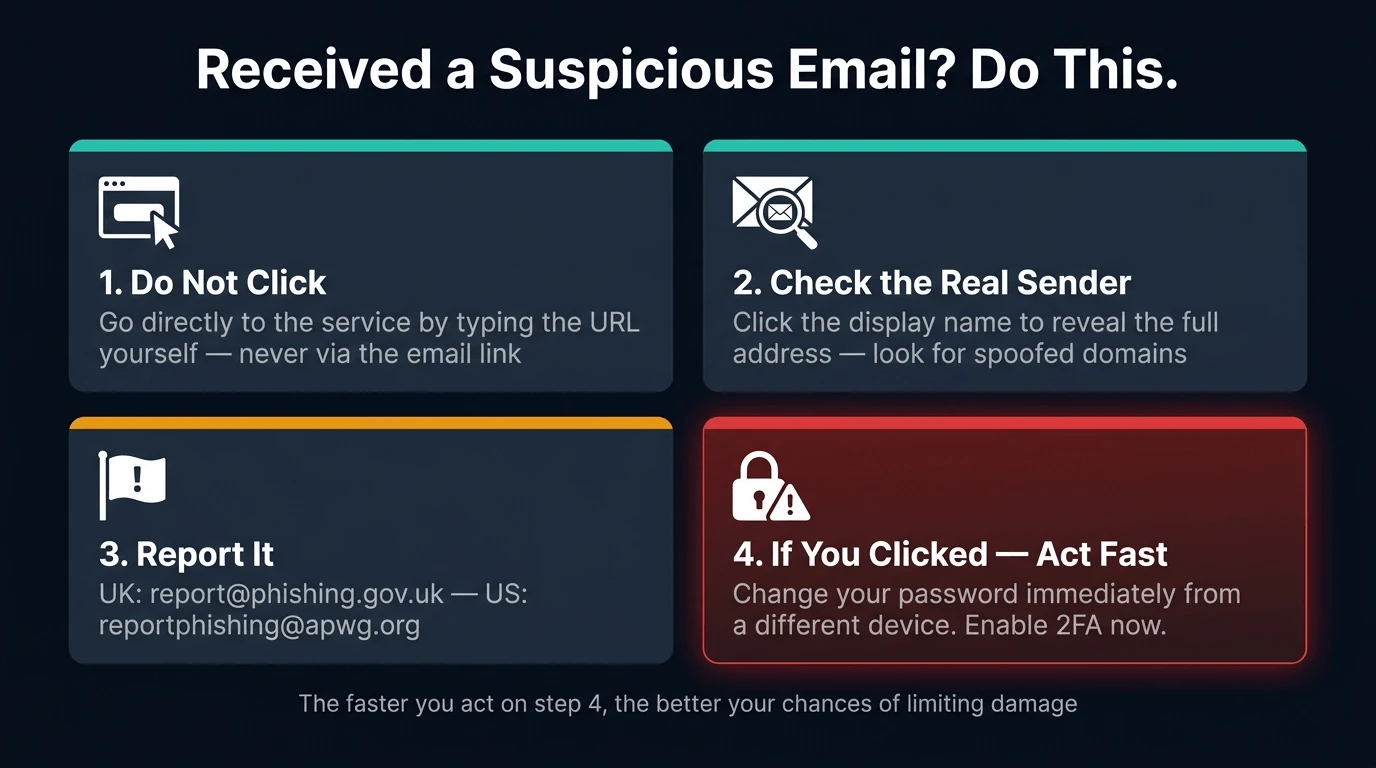
The subject line alone is never the full story. Sophisticated phishing emails look identical to legitimate ones. The action you take matters more than whether you recognised the subject line as suspicious.
Don't click anything inside the email. If the subject line references an account you have, open that service directly by typing the URL yourself. If your bank claims to have flagged a transaction, call the number on your card. If HMRC says your refund is waiting, log in through GOV.UK.
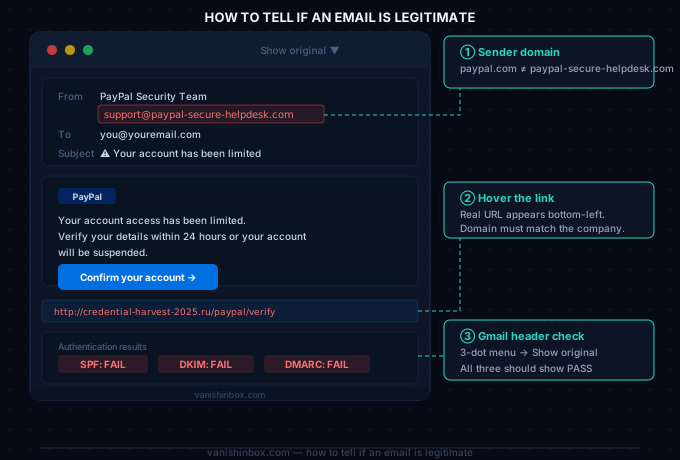
Check the sender's actual domain. Click or tap the display name to reveal the full email address. [email protected] and [email protected] are not legitimate domains, regardless of what the display name says.
Report it. In the UK, forward phishing emails to [email protected]. In the US, forward to [email protected]. HMRC has a dedicated address: [email protected]. Reporting takes thirty seconds and contributes directly to takedowns.
If you clicked a link: change your password for that account immediately, from a different device. Enable two-factor authentication if it isn't already active. Contact the organisation's real support team to flag that your credentials may be compromised. For the complete guide to what to do at each stage, before clicking, after clicking, after entering credentials, see how to spot a phishing email.
The subject lines getting harder to spot
The 50 above represent what phishing looked like through early 2026. The trajectory is toward something harder to catch.
AI-generated spear phishing now references your name, your employer, your job title, your recent LinkedIn activity, and in some cases your recent purchases or public posts. A subject line like "Following up on your presentation at [conference name] last week" arrives with the right name, the right event, and the right tone, because the attacker built a profile using public data before sending a single email.
The tell is no longer in the subject line. It's in the link destination and in the question: were you expecting this contact? A subject line that feels relevant isn't proof the email is real. It's increasingly proof that the attacker did their research.
That shift makes the upstream prevention, keeping your real email address out of as many databases as possible, more valuable, not less. The fewer places your address exists, the less material is available to build a convincing impersonation around you.
Seen a phishing subject line in 2026 that isn't on this list? We update this post as new campaigns are documented. Use VanishInbox for sign-ups you're uncertain about, and your real address stays out of the lists that power campaigns like these.
Frequently asked questions
Are these subject lines still being used right now?
Most of them, yes. Phishing subject lines in the account alerts, HR, and finance categories are perennial. The specific wording rotates but the formats stay stable because they keep performing. Tax-themed subjects are seasonal, peaking between January and April. The SaaS impersonation subjects (DocuSign, Microsoft, Zoom) evolve fastest as attackers track new product rollouts; "IT: Copilot AI License Activation" appeared in KnowBe4's most-reported list because Copilot deployment across enterprises was a 2025 news story.
Which phishing subject lines have the highest click rates?
HR-related subjects outperform other categories in controlled simulations. "Change of Password Required Immediately" carries a documented 26% click rate. Payslip notifications and performance review requests land close behind. The pattern across all high-performing subjects is personal relevance combined with low suspicion: the email feels like something you'd receive legitimately and can't safely ignore.
How can I tell if a subject line is a phishing attempt?
The subject line alone is rarely definitive. The more reliable checks are the sender's actual domain (not just the display name), whether you were expecting this contact, and whether the link destination matches the organisation's real domain. Hover over any link before clicking on desktop; press and hold on mobile. If the destination doesn't match what you'd expect, treat the email as suspicious regardless of how legitimate the subject line looks.
Why do attackers impersonate Microsoft and HR departments so often?
Microsoft because it's the most widely used enterprise platform in the world, so a spoofed Microsoft notification reaches a credible target in almost any organisation. HR because employees feel personally impacted by anything touching their pay, benefits, or employment status and are least likely to forward it to IT for a second opinion before acting. Both combine high reach with high emotional stakes, which is exactly what phishing needs to work.
Where can I report phishing emails to help others?
In the UK: forward to [email protected] (National Cyber Security Centre) or [email protected] for HMRC-specific scams. In the US: [email protected] (Anti-Phishing Working Group) or [email protected] for IRS impersonation. Both countries' reporting systems feed into active takedown operations. Your email client's built-in spam reporting also trains filters that protect other users on the same platform.