An email arrives from your friend. She's throwing an Easter dinner and she's used Punchbowl to send the invite. The email looks exactly right: the logo, the colours, the friendly layout. You click to RSVP. A login page appears asking for your email password.
You enter it. Nothing happens. You move on.
Within the hour, everyone in your contact list gets the same invitation, now apparently from you. Your friend's account did exactly what yours just did. You're not going to a party. You handed your email credentials to a scammer, and now they're using your account to repeat the process with everyone you know.
That's the Punchbowl phishing scam, and it's been spreading faster in 2026 than at any point since it first appeared in late 2024.
Is Punchbowl Itself a Scam?
No. Punchbowl is a legitimate platform used by millions to send digital party invitations, greeting cards, and event RSVPs. Real Punchbowl invitations arrive in inboxes every day.
The scam is impersonation. Attackers copy Punchbowl's branding, templates, and email format to send fraudulent messages that look identical to the real thing. Punchbowl has confirmed it has received widespread reports of phishing emails imitating its brand, and that these messages have no connection to its platform.
This distinction matters practically: not every Punchbowl email in your inbox is fake. The presence of the Punchbowl logo or name is not itself a red flag. The red flags are specific, and they're covered below.
How the Scam Works: Two Attack Modes
Most coverage of this scam treats it as a single thing. It's not. Security researchers have documented two distinct payloads, and which one you're dealing with changes what happened to your device.
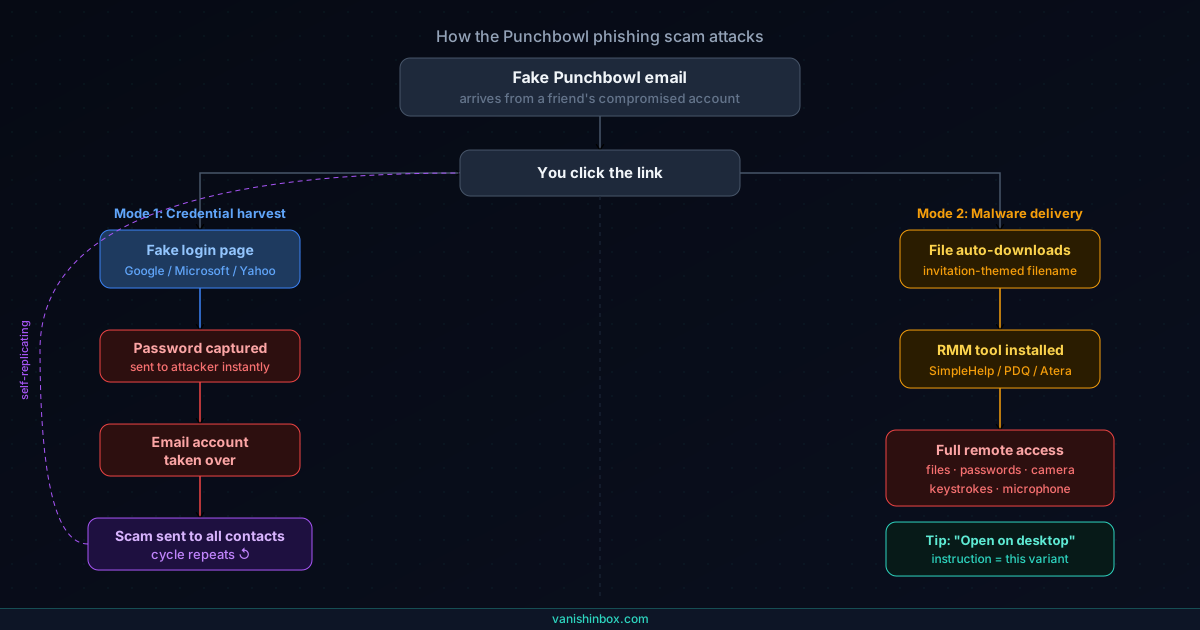
Mode 1: Credential harvesting
You click the RSVP or "View Invitation" button. Instead of going to punchbowl.com, the link routes through an external domain to a login page. The page offers familiar sign-in options: Google, Microsoft, Yahoo, AOL, Dropbox. Whichever you choose, the page captures your username and password and sends them directly to the attacker. You may see a fake error message, or the page may just not load. Either outcome is deliberate. Scammers sometimes display errors and prompt a retry specifically to harvest two or three password variations from the same victim.
Your email account is now compromised. The attacker can read everything in it, access linked services, and send email from it.
Mode 2: Malware delivery
In this variant, clicking the link auto-downloads a file to your device rather than showing a login page. The file has an invitation-themed name, something like event-invite.exe or party-details.zip, and a confirmation page may appear directing you to "view your invitation" in your Downloads folder.
The payload in documented cases has been repurposed remote monitoring and management tools: SimpleHelp, PDQ, Atera Agent. These give the attacker persistent remote access to your machine: not just your email, but your files, your activity, your saved passwords, and in some cases your camera and microphone.
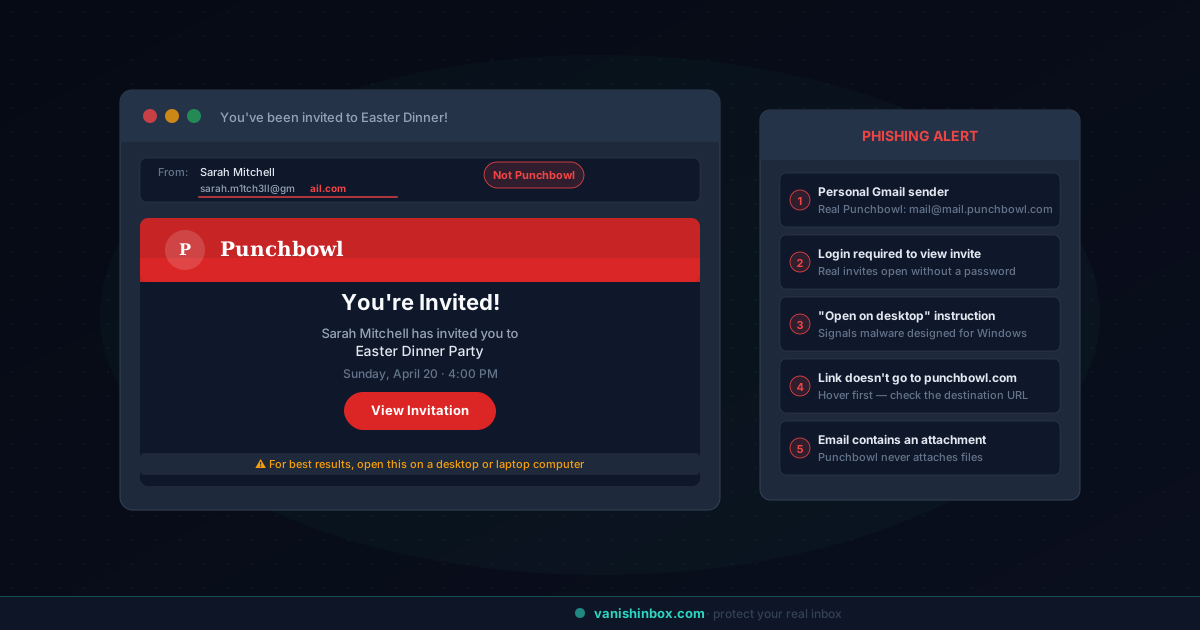
The "open on desktop" instruction is the tell for this variant. Fake invitations regularly include text like "For the best experience, please open this on a laptop or desktop computer." Real invitation platforms don't make requests like this. The instruction exists because the malware is engineered for desktop operating systems and won't execute on a phone.
The Self-Replicating Spread: Why This Scam Moves So Fast
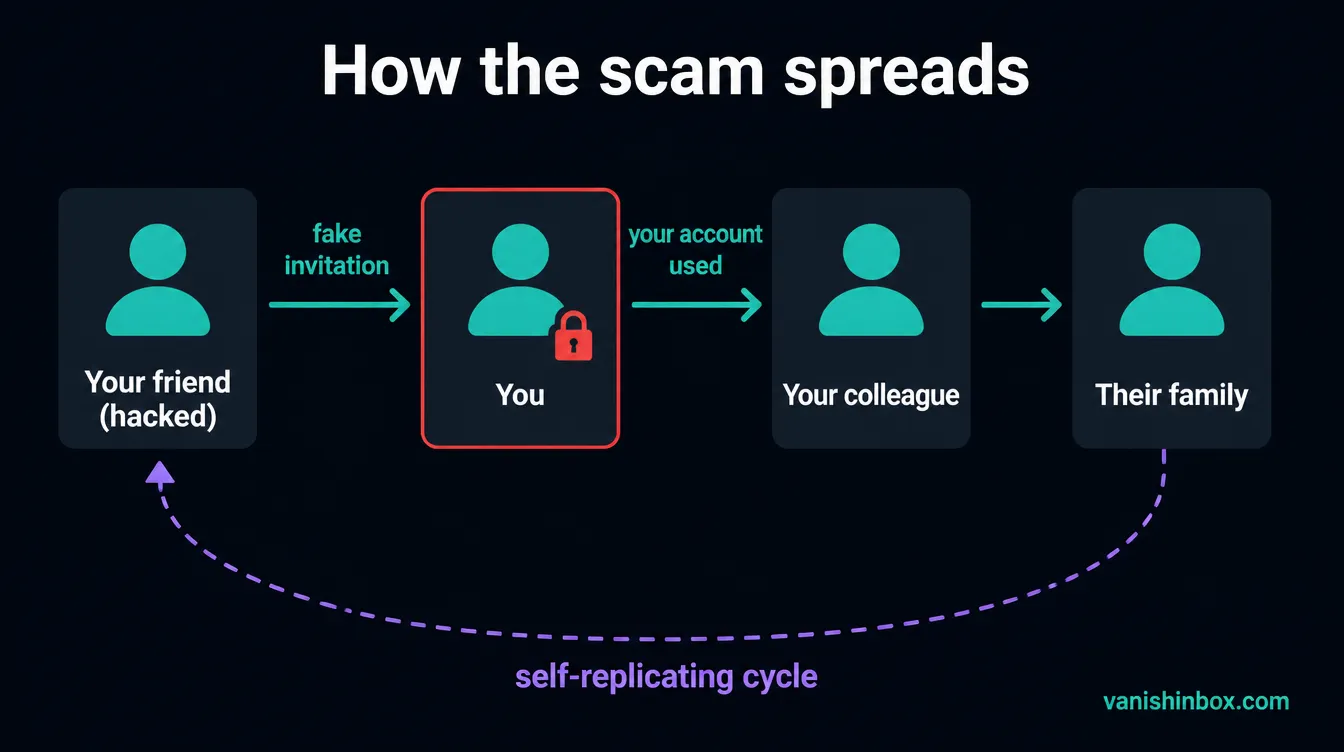
Most phishing campaigns are one-directional: a scammer sends messages to a list of harvested addresses. The Punchbowl scam is different. Once a victim falls for the credential-harvesting variant, the attacker gains access to a real, trusted email account and uses it to send the fake invitation to every contact in that inbox.
This means the next wave of victims receives the invitation from someone they actually know, a friend, a family member, a colleague, using that person's real email address, not a spoofed one. The trust is genuine, not manufactured. Your guard goes down automatically.
One victim documented in local news reports in early 2026 received what appeared to be an Easter dinner invitation from a well-known community figure. She clicked, entered her credentials, and within hours her account had sent the invitation to her entire contact list. She spent the next half hour contacting people by phone to warn them. Several had already clicked before she reached them.
This self-replicating mechanism is why the scam has hit specific communities, schools, churches, youth organisations, local professional networks, so disproportionately hard. Each new victim is connected to the same social graph as the previous one.
Why It Works: The Psychology of Invitation-Based Attacks
Most phishing uses fear. The fake bank email, the HMRC penalty notice, the "your account has been suspended" message: these work by triggering anxiety and shutting down critical thinking.
The Punchbowl scam uses the opposite emotion. It's a party invitation, something joyful, a celebration rather than a warning. That emotional context lowers the guard that fear-based phishing has trained you to raise.
Add to that the seasonality: the scam surges around Easter, Christmas, graduation season, and summer weddings, periods when your inbox already contains real invitations from real people, and one more doesn't stand out.
And add the social proof of a known sender's email address. Security training tells you to check for suspicious senders. When the sender is your actual cousin, that check passes. The scam has already neutralised the tool you'd normally use to identify it.
How to Spot a Fake Punchbowl Invitation: Five Checks
None of these checks individually is conclusive. Together, they give you a clear picture.
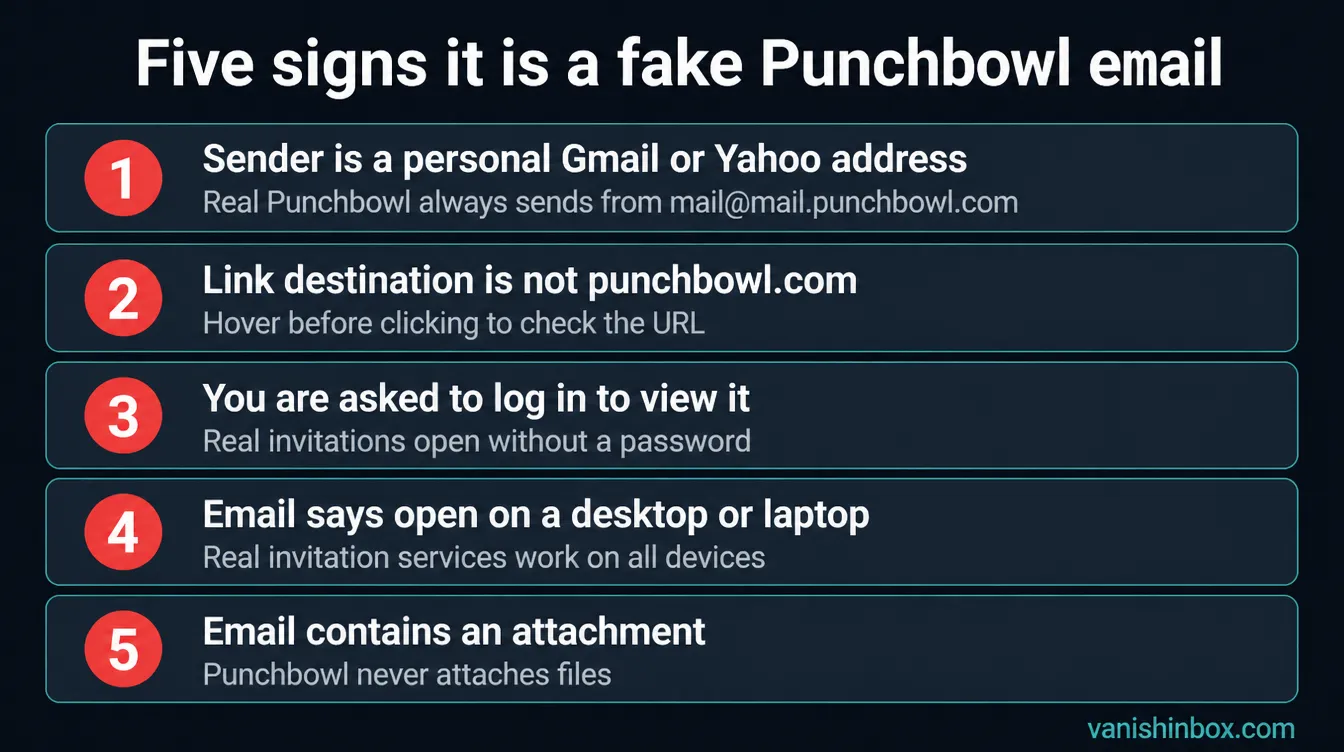
1. Sender address
The only legitimate domain for Punchbowl invitation emails is [email protected]. Official support emails come from [email protected]. Any invitation arriving from a personal Gmail, Yahoo, or Outlook address is coming from a compromised account, not from Punchbowl's platform, and the invitation link inside it is the attack.
Click the sender name in your email client to see the full address before doing anything else.
2. Link destination
Hover your mouse over the RSVP or "View Invitation" button without clicking. The URL that appears in the bottom of your browser should start with https://www.punchbowl.com. Anything else, a random string, a subdomain on a service like pages.dev, workers.dev, or a domain that sounds like Punchbowl but isn't, is the phishing redirect.
3. Login requirement
Real Punchbowl invitations don't require you to enter your email password to view them. All Punchbowl invitations and cards can be opened without signing into an account. If clicking an invitation link leads to a page asking for Google, Microsoft, Yahoo, or any other credentials, stop. That page is collecting your password.
4. The "open on desktop" instruction
Any invitation email that tells you to open it specifically on a laptop or desktop computer is showing you the malware variant. Real digital invitation services work on all devices. This instruction is engineered to get the malware onto a desktop operating system where it will execute.
5. Attachments
Legitimate Punchbowl emails never contain attachments. If the email has any attached file, a PDF, a ZIP, an EXE, anything, it is not from Punchbowl.
What the Attacker Does With Your Credentials in the First Hour
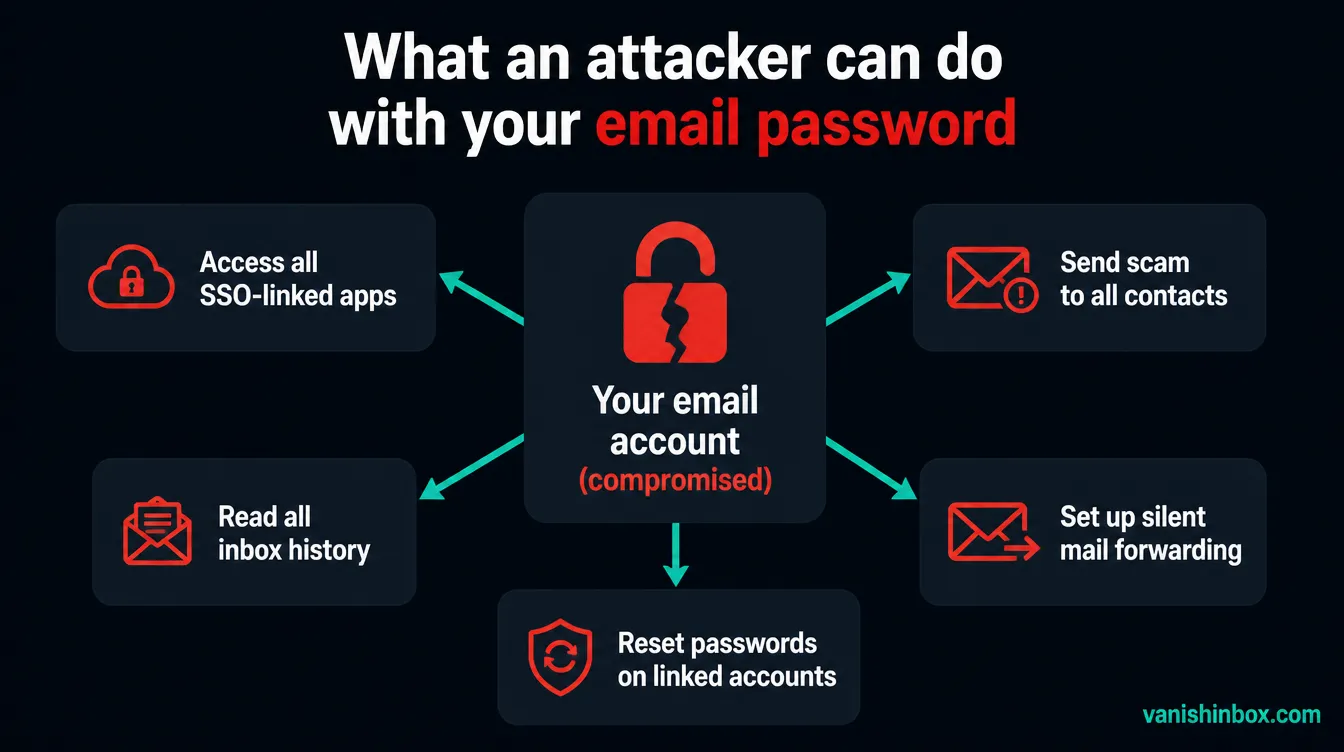
Within minutes of capturing your email password, the attacker has access to far more than your inbox.
They run your address through linked services: the "Sign in with Google" or "Sign in with Microsoft" connections you've accumulated over years. Any service where you've used that email's SSO is now accessible without a separate password. That often includes cloud storage, workplace tools, shopping accounts, and productivity apps.
They search your inbox for high-value threads: password reset emails (which reveal every service you've registered with), bank statements, tax documents, invoices containing card or account numbers, and HR correspondence. Email inboxes are extraordinarily rich data stores.
They set up forwarding rules that copy all incoming mail to an external address without any visible sign in your inbox. This means that even after you change your password and regain control, the attacker continues to receive your mail, including password resets for every account you try to recover.
They send the scam invitation to your contacts. This usually happens within the first few minutes, before most victims have had time to react.
In some cases, they attempt to use the email account to reset passwords on more valuable accounts: banking, PayPal, cryptocurrency exchanges, while they still have access.
Getting your account back isn't enough on its own. The recovery steps below are sequenced to undo everything that may have been set in motion during that window.
Three-Tier Response: What to Do Based on What You Did
The response is different depending on exactly what happened. Work through the section that applies to you.
Tier 1: I received the email but didn't click anything
You're fine. Delete the email and mark it as spam so your email provider learns the pattern.
If the email appeared to come from someone you know, contact them by text or phone call, not by replying to the email, to let them know their account may have been compromised. They probably don't know yet. Don't reply by email because the compromised account may still be actively sending messages.
Tier 2: I clicked the link but didn't enter any credentials or download a file
Your account credentials are likely still safe. The primary risk at this level is tracking scripts or browser-based exploits that can execute from visiting the phishing page alone.
Run a full malware scan using Malwarebytes Free (available for Windows, Mac, Android, and iOS) or Windows Security's built-in scanner on Windows 10/11. Monitor accounts you were logged into at the time for unusual activity over the next few days.
Tier 3: I entered my password on the fake login page
Act in this order. Speed matters, since you're working against what the attacker is doing in parallel.
Change your email password right away from a device you trust. If you're on Windows, use Windows Security first to confirm there's no active malware on that machine before entering a new password into it.
Check for forwarding rules. In Gmail: Settings → See all settings → Forwarding and POP/IMAP. In Outlook: Settings → Mail → Forwarding. Delete any rule you didn't create.
Revoke third-party app access. In Gmail: myaccount.google.com → Security → Third-party apps with account access. In Microsoft: account.microsoft.com → Privacy → Apps and services. Remove anything unfamiliar.
Enable two-factor authentication if it isn't already on. This is the single most effective barrier against a repeat compromise. Even with your password, an attacker can't access the account without the second factor.
Log out all other sessions. This invalidates any authentication tokens the attacker may have captured. In Gmail: scroll to the bottom of any inbox page → "Last account activity" → Sign out of all other sessions.
Change passwords for accounts where you use the same password. If your email password appeared elsewhere, change it everywhere. A password manager will help you track which accounts share credentials.
Warn your contacts. By text or phone, not email. Let the people most likely to receive the scam from your address know what happened. Keep it short: "My email was compromised. If you got a Punchbowl invite from me, don't click it."
Run a malware scan. If you clicked on a desktop device, run Malwarebytes or Windows Defender regardless of whether you entered credentials. The credential phishing and malware delivery variants sometimes operate in parallel.
How a Disposable Email Breaks the Attack Chain
Every other article about this scam ends with "be careful what you click." That advice is correct and insufficient. The scam works even on careful people because the sender is someone they trust.
The more useful question is: how did your address get into a position where it could be weaponised this way?
The answer is usually a chain of sign-ups. Your real email address has been used for event platforms, community forums, loyalty programmes, and dozens of other services over the years. Some of those services have breached databases. Some sell subscriber lists. When a scammer runs a credential-stuffing or phishing campaign, your primary email address is in the target pool because it has been shared widely enough to appear in those lists.
Using a disposable email address for services you're unsure about, or for one-off RSVPs to events received through unfamiliar platforms, keeps your real address out of that cycle. If the service is compromised or sells its data, the disposable address is a dead end. It expires. Your real inbox is never touched.
The specific scenario this protects against: you receive an invitation to an event through a platform you've never used before, and you're asked to create an account or confirm your email to RSVP. That's an exchange where your real email has low value to you and high potential cost if the platform is careless or malicious. A disposable address handles the RSVP. Your primary inbox is never part of the transaction.
VanishInbox generates a working inbox in seconds with no account required. Use it for event sign-ups, community platforms, and any service where the long-term relationship doesn't justify exposing your primary address. The inbox receives mail for ten minutes, long enough for a confirmation or RSVP link, and then it's gone.
For a broader look at how your email address ends up in the data pipelines that feed scam campaigns, see what actually happens when a website sells your email address.
How to Report a Fake Punchbowl Email
Reporting is fast and genuinely helps shut down the campaign infrastructure faster.
Forward to Punchbowl. Send the fake email to [email protected]. Their team verifies whether it's fraudulent and reports confirmed phishing links to anti-phishing organisations.
Mark as spam in your email client. Gmail, Outlook, and Apple Mail all use reports to train spam filters. Marking the message as spam improves detection across all users of that service.
Report to the NCSC (UK). Forward the email to [email protected]. The National Cyber Security Centre uses these reports to take down phishing infrastructure.
Report to the FTC (US). File at reportfraud.ftc.gov. If you lost money or had personal data stolen as a result of the scam, this creates an official record that supports recovery efforts.
FAQ
Is Punchbowl itself a scam?
No. Punchbowl is a legitimate, well-established digital invitation platform. The scam emails are sent by attackers impersonating it. They have no connection to Punchbowl's infrastructure, and legitimate Punchbowl invitations are sent to millions of people every day.
The email came from a friend's real address. Does that mean their account has been hacked?
Almost certainly yes. The credential-harvesting variant of this scam hijacks the victim's email account and uses it to send the fake invitation to every contact in their address book. Your friend's account sent that message without their knowledge. Contact them outside of email, by text or phone, so they can secure their account.
I clicked but I'm not sure whether I entered my password. What should I do?
Treat it as though you did. Change your email password, check for forwarding rules, revoke unfamiliar third-party app access, and enable two-factor authentication. These steps have no downside if it turns out nothing was captured, and they substantially limit the damage if something was.
Can you get malware just from clicking the link without downloading anything?
In most documented cases of this scam, clicking alone doesn't install malware, since you typically need to run a downloaded file. However, some phishing pages use scripts that execute on page load and can probe your browser environment. Running a malware scan after clicking on a desktop is good practice regardless.
Why does the fake invitation tell me to open it on a desktop?
The malware delivery variant of this scam uses payloads that only execute on desktop operating systems, Windows in particular. The "open on desktop" instruction is there to route victims away from their phones, where the malware would do nothing, and onto the device where it will run. Real invitation services don't have device preferences.
I already changed my password. Is there anything else I need to do?
Yes. Changing the password stops the attacker from logging in again, but it doesn't undo what they may have set up while they had access. Check for email forwarding rules, revoke any third-party app access you didn't create, log out all other active sessions, and run a malware scan if you clicked on a desktop. The forwarding rule check is the one most people miss: it lets the attacker keep receiving your mail with no visible trace, even after you recover the account.
How can I prevent this from happening again?
Enable two-factor authentication on your email account. Use a unique password for your email that you don't use anywhere else. For services and event platforms you're unsure about, use a disposable email address rather than your primary one. This keeps your real address out of the data pipelines that feed scam campaigns. And before clicking any unexpected invitation link, contact the apparent sender through a different channel to confirm they sent it.
For more on how phishing attacks work across different platforms and delivery methods, see how to spot a phishing email. If a similar scam has prompted you to review your broader online exposure, how to protect your personal information online covers the full picture.