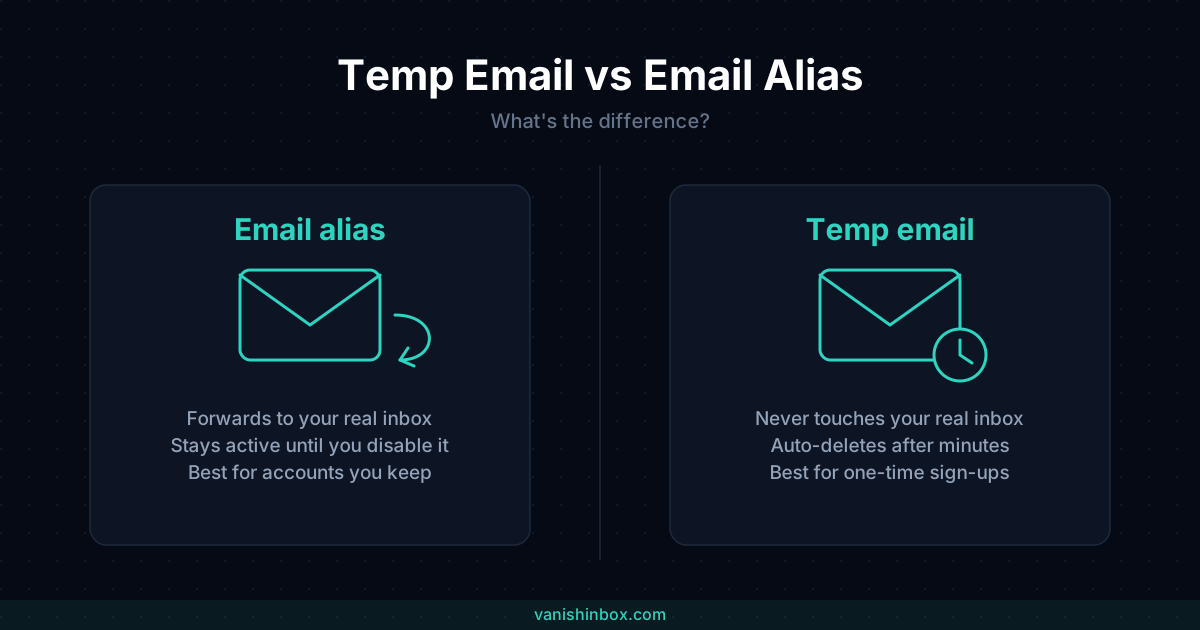
The short answer: an email alias forwards mail to your real inbox forever, until you turn it off. A temporary email address never touches your real inbox at all, and deletes itself automatically after a few minutes. Same goal, opposite mechanics.
If you're choosing between the two for a specific sign-up right now, here's the one-line version: use an alias for accounts you'll keep and want to manage long-term, use a temp email for anything you're testing, verifying once, or don't want a lasting connection to at all.
The rest of this comes up because "hide your real email" gets marketed as a single idea when it's actually two different tools solving two different problems. Getting the distinction wrong means either an alias you have to manage forever, or a temp inbox that expired right when you needed the password reset it was holding.
What Problem Each One Solves
An email alias is a second address that forwards to your real inbox. You give the alias to a website instead of your real address. Mail sent to the alias lands in your normal inbox, just like anything else, and stays there. The alias is a wrapper, not a separate mailbox.
A temporary email address is a separate, short-lived inbox with no connection to your real one. Mail sent to it stays in that temporary inbox, never reaches your real address, and the whole thing is deleted after a set window, ten minutes in VanishInbox's case. Nothing forwards. Nothing persists.
The difference comes down to one question: does the mail eventually reach your real inbox? With an alias, yes, always. With a temp email, no, never.
How Email Aliases Actually Work
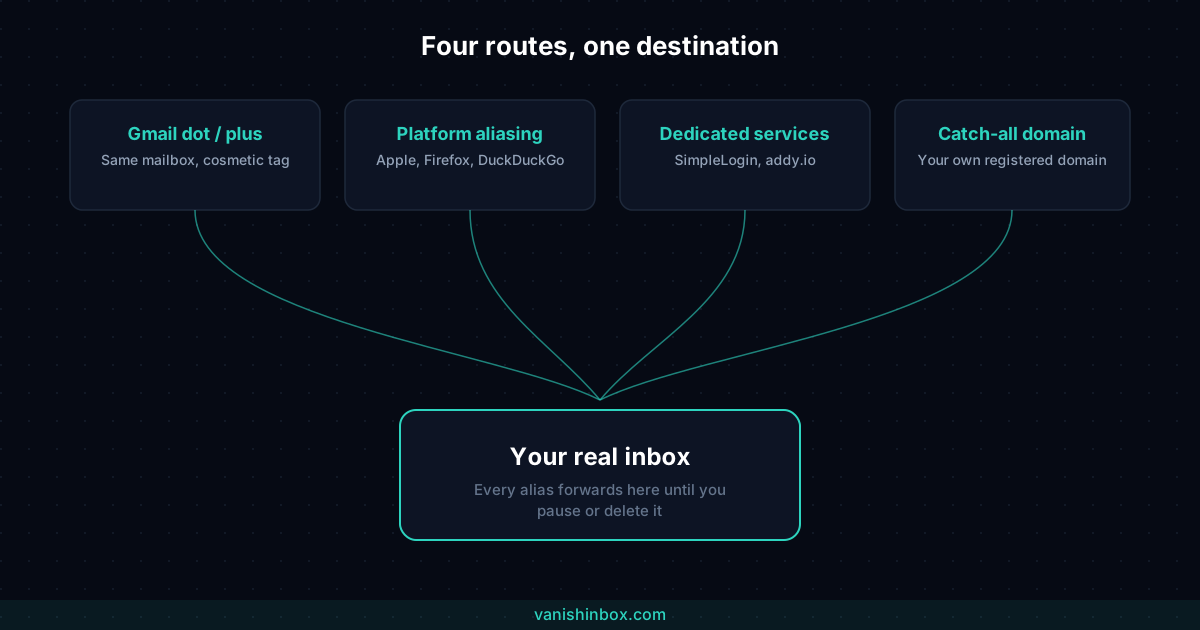
Most people run into aliasing through one of three routes.
Gmail's built-in tricks. Gmail ignores dots in the local part of an address, so [email protected] and [email protected] land in the same inbox. Gmail also supports plus addressing: [email protected] still delivers to [email protected], and the +amazon tag shows up in the recipient field, making it easy to filter or spot which company leaked your address. Neither trick creates a new address at the provider level. Both are the same mailbox with cosmetic variation, and a lot of sites reject the plus sign outright.
Built-in platform aliasing. Apple's Hide My Email generates a random @privaterelay.appleid.com address on the fly at sign-up and forwards to your real iCloud inbox. Firefox Relay and DuckDuckGo's Email Protection work the same way: random alias, permanent forward, off by a toggle. Fastmail's masked email does the same thing for paying Fastmail customers, generated directly from the sign-up form via a browser extension.
Dedicated alias services. SimpleLogin (acquired by Proton in 2022) and AnonAddy, rebranded to addy.io, let you generate unlimited aliases tied to your own domain or their shared domains, each one individually forwarding, pausable, or deletable, with reply-from-alias support so you can respond without exposing your real address.
Catch-all domains. If you own a domain, most registrars and mail providers let you set up a catch-all address: anything sent to *@yourdomain.com lands in one inbox. You can hand out [email protected] or [email protected] on the spot, without registering either one first. It's the same forwarding mechanic as a dedicated alias service, just self-hosted.
In every case, the mechanism is the same: a real, permanent address exists behind the alias, and mail flows through to it unless you manually break the connection.
Where Sign-up Forms Push Back
Neither option gets a free pass at every sign-up form. Gmail's plus sign is a legal character in an email address, but plenty of validation scripts reject it anyway, treating + as malformed input rather than a valid tag. Dedicated alias services fare a little better, since the address itself looks ordinary, but sites that check incoming addresses against known forwarding and disposable domains can flag SimpleLogin's or addy.io's shared domains the same way they flag temp mail domains. If you've had a sign-up form reject an email outright before, why websites reject temp email covers the detection methods in more depth. Most of them apply to alias domains too, not only disposable ones.
What an Alias Protects You From
- Giving your real address to a company that later gets breached (the alias leaks, not your real inbox)
- Companies cross-referencing your identity by email address across their own products
- Spam from one specific source (delete or pause just that one alias)
- Losing the ability to receive mail from an account you plan to use long-term
What a Temp Email Protects You From
- Any ongoing connection between the sign-up and your identity at all
- Needing to remember or manage the address afterward
- Marketing lists you'll never read, from a service you'll never use again
- Verification gates on sites that require an email but you have no reason to trust with a real one, even an alias
For a deeper look at what happens after a site collects your email either way, see what actually happens when a website sells your email address.
Where They Don't Overlap
This is the part most comparison guides skip.
An alias still reaches your real inbox. If the alias provider itself gets breached, or if a company you gave the alias to figures out the forwarding pattern, your real address is one step away, not gone. Aliases reduce exposure. They don't eliminate the link.
An alias also keeps working until you act. Forget you set one up for a free trial three years ago, and it's still quietly forwarding today. Managing a growing pile of aliases becomes its own small chore, one more account to audit.
A temp email has no such tail. There's no real inbox sitting behind it to eventually reach, because there isn't one. Once the inbox expires, the address is gone completely, not paused, not forwarding to something else. That's also the limit: you cannot go back and check that inbox next week. If you needed the alias's persistence, a temp email won't give it to you.
If you've ever wondered whether that disposability is a security risk in itself, we've covered whether temp mail is actually safe to use in more detail.
The Reversibility Trade-off
Aliases are built for accounts you're keeping. A subscription, a work tool, a service you'll use for years, all benefit from an alias you can individually pause if that one company starts spamming you, without touching anything else.
Temp email is built for the opposite case: a one-time verification, a forum you're testing before committing, a download gate, a coupon code that wants an email address for no real reason. You don't want a persistent alias for something you'll use once and never think about again. You want it gone.
The mistake is using the wrong tool for the job. An alias for a one-time download just means one more forwarding rule sitting in your account forever. A temp email for your actual banking sign-up means losing access to password resets the moment the inbox expires.
Two concrete examples make the split obvious. Signing up for a streaming service you're planning to keep: use an alias, since you'll want billing receipts, password resets, and renewal notices reaching you for as long as the subscription runs. Entering a one-off online raffle that wants an email address before showing you the result: use a temp email, since there's no account to recover and no reason for the entry to leave a lasting trace anywhere.
Do You Need Both?
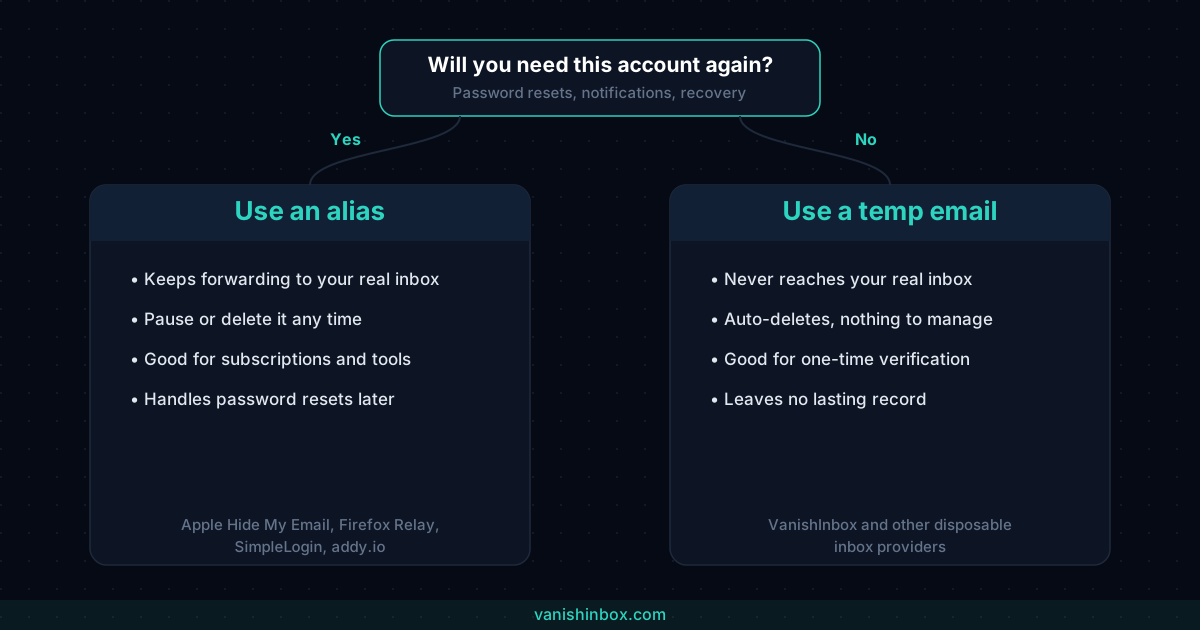
Most people end up using both, for different categories of sign-up:
Use an alias when:
- You're keeping the account
- You might need password resets or notifications later
- You want the option to individually block one source of spam without losing everything else
Use a temp email when:
- You're verifying an email field once and moving on
- You're testing a service before deciding whether to keep it
- You don't want any lasting record connecting the sign-up to you
- The account doesn't need to exist past tomorrow
Cost Comparison
| Tool | Free Option | Paid Option |
|---|---|---|
| Temp email (VanishInbox) | ✅ Completely free | N/A |
| Built-in aliasing (Apple, Firefox, DuckDuckGo) | ✅ Free with the platform | N/A |
| Dedicated alias service (SimpleLogin, addy.io) | ✅ Limited free tier | Paid tiers for unlimited aliases + custom domains |
Neither category requires payment to get meaningful privacy benefit. The paid alias tiers mainly buy you higher alias limits and custom domains, not better forwarding.
Frequently Asked Questions
Is an email alias the same as a disposable email?
No. An alias forwards to your real inbox and keeps working until you turn it off. A disposable email is a separate inbox that never reaches your real address and deletes itself after a short window. Both solve the "don't hand out my real email" problem, with opposite mechanics underneath.
Can email aliases be traced back to you?
Not directly by the company you gave the alias to, but the alias exists specifically to reach your real inbox, so the connection sits one step away rather than being gone. If the alias provider's own database is breached, or if a company correlates alias activity with account behaviour, that link can surface. An alias is meaningfully more private than handing out your real address everywhere. It isn't full anonymity.
Which is better for online shopping?
An alias, generally. Order confirmations, shipping updates, and return authorisations often arrive over days or weeks, longer than most temp email windows last. An alias keeps working for the length of the transaction and beyond, in case you need to dispute a charge or return something later.
Do email aliases expire?
Only if you set them to. Most alias services let you pause or delete an individual alias whenever you want, but nothing expires automatically the way a temp email does. An alias created today and forgotten about will still be forwarding mail years from now, unless you go back and turn it off.
Can you use an alias and a temp email at the same time?
Yes, for different sign-ups. A common pattern: aliases for accounts you're actually keeping, subscriptions, tools, communities you're active in, and temp email for anything you'll use once and never touch again, a download gate, a one-time verification, a coupon code. Neither replaces the other.
The Bottom Line
Use an alias for accounts tied to your real identity that you're planning to keep, where you might need to log back in or recover access later.
Use a temporary email for anything one-off: verification codes, free trials you're not committing to, downloads, forum sign-ups, or any site you don't trust enough to hand even an alias to.
They're not competing tools. An alias manages a permanent connection you want to keep some control over. A temp email avoids creating that connection in the first place. Most people need both, just for different halves of their inbox.