Browser fingerprinting doesn't ask you for anything. No cookie banner, no account, no field to fill in. It reads what your browser already hands over on every page load, and turns that into an identifier.
The Electronic Frontier Foundation's original Panopticlick study measured this directly: 83.6% of the browsers tested carried a fingerprint unique enough to identify them individually, no cookie required. The average browser in that sample carried at least 18.1 bits of identifying entropy, which sounds abstract until you convert it. 18.1 bits means one in roughly 286,777 browsers shared that exact configuration. Out of a sample that size, most people stood alone. The EFF's modern successor, Cover Your Tracks, still runs the same test today and scores your own browser against recent visitors. The exact number moves with the sample. The mechanism behind it hasn't changed.
I run a disposable email service, so I spend a fair amount of time reading how sites identify visitors who'd rather not be identified. Fingerprinting is the one that surprises people most, because it doesn't fit the mental model everyone already has for tracking. This covers how a fingerprint gets built, what it looks like from the other side of that arms race, and what reduces it.
How a Fingerprint Gets Built
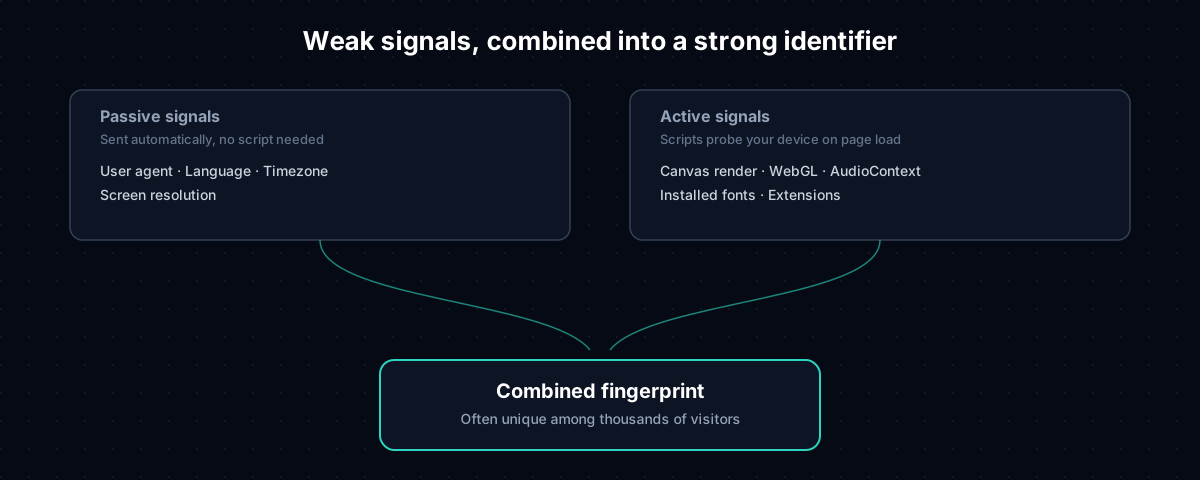
A fingerprint isn't one signal. It's dozens of small, individually unremarkable details, combined.
Passive signals arrive with every request, no JavaScript required. Your user agent string, browser language, timezone, and screen resolution get sent as a normal part of loading a page. Plenty of people share your timezone and your screen size, so on their own these signals narrow the crowd only a little.
Active signals come from small scripts that run the moment a page loads, and they narrow the crowd a lot faster.
Canvas, WebGL, and Audio: A Closer Look
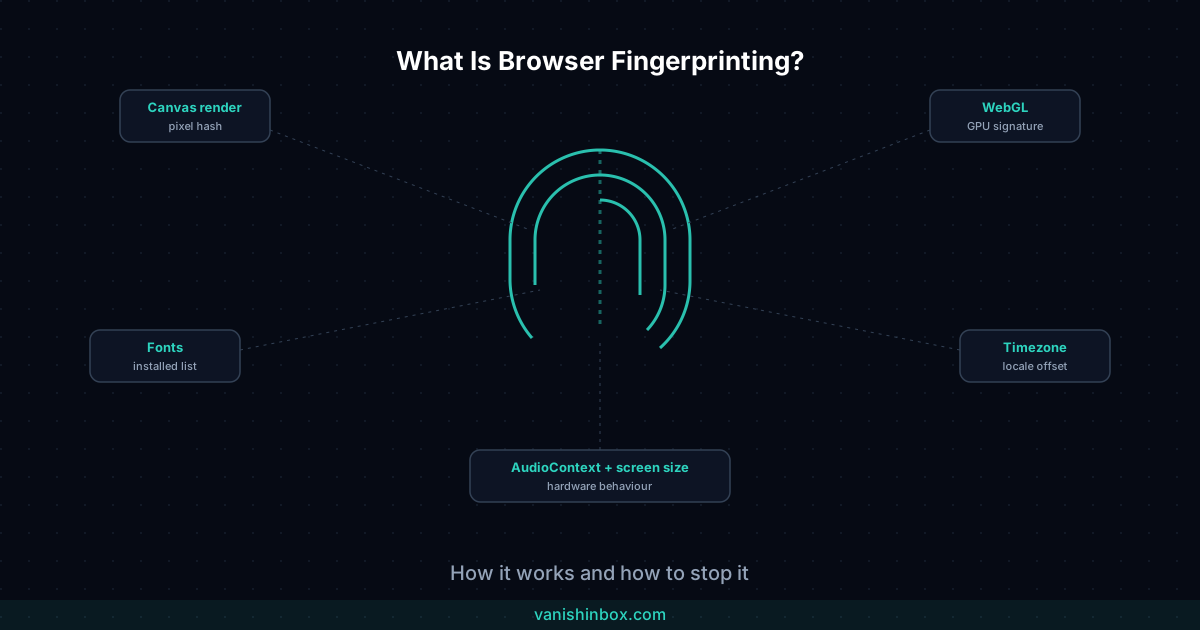
Three techniques do most of the heavy lifting in a modern fingerprint, and each one exploits a different layer of your device.
Canvas fingerprinting asks your browser to draw a hidden image, something like coloured text on a shape, using the HTML5 canvas element. The image never appears on screen. The script reads back the exact pixels your browser produced and hashes them. Your graphics driver, your font rendering engine, and your operating system all introduce tiny rendering differences that a human eye would never catch but a hash function catches perfectly. Two identical model laptops, one on Windows and one on macOS, produce different canvas hashes almost every time.
WebGL fingerprinting runs the same idea through your 3D graphics pipeline instead of 2D. It asks your GPU to render a scene and reads back details about how the rendering happened: which extensions your graphics card supports, how it handles shading, sometimes the exact model name of the GPU itself. Gaming laptops and workstations with distinctive graphics cards stand out here more than a standard-issue office laptop does.
AudioContext fingerprinting sends a signal through your device's audio processing stack, not through your speakers, you'd never hear it, but through the software and hardware pipeline that would process it if you did. Floating-point rounding differences between audio chipsets and drivers produce a measurably different output waveform on different machines.
Stack a font-detection script on top, one that measures how text renders at different sizes to infer which fonts you have installed, and a fingerprinting script can walk away with twenty or thirty independent signals in the time it takes your page to finish loading. Ten million people might share your timezone. A few hundred thousand might match your exact canvas hash. Tens of thousands might match your specific font list. A device that matches all of them at once, out of everyone visiting a given site, often matches nobody else.
Fingerprinting vs Cookies
A cookie is something a site puts in your browser. Clear it, and the site loses the thread. Most people picture tracking this way, which is why clearing history feels like it should work.
Fingerprinting stores nothing on your device. There's nothing in your browser settings to find and nothing to delete. Your browser recalculates the same fingerprint fresh every time, built from your device's actual characteristics, and clearing your cache doesn't change any of those characteristics.
Clear your cookies and the fingerprint stays put, since it never depended on stored data in the first place. Log into a new account, and it stays put again, since it doesn't care what you're logged in as. Generate a new temporary email address, and nothing changes there either, since your screen resolution, fonts, and graphics driver are still exactly what they were a minute ago.
If you've read can temporary email be traced, this is the mechanism behind that post's central point. Your email address and your fingerprint are two unrelated identifiers, and resetting one does nothing to the other.
The Other Side: Fingerprinting as a Fraud Signal
Most guides on this topic write about fingerprinting as something done to you. Running VanishInbox has shown me the flip side: plenty of sites deploy it on purpose, for reasons that have nothing to do with advertising.
VanishInbox runs on five separate domains for one main reason: domain-based detection is the first thing sites check. A commercial email-verification API flags a known disposable domain and a sign-up gets rejected before a verification message is even queued, a mechanism covered in full in why does this website reject my temp email. Switching domains gets past that first check. It does nothing about the second one.
IPQualityScore, one of the vendors named in that post for email domain reputation, sells browser-level device fingerprinting as a separate product line in the same dashboard. So does most of the rest of that industry. A site using one of these vendors for fraud prevention isn't choosing between checking your email domain and checking your device. It's paying for both, and the two signals get correlated on the same account. Rotate the domain all you like; if the fingerprint underneath matches an account that got banned yesterday, the domain swap buys you nothing.
This is worth knowing if you assume a fresh disposable address resets your relationship with a site from scratch. The address is one identifier among several, and it happens to be the easiest one to change. Sites that care about repeat abuse, free-trial farming, referral fraud, banned-account evasion, were never relying on the email address alone to catch it.
How Unique Is Your Fingerprint?
It depends on your setup, and the numbers you'll see quoted measure you against a specific sample of visitors, not the whole internet.
Cover Your Tracks and similar tools like AmIUnique report your fingerprint's uniqueness against the pool of visitors they've measured, usually as "one in X browsers" or a bits-of-entropy score. A result showing you're unique among the last several thousand visitors tested says something real about how identifiable your specific configuration is. It doesn't prove any particular company has matched you personally, since real-world tracking depends on the size and quality of the database doing the matching.
Unusual screen resolutions, a long list of installed fonts, uncommon extensions, and browser or OS combinations that aren't the current default all push uniqueness up. A common, unmodified setup pulls it back down. Browsers designed for fingerprint resistance lean on that second fact, and the next section covers how.
Test your own browser at Cover Your Tracks or AmIUnique. Both are free, and both show which of your signals are contributing most to your score.
What Doesn't Stop It
A VPN changes your IP address, which changes your apparent location and which server you appear to connect from. It has no effect on canvas rendering, installed fonts, screen resolution, or any of the other signals fingerprinting reads directly from your browser and device. You can sit behind a VPN in a different country and present the exact same fingerprint you had before connecting. For the full breakdown of what a VPN covers, see temp email vs VPN: what's the difference and which do you need.
Private browsing doesn't stop it either, and this one trips up more people than the VPN misconception does. Private mode stops your browser from saving history, cookies, and site data after you close the window, which is a change to what gets written to disk. It has no bearing on what your browser sends to the site you're visiting during the session. Your screen resolution, installed fonts, canvas rendering, and timezone are identical in a private window and a normal one, because fingerprinting never reads stored data to begin with. It reads your device.
What Reduces Fingerprinting Exposure
Three different approaches exist, and they don't work the same way.
Brave randomises. By default it varies signals like canvas output and font metrics slightly on each site visit, so the fingerprint you present today doesn't match the one you presented yesterday. That breaks long-term tracking without breaking the page.
Firefox blends in. Strict tracking protection reduces the precision of several signals, rounding your timezone and standardising some rendering behaviour, so more users end up sharing the same values and any individual browser stands out less.
Tor Browser goes furthest. Rather than randomising or reducing signals, it makes every Tor Browser user's fingerprint look identical to every other Tor Browser user's, on the theory that a fingerprint shared by everyone identifies no one. That's a different strategy from the other two, and it's a big part of why Tor Browser looks and behaves differently from a standard browser with privacy settings turned up.
None of these eliminate fingerprinting. Running an unusual combination of privacy extensions can make you more unique, since the combination itself becomes a signal. The goal is reducing how reliably you can be singled out, not hitting zero.
Where Fingerprinting Fits in a Privacy Stack
Fingerprinting, IP address, cookies, and your email address are four separate identifiers, and no single tool covers all four. Can temporary email be traced breaks down the full picture: email address hidden by temp mail, the other three needing their own tools layered on top. A VPN for IP. A fingerprint-resistant browser for this. Cookie hygiene for the rest.
Frequently Asked Questions
Is browser fingerprinting illegal?
Not on its own. In the UK and EU, fingerprinting used for tracking purposes generally falls under the same consent requirements as cookies under GDPR and the ePrivacy Directive, since both identify a device without the user's explicit awareness. Enforcement varies, and many sites use fingerprinting for fraud detection, where the legal basis differs from marketing tracking. This area remains unsettled.
Can I opt out of browser fingerprinting?
There's no universal opt-out the way there sometimes is for cookies. Fingerprinting reads what your browser already exposes without needing your consent. The practical opt-out is reducing what your browser exposes in the first place, through the browser-level approaches above.
Does clearing cookies reset my fingerprint?
No. Cookies are stored data. A fingerprint gets recalculated from your device's characteristics every time, so clearing cookies has no effect on canvas rendering, fonts, screen resolution, or any other fingerprinting signal.
Is fingerprinting worse than cookies?
They're different threats. Cookies are easier to detect and clear but require the site to store something. Fingerprinting requires no storage and survives clearing, private browsing, and new logins, though it links sessions less precisely than a persistent cookie ID under ideal conditions. Sites increasingly run both together, which works better for them than either alone.
Can fingerprinting identify me across different browsers on the same device?
Rarely, and this is one real limitation. Chrome and Firefox on the same laptop produce different fingerprints, since each browser has its own rendering engine, font-handling behaviour, and extension set. A site that fingerprints you in Chrome generally can't connect that to a separate visit from Firefox on the same machine unless it has some other identifier bridging the two, like a shared IP address or an account login.
Does a temporary email address affect my fingerprint?
No. A temp email address changes what a site knows about your email identity. It has no effect on your screen resolution, fonts, canvas rendering, or any other fingerprinting signal, since your browser and device generate your fingerprint, not anything you type into a sign-up form.
The Bottom Line
Fingerprinting identifies you by reading what your browser already reveals, not by storing anything on your device. It survives the things people rely on to stay untracked: clearing cookies, going incognito, switching accounts, using a fresh temp email address. None of those touch your actual browser and device configuration, so none of those touch it.
It's also not only a marketing tool. The same signal that lets an ad network recognise you across sessions lets a fraud-prevention vendor recognise a banned account behind a new email address. Seeing it from the disposable-email side of that fence changes how you weigh the "switch domains" advice: sometimes it works, and sometimes the device underneath was never hidden at all.
A fingerprint-resistant browser changes what your browser exposes. The tools built for other privacy problems don't. If you're building out a fuller privacy stack, can temporary email be traced covers where fingerprinting fits alongside IP address, cookies, and email identity, and what closes each of those gaps.